Help Guide
Interchangeable Lens Digital Camera
ZV-E1
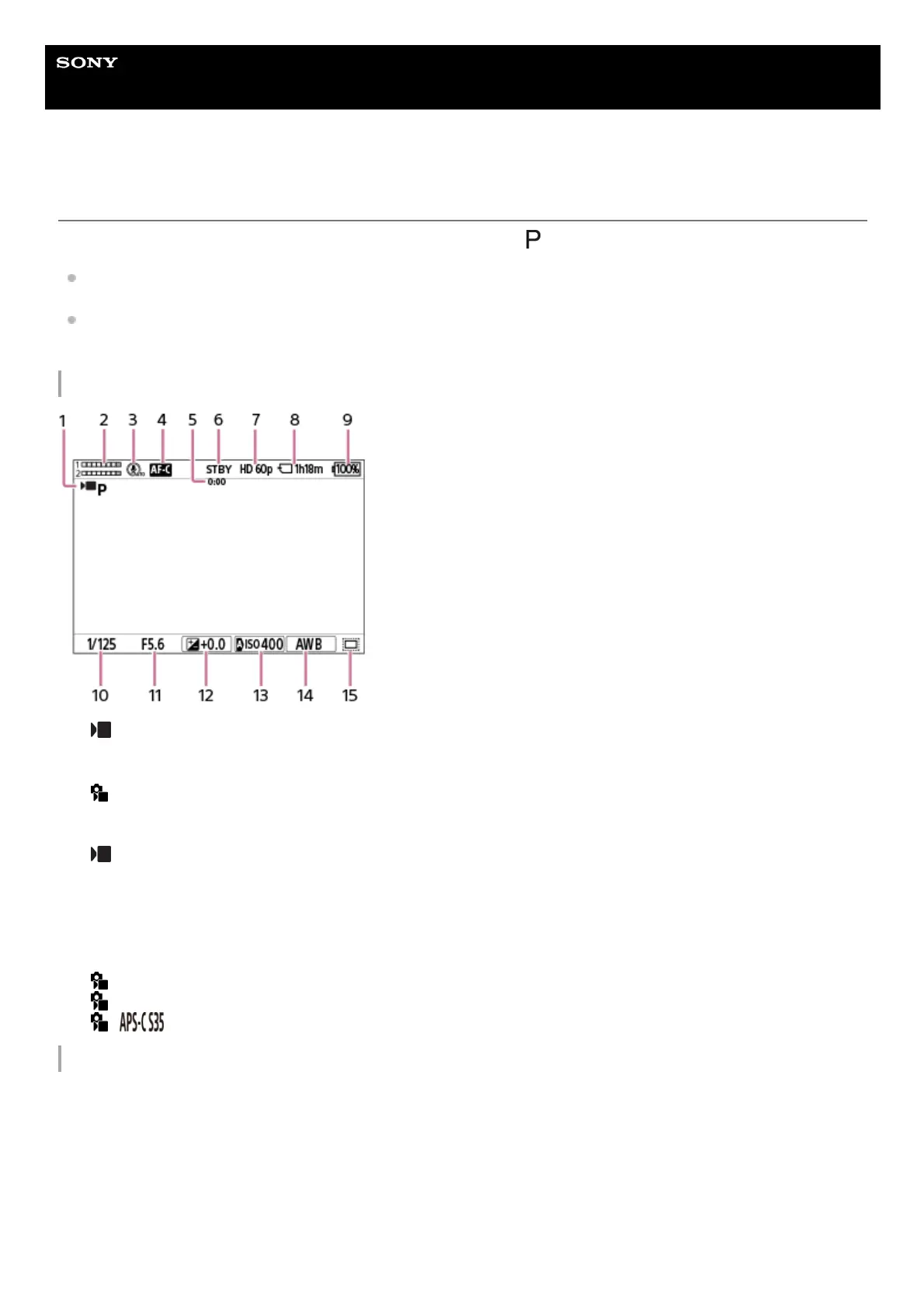
Basic icons displayed on the monitor
This section describes the screen display when the shooting mode is
(Program Auto).
The following is an example of the display when [DISP (Screen Disp) Set] is set to [Display All Info.] and the touch
function icons are hidden.
The displayed content and positions are for reference only, and may differ from the actual display. Some icons may
not be displayed depending on the camera settings.
During movie recording
During still image shooting
[
Shoot Mode] is set to [Program Auto].1.
Audio level2.
[Microphone Directivity] is set to [Auto].3.
[
Focus Mode] is set to [Continuous AF].4.
Actual shooting time of the movie5.
The camera is in the shooting standby mode.6.
[
File Format] is set to [XAVC S HD] and [Rec Frame Rate] is set to [60p].7.
Recordable movie time on the memory card8.
Remaining battery level9.
Shutter speed10.
Aperture value11.
Exposure compensation12.
[
ISO] is set to [ISO AUTO]. (The ISO value automatically set by the camera is displayed.)13.
[
White Balance] is set to [Auto].14.
[
Shooting] is set to [On] or [Auto], and the recordable area is the APS-C-equivalent size.15.



 To Next Page