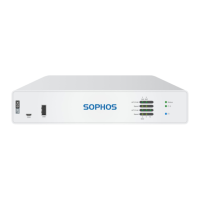
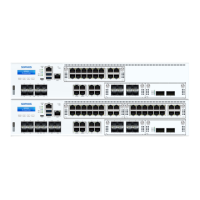
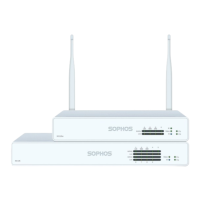
This document provides operating instructions for the Sophos XGS 2100, 2300, 3100, and 3300 series hardware appliances, which are designed for network use in commercial, industrial, and residential environments. These models belong to appliance group A.
Function Description
The Sophos XGS series appliances are network security devices that function as firewalls. They are designed to be operated as standalone appliances and offer a range of connectivity options and security features. The devices are managed through a multi-function LCD display and navigation keys on the front panel, as well as through a serial console or a dedicated management port.
Important Technical Specifications
The XGS series offers varying specifications across its models:
- Fixed Ethernet Ports:
- XGS 2100/2300: 10 ports
- XGS 3100/3300: 12 ports
- Fixed Bypass Port Pairs: 1 for all models.
- Max. Flexi Ports: 8 for all models.
- Main CPU Cores:
- XGS 2100/2300: 2/4 cores
- XGS 3100/3300: 4/4 cores
- Main Memory:
- XGS 2100/2300: 8 GB DDR4 2400
- XGS 3100/3300: 12 GB DDR4 2666 (XGS 3100), 16 GB DDR4 2666 (XGS 3300)
- NPU Cores: 16 (XGS 2100/2300), 20 (XGS 3100/3300)
- NPU Memory: 4GB DDR4 for all models.
- Storage: 1 x 120 GB (XGS 2100/2300), 1 x 240 GB (XGS 3100/3300)
- Power Supply: Internal auto-ranging AC-DC 100-240VAC, 3-6A@50-60 Hz, with an option for an external redundant PSU.
- Power Consumption (idle):
- XGS 2100: 43 W / 146.86 BTU/hr
- XGS 2300: 45 W / 153.7 BTU/hr
- XGS 3100/3300: 50 W / 170.77 BTU/hr
- Power Consumption (full load):
- XGS 2100: 162 W / 533.5 BTU/hr
- XGS 2300: 167 W / 570.74 BTU/hr
- XGS 3100: 182 W / 621.97 BTU/hr
- XGS 3300: 201 W / 686.68 BTU/hr
- PoE Addition Enabled: 76 W / 260 BTU/hr for all models.
- Mounting: Rackmount (1U sliding rails option).
- Dimensions (W x D x H): 438 x 405 x 44 mm (17.24 x 15.94 x 1.73 inches) for all models.
- Weight (unpacked/packed): 4.7 kg / 10.36 lbs (unpacked), 7 kg / 15.43 lbs (packed) for all models.
- Environmental:
- Noise level (avg.) typical idle/typ. max: 34.9/53.9 dBA (XGS 2100), 34.9/43.6 dBA (XGS 2300), 34.9/47.3 dBA (XGS 3100/3300).
- Operating Temperature: 0°C to 40°C.
- Storage Temperature: -20°C to 70°C.
- Operational/Storage Humidity: 10% to 90% non-condensing.
- Altitude: 2000m.
- Certifications: CB, CE, UL, FCC, ISED, VCCI, CCC, KC, BSMI, RCM, NOM, Anatel.
Usage Features
- Connectivity:
- LAN Ports (RJ45): 8 x GbE copper ports (10/100/1000 Mbps), with ports 1/2 configurable as a bypass pair.
- SFP Fiber Ports:
- XGS 2100/2300: 2 x SFP (1 Gbps)
- XGS 3100/3300: 2 x SFP+ (1/10 Gbps) and 2 x SFP (1 Gbps)
- Expansion Bay: 1 x expansion bay for optional modules.
- Other Ports:
- COM: RJ45/Micro USB for serial console access (38,400 bps, 8 data bits, N parity, 1 stop bit).
- USB: USB 3.0 (Type A) on the front for compatible devices (e.g., thumb drives, UPS, 3G/4G dongles).
- MGMT: RJ45 (10/100/1000 Mbps) for connecting an Admin PC.
- USB (rear): USB 2.0 (Type A) for compatible devices (e.g., keyboard).
- Flexi Port Modules: The expansion bay supports various Flexi Port modules, including 8-port GbE copper, 8-port GbE SFP, 4-port GbE copper with 2 bypass groups, 4-port 10 GbE SFP+, 2-port GbE fiber (LC) bypass + 4-port GbE SFP, 4-port 2.5 GbE copper PoE, and 4-port GbE copper PoE + 4-port GbE copper. SFP/SFP+/QSFP transceivers are sold separately.
- LCD Display and Control Keys: A multi-function LCD display with 16 characters per line and four membrane keys for navigation and control. The display shows system information like date, uptime, CPU usage, memory usage, load average, disk usage, live users, and network port details. It also allows for firmware management, factory reset, shutdown, and reboot operations.
- LED Status Indicators:
- Power LEDs (Power 1, Power 2): Green (Solid) for active, Red (Solid) for failure.
- SSD LED: Blue (Flashing) for reading/writing data.
- BP 1/2 LED: Green (Solid) for bypass mode enabled, Off for disabled/inactive.
- RJ45 Ethernet Connector LEDs (ACT/LNK, Speed):
- ACT/LNK (Green): Solid for link established, Flashing for sending/receiving data, Off for no power/connection/drivers.
- Speed (Amber/Green): Amber for 1000 Mbps, Green for 100 Mbps, Off for 10 Mbps.
- SFP/SFP+ Connector LEDs (ACT/LNK, Speed):
- ACT/LNK (Green): Solid for receiving power/good connection, Flashing for sending/receiving data, Off for no power/connection/drivers.
- Speed (Blue/Amber): Blue for 10,000 Mbps (SFP+), Amber for 1,000 Mbps (SFP+), Off for speeds below 1,000 Mbps or not working.
- Rack Mounting: The appliances are designed for rack installation. Users can choose between short brackets (for use with optional sliding rails) or long brackets (for fixed installation). Proper rack mounting considerations, including ambient operating temperature, airflow, mechanical loading, circuit overloading, and reliable grounding, must be observed.
Maintenance Features
- Factory Reset: Resets all configuration settings and options to their original state, deleting all user-entered data, including HTTP proxy cache, email queue, accounting/reporting data, passwords, and uninstalled Up2Date packages. Installed firmware and pattern updates are retained. This action is initiated and confirmed via the LCD menu.
- Shutdown: Allows for a clean shutdown of the system, stopping all running services. This action is initiated and confirmed via the LCD menu.
- Reboot Machine: Performs a complete system reboot, shutting down and restarting the system. This action is initiated and confirmed via the LCD menu.
- SFP/SFP+/QSFP+ Module Installation/Removal: Modules can be easily inserted until they engage and removed by detaching the optical cable and carefully pulling the module out. Different release mechanisms (plastic tab, wire bail, plastic collar) may be present depending on the module.
- Serial Console Access: Allows access to the Command Line Interface (CLI) via either the RJ45 or micro USB COM port, useful for troubleshooting and advanced configuration.
- Documentation and Support: Users can download all user manuals and additional documentation from the Sophos support webpage at sophos.com/support. Printed Hardware Quick Start Guide and Safety Instructions are also provided with the appliance.
Safety and Compliance:
- The devices comply with CB, CE, UL, FCC, ISED, VCCI, CCC, KC, BSMI, RCM, NOM, Anatel.
- Only CE and FCC compliant parts should be used to maintain compliance.
- Caution regarding battery replacement: Risk of explosion if replaced by an incorrect type. Dispose of used batteries according to instructions.
- Caution regarding SFP/SFP+ ports: These ports use Class 1 lasers. Never look directly at a transmit port when powered on. Always install appropriate and UL approved Laser Class I Transceivers.
- Installation must be performed by qualified personnel, adhering to electrical and general safety precautions.
- Functional reliability outside of a rack cannot be guaranteed.

 Need help?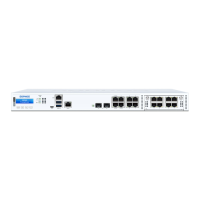

 To Next Page

 General