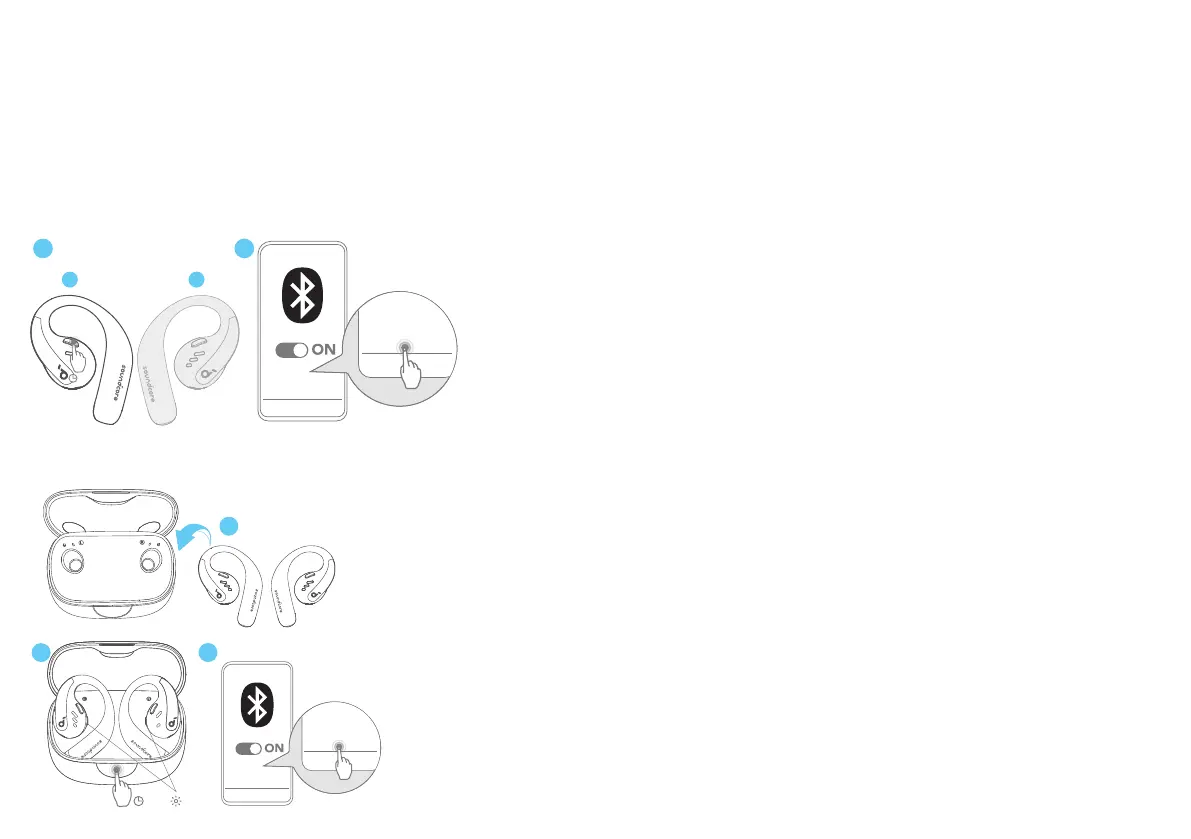
After removing the insulation stickers on the earbuds, return earbuds to the charging case, then press the button to activate Bluetooth pairing. Also, you
can pair by closing and reopening the case lid once the earbuds are back in the case. The earbuds will automatically enter Bluetooth pairing mode when
connecting for the first time. Select "soundcore AeroFit Pro" on your device's Bluetooth list to connect.
When pairing, the LED indicators inside the charging case will start flashing quickly. After the pairing is successful, the LED indicators inside the charging
case will stay on for 1 second and go off. Then, they will start flashing slowly.
Once connected successfully, they'll automatically reconnect to your device every time you open the charging case, as long as you haven't deleted the
pairing history from your device.
Manual Pairing
1 2
soundcore
AeroFit Pro
soundcore
AeroFit Pro
L
R
5s
To connect to your device when the earbuds are turned off, press and hold the button on either earbud for 5 seconds to enter Bluetooth pairing mode.
soundcore
AeroFit Pro
soundcore
AeroFit Pro
3s
×3
2 3
1
New Device



 To Next Page