27
A
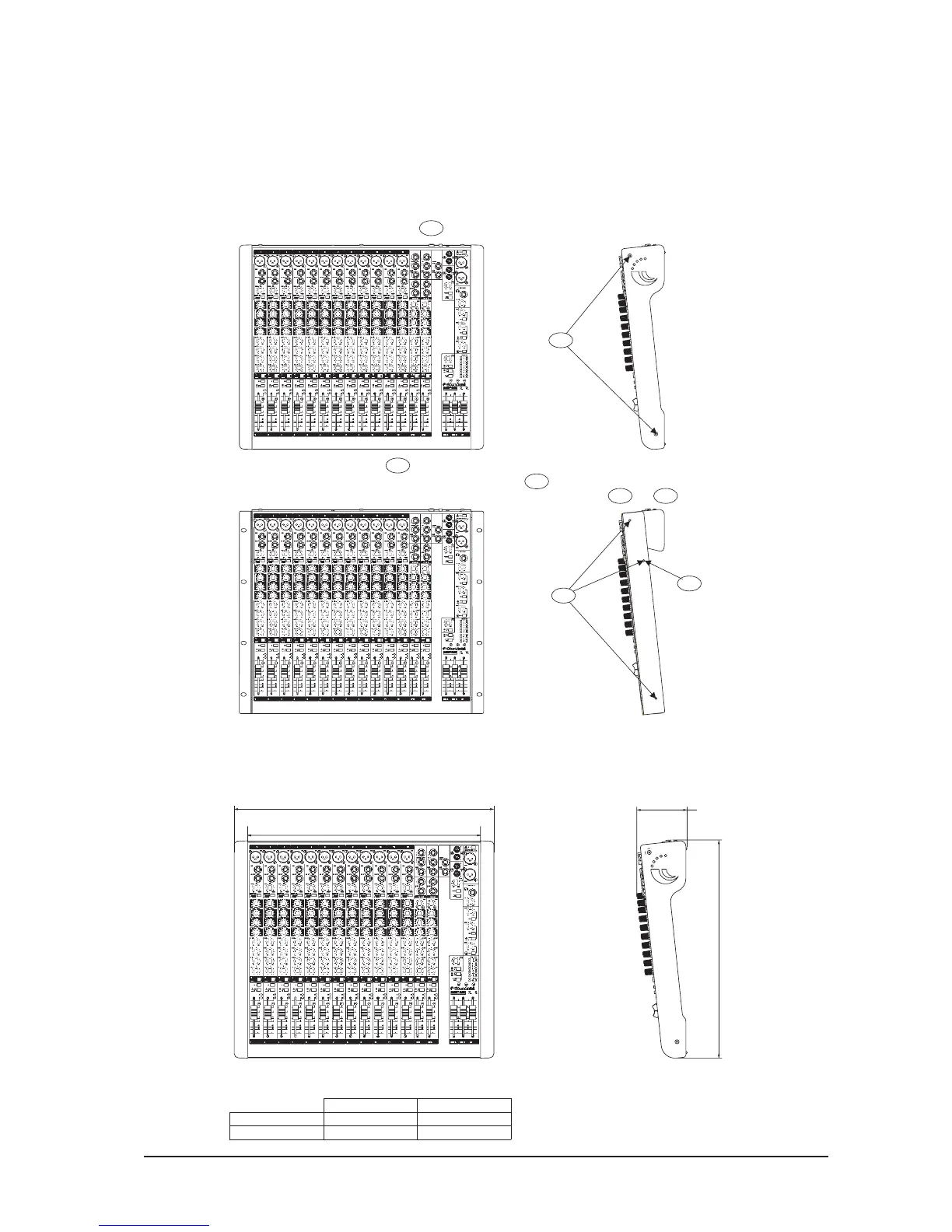
Remove the screws at points and remove the side mouldings.
A
Remove the screw at point ,
B2
Attach the rack brackets to both sides of mixer at points with the screws
removed at and above.
B2
B1
B1
repeat on the other side of the mixer.
A B1
Keep the side mouldings in case you want to re-fit them at a later date.
WARNING: ensure that the mixer is disconnected from the mains supply
and all other equipment before fitting the rack-mounting brackets.
FITTING OPTIONAL RACK-MOUNT BRACKETS
The rack-mount kit is included with the MPMi 12 channel.
(MPMi 12 Channel)
93.52mm
404.68mm
DIMENSION “X”
688mm
482mm
DIMENSION “X”
MPMi 12 Channel
MPMi 20 Channel
DIMENSION “Y”
DIMENSION “Y”
432mm
638mm
DIMENSIONS





 To Next Page