DAB85 / English Instruction Manual
1
LOCATION OF CONTROLS
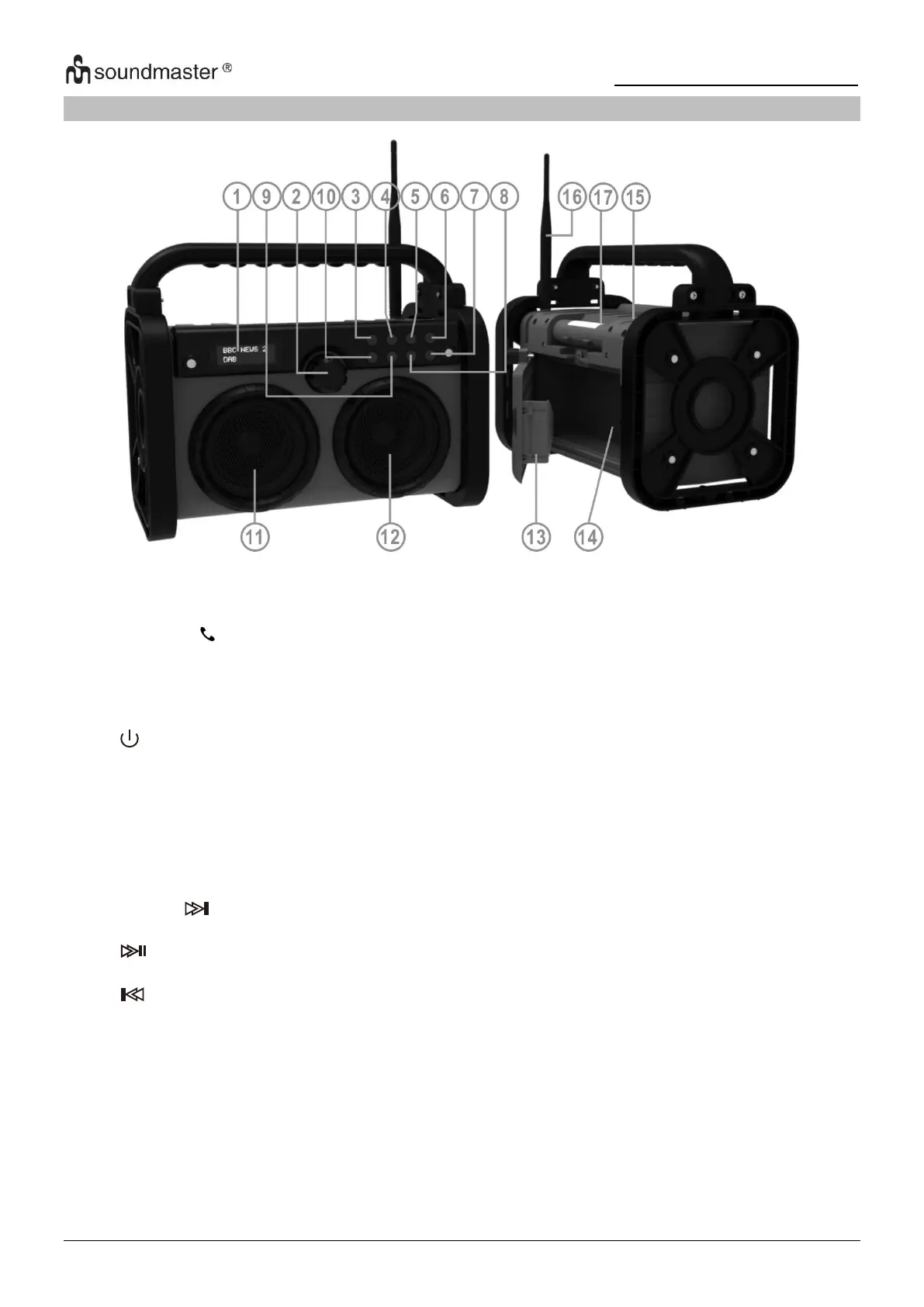
Show all information of the device
Rotate for volume adjustment and selection values
Press for confirming selection,
FM fine tuning (press and hold when frequency indication flash you can
adjust the frequency
Press for accept / ending an incoming call
Press and hold for reject incoming call.
Press to turn on; press and hold to switch off.
In on mode press to select the source
In on mode: Press to show information, press and hold to open menu
In Standby mode: Press to open menu
Short press: Open preset memory
Press and hold: Start station scan
In standby: Open the NAP timer
In on mode: open EQ menu for selection
Go to next station (DAB) / preset station or next song in BT
Press and hold for FM search upwards
Play/pause BT playback
In BT mode long press to disconnect BT device
Go to previous station (DAB) / preset or previous song in BT
Press and hold for FM search downwards
Press to switch on/off the LED light
Press and hold for FM Stereo/Mono selection














 To Next Page