UR190 / English Instruction Manual
1
LOCATIONS OF CONTROLS
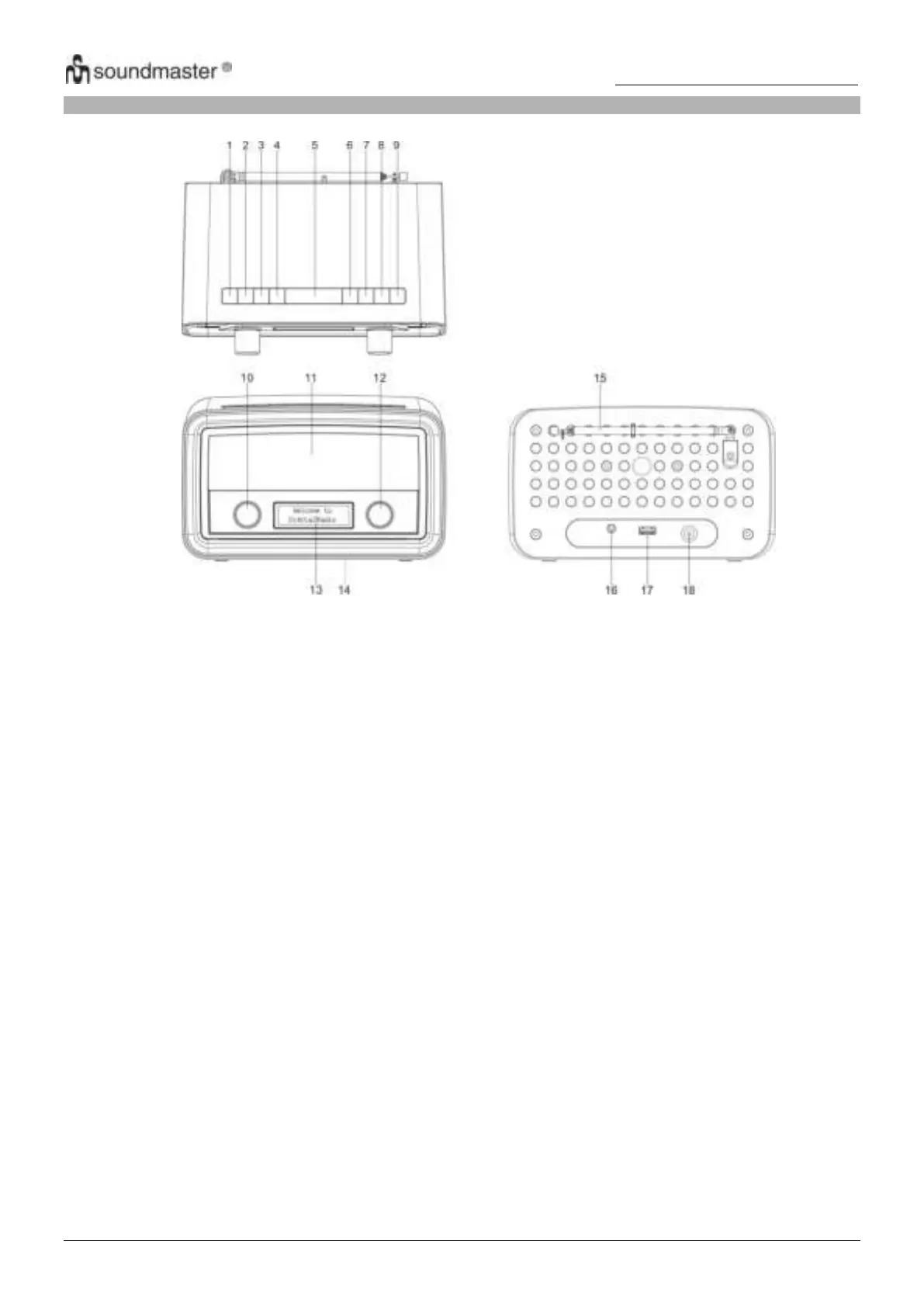
1. ON/OFF: Selects between “On” mode and “Standby” mode (showing clock and date). Cancels
sleep function and a sounding alarm.
2. SOURCE: Selects between DAB and FM audio sources.
3. MENU: Shows menus of the current mode.
4. ALARM: Enters alarm wizard or cancels the alarm (when it sounds), and cycles through alarm
on/off settings in standby mode.
5. SLEEP/SNOOZE: When the radio is playing, selects duration before the radio automatically switches
itself to standby mode. When the alarm sounds, activates the snooze function.
6. INFO: Cycles through information screens
7. BACK: Returns to the previous screen.
8. PRESET: Selects a preset station.
9. SCAN: In DAB mode, searches all available stations. In FM mode, searches the next available
station.
10. VOLUME: Rotate the knob to control the volume.
12. SELECT: In DAB mode, rotate to select a DAB station. In FM mode, rotate to tune FM
frequency. In menus, rotate to cycle through the options. Press the knob to confirm a
selection.
17. USB jack For external device charging
18. DC IN jack: Connects the power adapter.











 To Next Page