UR8600 / English Instruction Manual
4
DISPLAY INFORMATION
In standby mode, press the “Y-M-D” button (5) repeatedly to change showing the year, date,
time and day of the week (d1 = Monday, d2 = Tuesday, d3 = Wednesday, d4 = Thursday, d5
= Friday, d6 = Saturday and d7 = Sunday).
In radio mode, press the ◄◄ or ►► button (4 or 3) once to briefly change the display from
the clock time to the current radio frequency.
DISPLAY BRIGHTNESS
In standby mode, press the “DIMMER” button (2) to change the brightness level of the
display (low level, high level or off).
PROJECTOR
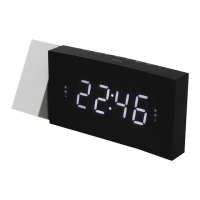
Press the “PROJECTOR” button (1) to project the current clock time on a wall.
Swivel the projector (+/- 90°) to adjust the projection angle.
Press and hold the “180° FLIP” button (1) to flip the projected image.
Note: The effective projection distance is 0.5 – 3 meter, the projected time is only in dark
environment visible.
CHARGING EXTERNAL DEVICE
Connect an external device (e.g. smartphone, mp3 player) via a USB cable (not provided) to the
USB jack on the back of the radio for charging. The radio cannot access the contents in the
connected external device.
Care and maintenance
Clean the radio with a soft damp cloth and let all parts dry completely after cleaning.
Do not use any aggressive cleaners, brushes with nylon bristles, sharp or metallic cleaning
utensils, knives, hard scrapers and the like. They could damage the surfaces of the radio.
Do not immerse the radio in water and do not let water getting into the housing of the radio.
Storage
Unplug the power adapter and clean the radio before storage.
Always store the radio in a dry and clean place.
TECHNICAL SPECIFICATIONS
Tuner Range: FM: 87.5 – 108 MHz
Number of preset radio stations: 10
AC power adaptor: Input: AC 100-240 V, 50/60Hz
Output: DC 5 V 1.5A
Features and specifications are subject to change without prior notice.
IMPORTER
Wörlein GmbH Tel.: +49 9103 71 67 0
Gewerbestrasse 12 Fax.: +49 9103 71 67 12
D 90556 Cadolzburg Email: service@woerlein.com
Germany Web: www.woerlein.com
Technische Änderungen und Druckfehler vorbehalten
Copyright by Woerlein GmbH, 90556 Cadolzburg, www.woerlein.com
Vervielfältigung nur mit ausdrücklicher Genehmigung der Woerlein GmbH



 To Next Page