9
SELECTING INPUT MODES
The Reference705 can be driven with either one, two, or three pairs of stereo inputs. If your source unit has
front and rear outputs, you can take advantage of its fading capability by driving the Reference705 in 5
channel mode with two pairs of inputs. When operated in the 5 channel mode with 2 pairs of inputs, the
lowpass subwoofer channel will operate in a non-fading mode—it derives its signal from the front and rear
inputs. After setting the input mode switches, be sure to install the hole plugs included with the amplifier.
5 CHANNEL OPERATION WITH 4 CHANNELS OF INPUT
• Front input to Channels 1 & 2 and set stereo switch to either “Coherent Stereo” or “Mixed-Mono”
• Rear input to Channels 3 & 4 and set input switch to “3 & 4”; stereo switch to either “Coherent Stereo” or
“Mixed-Mono”
• Subwoofer input switch set to “CH 1 - 4”
5 CHANNEL OPERATION WITH 2 CHANNELS OF INPUT
• Input to Channels 1 & 2; set stereo switch to either “Coherent Stereo” or “Mixed-Mono”
• Channels 3 & 4: set input switch to “Internal From Ch 1 & 2”; stereo switch to either “Coherent Stereo” or
“Mixed-Mono”
• Subwoofer input switch set to “CH 1 - 4”
3 CHANNEL OPERATION WITH 2 CHANNELS OF INPUT
• Input to Channels 1 & 2: set stereo switch to “Mono”
• Input to Channels 3 & 4: set input switch to “3 & 4”; stereo switch to “Mono”
• Subwoofer input switch set to “CH 1 - 4”
INSTALLATION STEP 3
For system
examples and
diagrams, see pages
14 - 17.
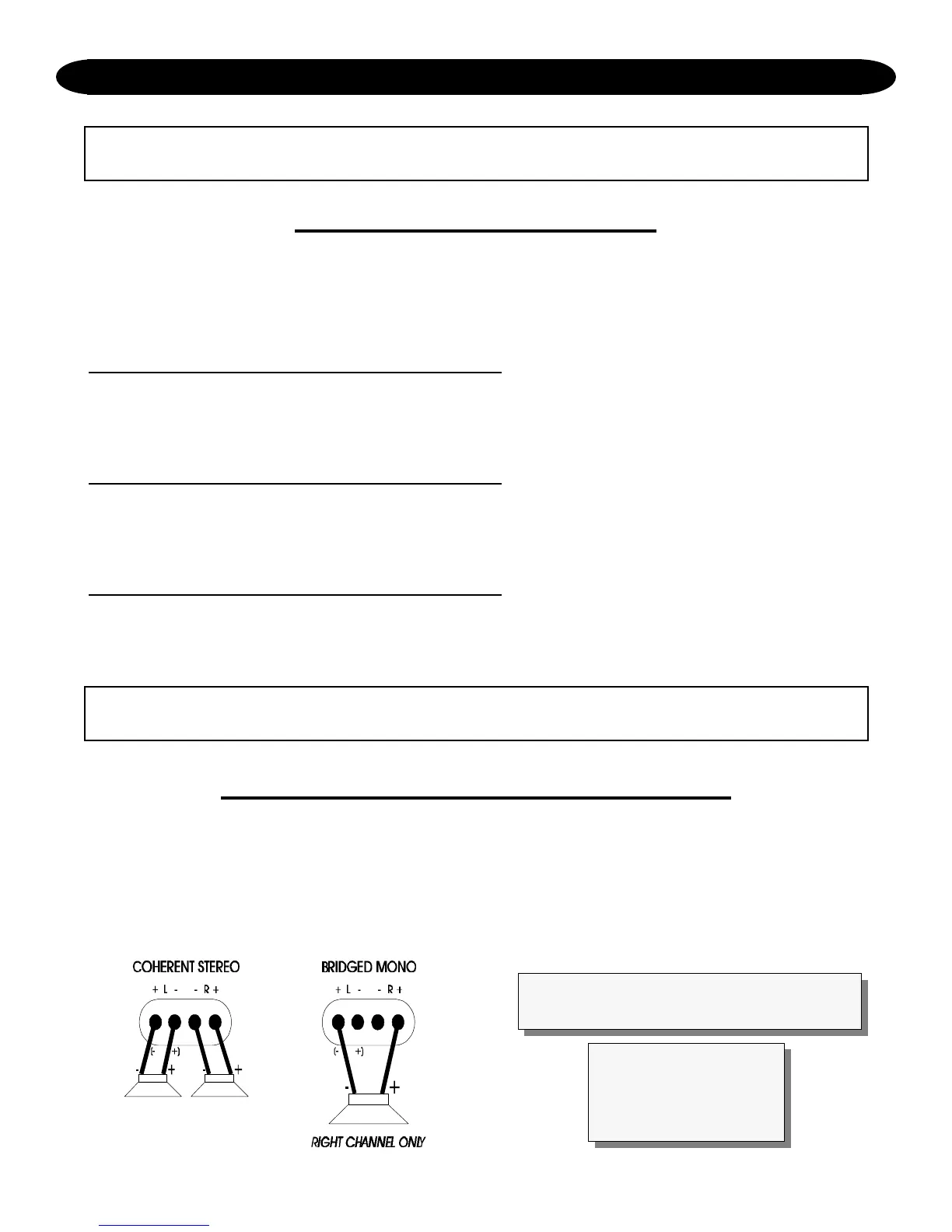
COHERENT STEREO/BRIDGED MONO
The stereo channels of the Reference705 have the ability to operate in either of the following modes:
Coherent Stereo with identical left and right stereo channels for maximum fidelity.
Bridged Mono for dedicated single channel operation; ideal for using the Reference705 in three-channel
operation. It is also used when large amounts of power are necessary for single speakers. In bridged mono,
only the right channel input (per pair of channels) is active.
INSTALLATION STEP 4
In bridged mono, only the right channel
input is active.





 To Next Page