Operation
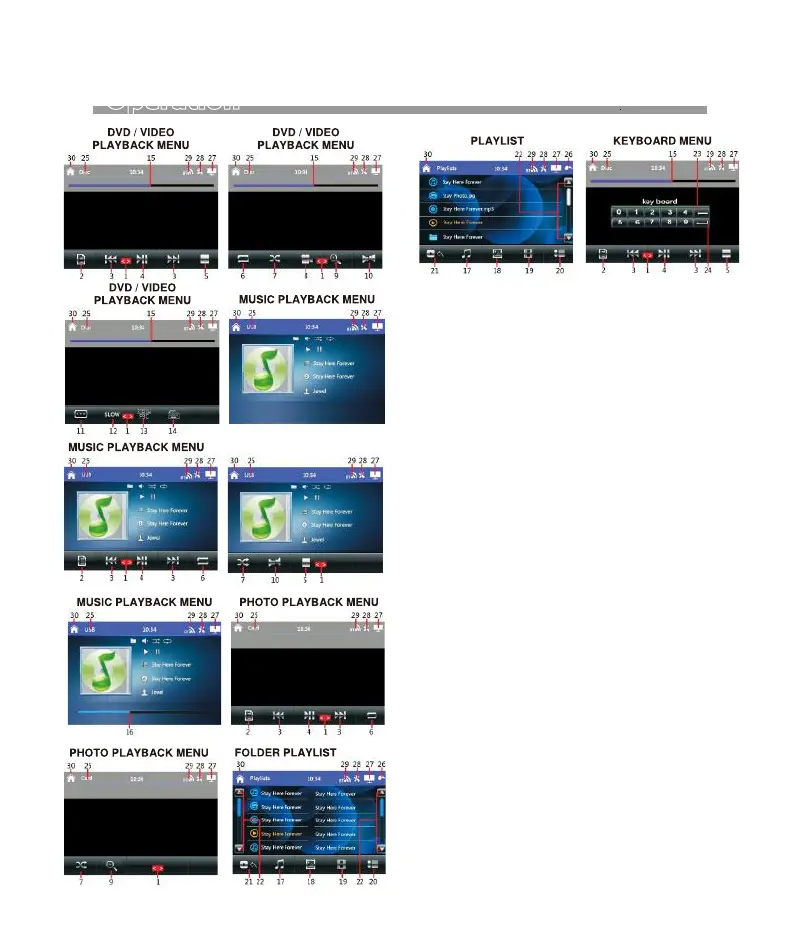
1. Hold and slide to show the hidden operation icons
for operation.
2. DVD Mode
Touch to display on screen the menu of the disc &
playback will resume after a while.
Video / Music / Photo Mode
Touch to shift to FOLDER / PLAYLIST MENU for
playback selection. Touch once or twice (as the
case may be) on the selected folder / track for
playback.
3. Touch to shift to next or previous track for playback.
At DVD / VCD / video / music playback mode, touch
& hold shortly to activate fast forward or fast rewind
mode. At this mode, touch repeatedly to select
various speed on fast forward or fast rewind.
4.Touch to start, pause or resume playback.
5. At video playback mode under disc input, touch
to stop playback.
At music / photo playback mode under disc input
and playback mode under USB/SD card input, touch
to stop playback temporary and will shift to playlist
for playback selection. Touch twice on the selected
track for playback or normal playback will resume
after a while.
6.Touch repeatedly to select various repeat playback
modes of the input device.
7. Touch to turn on or off of random playback mode
of the input device.
8. Touch repeatedly to view the angle changes in
sequential order (available for DVD recorded
with multi-angle senses).
9. Touch repeatedly to zoom in and zoom out of screen
for viewing.
10. Touch repeatedly to select the audio output
channels that recorded in the playback device.
11.Touch repeatedly to select different sub-titles that
recorded in the playback device.
16


 To Next Page