Operation
MAIN MENU OPERATION
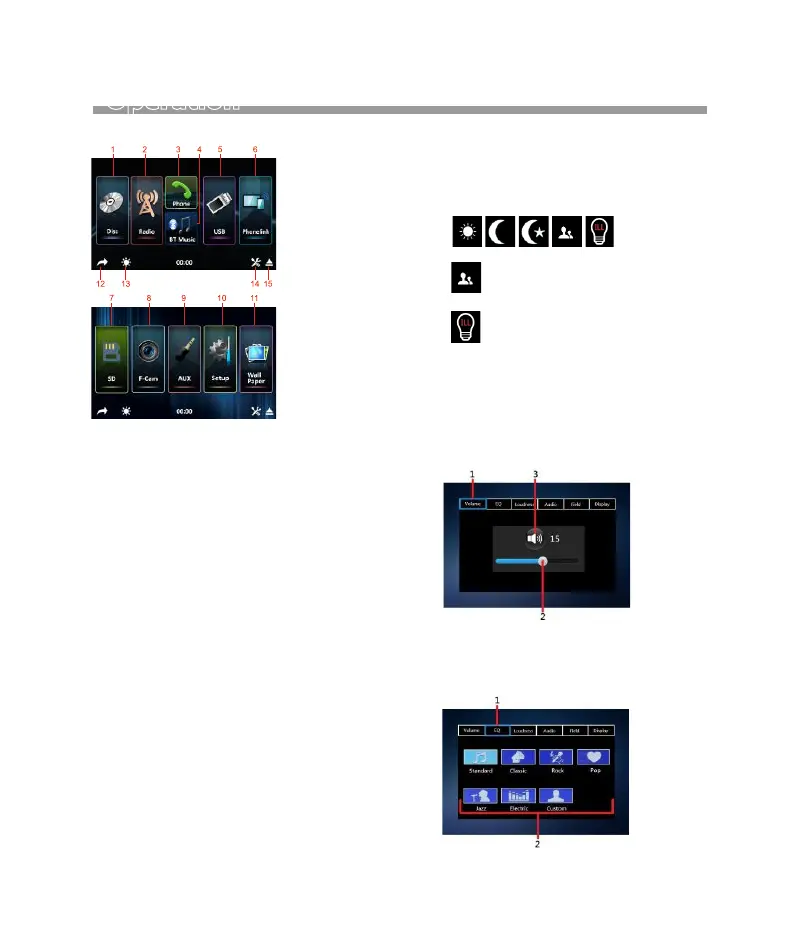
At MAIN MENU, touch the icon of the desired
mode on screen and the unit will then enter
into the mode that selected for operation.
At MAIN MENU, touch & hold on screen and
slide to left or right will shift screen to second
page operation selection.
1. Touch to start disc input operation (when
a disc inserted).
2. Touch to start tuner operation (when the
radio antenna connected).
3. Touch to start phone (Bluetooth) operation
(when a mobile phone connected).
4. Touch to start Bluetooth streaming operation
(when a mobile phone connected).
5. Touch to start USB input operation (when an
USB device inserted).
6. Touch to start mobile phone mirror linking
operation (when the mobile phone connected
to the front USB port/
7. Touch to start SD card input operation (when a
micro SD card inserted).
8. Touch to start camera input operation (when
connected with front camera).
9. Touch to start auxiliary input operation (when
an external device has been connected).
10. Touch to start various setup of the unit.
11. Touch to select desired wallpaper.
12. Touch to shift back to previous operation
mode.
13. Touch repeatedly to select brightness of
screen or turn off the screen. When the
screen is off, touch any portion of the
screen to turn it on again. Below preset
brightness modes can be selected.
13. Touch to activate audio & visual setting.
(Refer to AUDIO & VISUAL SETTINGS).
1. Touch to shift to volume control menu.
2. Hold & slide to adjust sound output level.
3. Touch to MUTE or UNUNTE.
1. Touch to shift to equalizer control menu.
2. Touch to select the desired EQ mode.
AUDIO & VISUAL SETTINGS.
14. Touch to EJECT the inserted disc from unit.
Volume Control
Preset Equalizer Control
At this mode, brightness of screen
is set by the user. Refer to ILLUMI-
NATION BACKLIGHT SETUP under
ON SCREEN -SETUP OPERATION
for details.
Volume
9


 To Next Page