Panel description Remote control
Remote control
1 2
4
1
15
16
17
2
4
6
5
3
5
6
7
8
9
10
11
12
13
3
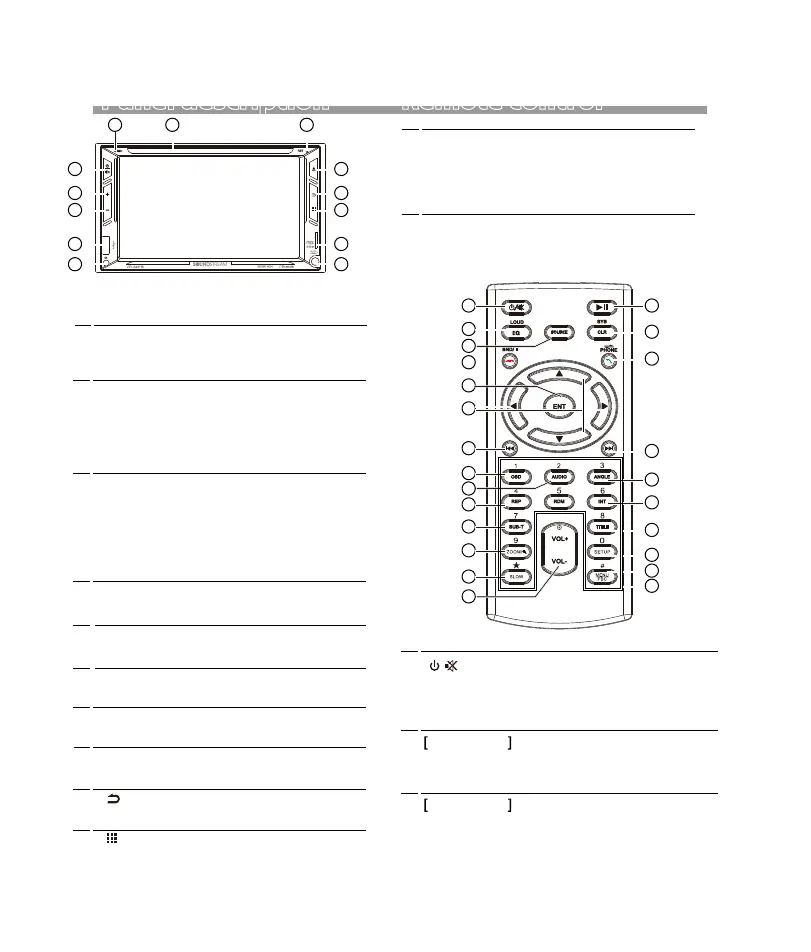
Remote Sensor
• Receives the remote control signal.
1
Microphone
• Built-in Microphone.
2
Disc slot
• Insert or eject the disc.
USB
5
+ (Volume)
•
Press to increase the volume value.
When the unit is turn off, press to turn on the unit.
When the unit is turn on, press and hold to turn off.
During unit working, press to mute or unmute.
6
– (Volume)
•
Press to decrease the volume value.
8
Eject button
• Press to eject the disc.
9
• USB slot.
Return button
10
•
Press to back to previous menu.
Mode button
11
• Press to selet the desired mode.
3
Reset
4
Power / Mute
•
If the unit or the connected unit fails to
operate properly, the unit returns to
factory settings when this button is
pressed.
• Pressing and hold to turn the source unit
power off.
• When the unit is working, short pressing
for Mute, press again for un-mute.
• When the power off, press to power on.
7
SD slot
12
•
AUX
13
•
AUX jack for AUX playback.
Micro SD slot for audio/video playback.
18
19
20
21
22
23
24
7
8
10
11
12
13
9
14
1
[ ]
/
2 EQ/LOUD
Press repeatedly to select desired equalizer mode.
Long press to switch Loudness is ON or OFF.
3 SOURCE
Press repeatedly to select the desired mode for
operation.
6


 To Next Page