Cleaning the Unit
If the front panel of this unit is stained, wipe it
with a dry soft cloth such as a silicon cloth. If
the front panel is stained badly, wipe the stain
off with a cloth moistened with neutral cleaner,
then wipe it again with a clean soft dry cloth.
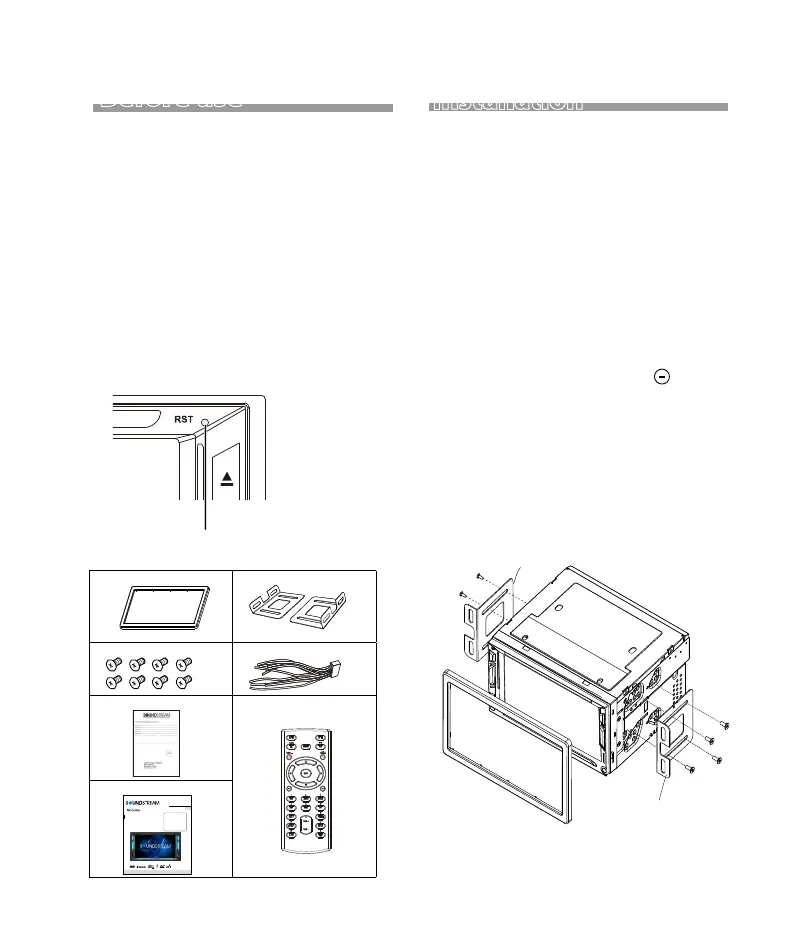
How to reset your unit
If the unit or the connected unit fails to operate
properly, reset the unit.
Reset button
CAUTION
•
•
•
Applying spray cleaner directly to the unit may
affect its mechanical parts. Wiping the front
panel with a hard cloth or using a volatile liquid
such as thinner or alcohol may scratch the
surface or erase screened print.
Before use
Installation
Supplied accessories
1 .Trim Ring
7 .Remote Control
6 .User Manual
4 .Power Cable
5 .Wrranty Card
3 . Screws
2 .Mounting Bracket
x1
x2
x8
x1
x1
x1
x1
2-Din DVD Head unit
Owner ’s Manua l
VR-64HBL
EN
2 DIN 6.2' ' Monitor
Touch screen
DVD/CD/MP3/MP4/USB/SD
AM/FM Radio
Support Android Phone Link
Support Bluetooth
Bracket
Bracket
1.Putthe 2 brackets to the left and right side
of the headunit.
2.Use screws to fix the brackets to the unit.
Before installation of this unit, please note
the following precautions.
Installation
WARNINGS
If you connect the ignition wire (red) and the
battery wire (yellow) to the car chassis (ground),
you may cause a short circuit, that in turn may
start a fire.
Always connect those wires to the power source
running through the fuse box.
Do not cut out the fuse from the ignition wire
(red) and the battery wire (yellow). The power
supply must be connected to the wires via the f
use.
1) To prevent a short circuit, remove the key from
the ignition and disconnect the terminal
of the battery.
2) Make the proper input and output wire
connections
for each unit.
3) Connect the wire on the wiring harness.
3


 To Next Page