3 Front 406 mm (16 in.)
Note: The minimum space needed in front of the printer is 76 mm (3 in.).
4 Left side 152 mm (6 in.)
5 Rear 152 mm (6 in.)
Printer configurations
CAUTION—TIPPING HAZARD: Installing one or more options on your printer or MFP may require a
caster base, furniture, or other feature to prevent instability causing possible injury. For more information
on supported configurations, contact the place where you purchased the printer.
CAUTION—TIPPING HAZARD: To reduce the risk of equipment instability, load each tray separately.
Keep all other trays closed until needed.
You can configure your printer by adding optional 250‑, 550‑, or 2100‑sheet trays. For more information, see
“Installing the 250‑ or 550‑sheet tray” on page 182 or “Installing the 2100‑sheet tray” on page 183.
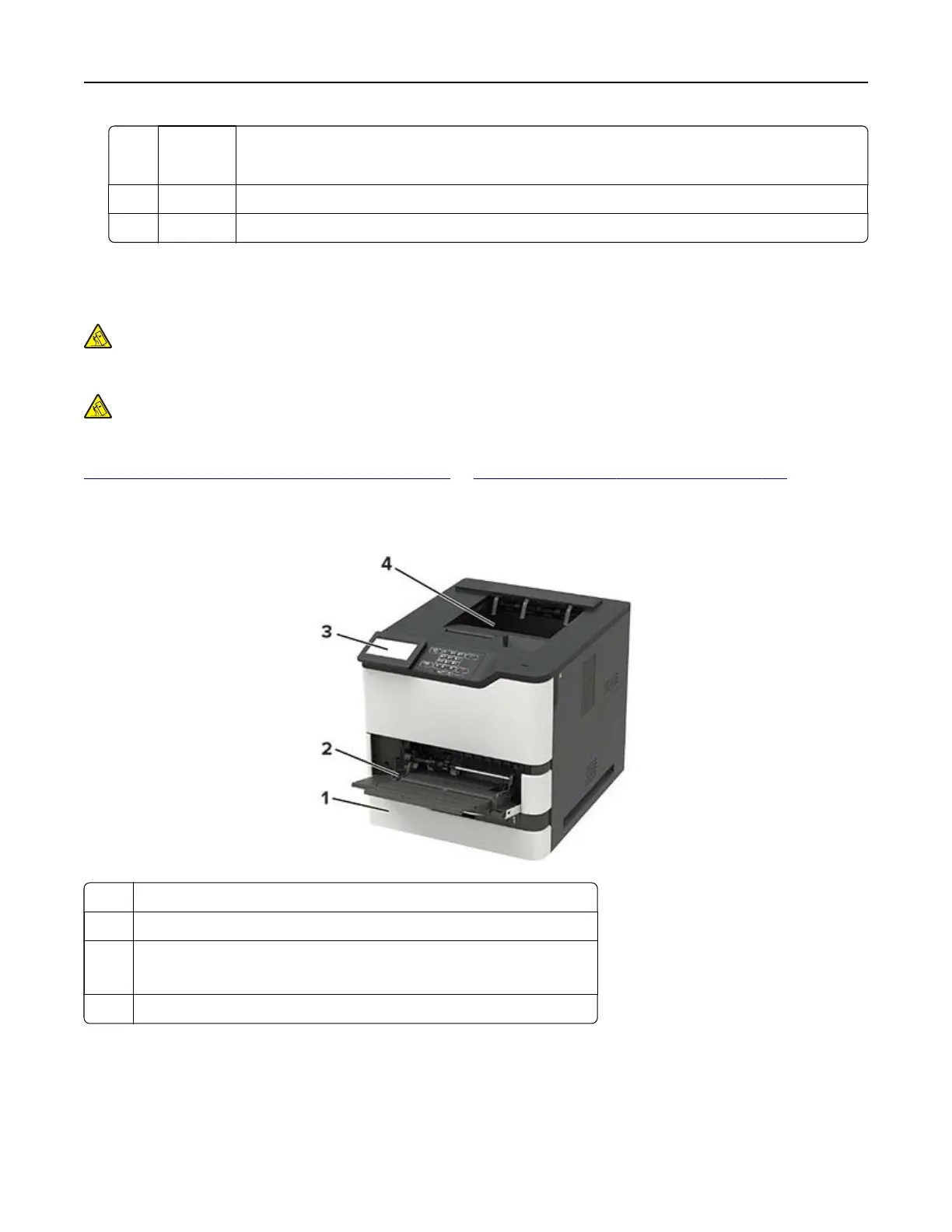
Basic model
1 Standard 550‑sheet tray
2 Multipurpose feeder
3 Control panel
Note: The appearance may vary depending on your printer model.
4 Standard bin
Learning about the printer 9



 To Next Page