Home
Source Technologies
Printer
ST9830
Page 103
Source Technologies ST9830 - Page 103
212 pages
Manual
Save Page as PDF
To Next Page
To Next Page
To Previous Page
To Previous Page
Loading...
3
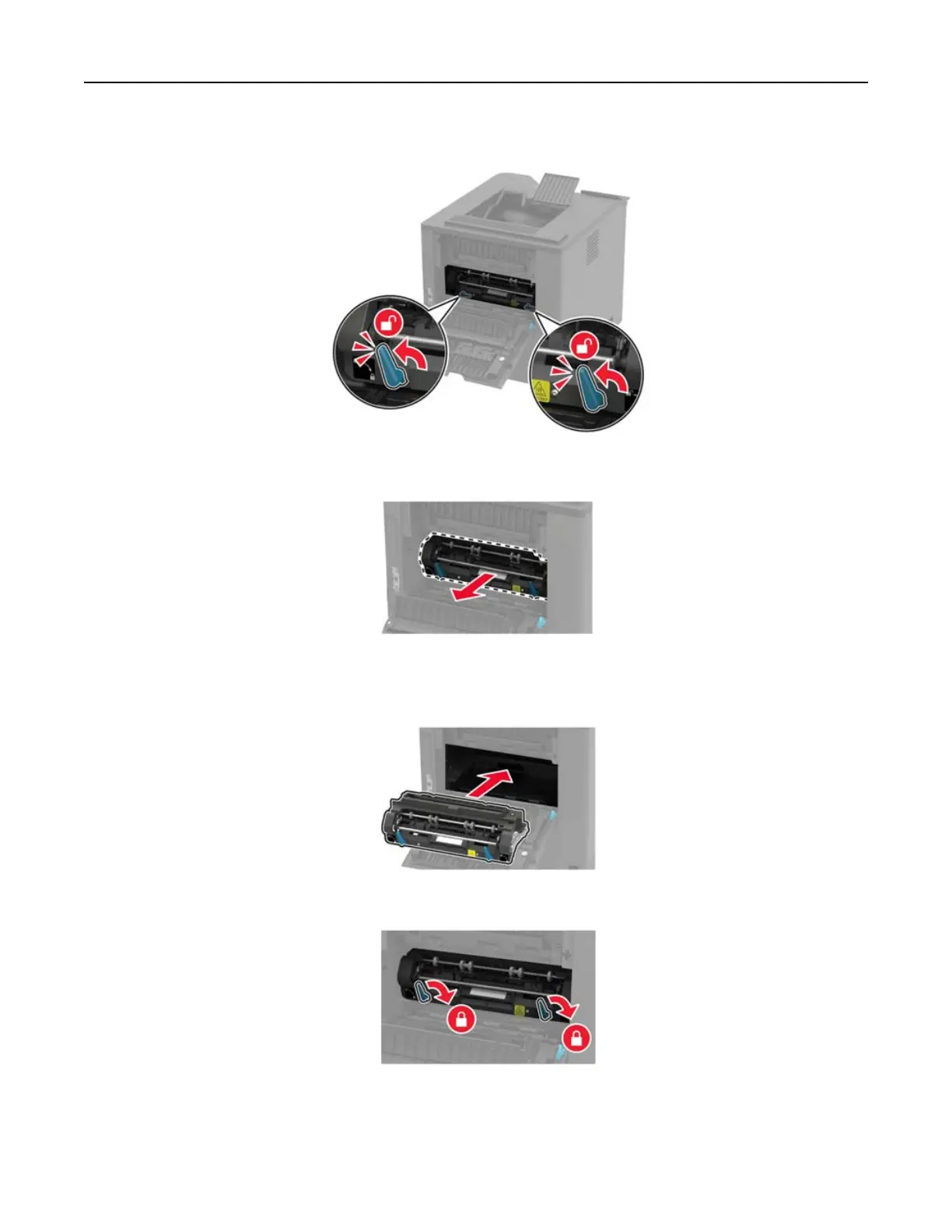
Unlock the hot roll fuser
.
4
R
emove the used
hot roll fuser
.
5
Unpack the new hot roll fuser
.
6
Insert the new hot roll fuser until it
clicks
into place
.
7
L
ock the hot roll fuser
.
8
Close the door
.
Maintaining the printer
102
102
104
Table of Contents
Main Page
Default Chapter
3
Table of Contents
3
Safety Information
6
Conventions
6
Product Statements
6
Learning about the Printer
9
Selecting a Location for the Printer
9
Printer Configurations
10
Attaching Cables
12
Using the Control Panel
13
Panel with 2.4-Inch LCD
13
Panel with Touch-Screen Display
14
Understanding the Status of the Power Button and Indicator Light
14
Setting up and Using the Home Screen Applications
15
Using the Home Screen
15
Customizing the Home Screen
16
Using Display Customization
16
Configuring Eco-Settings
17
Setting up Device Quotas
17
Using QR Code Generator
17
Using Customer Support
17
Managing Bookmarks
18
Managing Contacts
19
Loading Paper and Specialty Media
21
Setting the Paper Size and Type
21
Configuring Universal Paper Settings
21
Loading the 250- or 550-Sheet Tray
21
Loading the 2100-Sheet Tray
24
Loading the Multipurpose Feeder
29
Linking Trays
30
Paper Support
31
Supported Paper Sizes
31
Supported Paper Types
34
Supported Paper Weights
36
Printing
39
Printing from a Computer
39
Printing from a Mobile Device
39
Printing from a Flash Drive
40
Supported Flash Drives and File Types
41
Configuring Confidential Jobs
41
Printing Confidential and Other Held Jobs
42
Printing a Font Sample List
43
Understanding the Printer Menus
44
Menu Map
44
Device
45
Print
56
Paper
64
USB Drive
66
Network/Ports
67
Security
79
Reports
87
Help
88
Troubleshooting
88
Printing the Menu Settings Page
88
Securing the Printer
89
Locating the Security Slot
89
Erasing Printer Memory
89
Erasing Printer Hard Disk Memory
89
Encrypting the Printer Hard Disk
90
Restoring Factory Default Settings
90
Statement of Volatility
90
Maintaining the Printer
92
Adjusting the Speaker Volume
92
Networking
92
Cleaning the Printer
94
Ordering Parts and Supplies
95
Replacing Parts and Supplies
96
Moving the Printer
114
Saving Energy and Paper
115
Clearing Jams
116
Avoiding Jams
116
Identifying Jam Locations
118
Paper Jam in Trays
120
Paper Jam in Door a
120
Paper Jam in Door C
123
Paper Jam in the Standard bin
124
Paper Jam in the Multipurpose Feeder
125
Paper Jam in the Output Expander
126
Paper Jam in the High-Capacity Output Expander
126
Paper Jam in the 4-Bin Mailbox
127
Paper Jam in the Staple Finisher
128
Paper Jam in the Staple, Hole Punch Finisher
129
Staple Jam in the Staple Finisher
130
Staple Jam in the Staple, Hole Punch Finisher
133
Troubleshooting
136
Network Connection Problems
136
Hardware Options Problems
138
Issues with Supplies
139
Paper Feed Problems
140
Printing Problems
143
Contacting Customer Support
173
Upgrading and Migrating
174
Hardware
174
Software
194
Firmware
195
Notices
197
Index
208
Related product manuals
Source Technologies ST9817
9 pages
Source Technologies ST9820
9 pages
Source Technologies ST9612
47 pages
Source Technologies ST9620
82 pages
Source Technologies ST9510
34 pages
Source Technologies ST9720
66 pages
Source Technologies ST9917
180 pages
SECURE MICR PRINTER ST9630
79 pages



 To Next Page