Rev 007, 10/11 9
© SP Scientific 2011
Chapter
4
Sentry 2.0 Controls
The Sentry 2.0 is the control center for the BenchTop K series. Driven by a powerful
microprocessor, the Sentry 2.0 provides extreme versatility while remaining intuitively
easy to use. The controller allows for custom programming, includes a detailed LCD
display and offers flexibility with a wealth of configurable features.
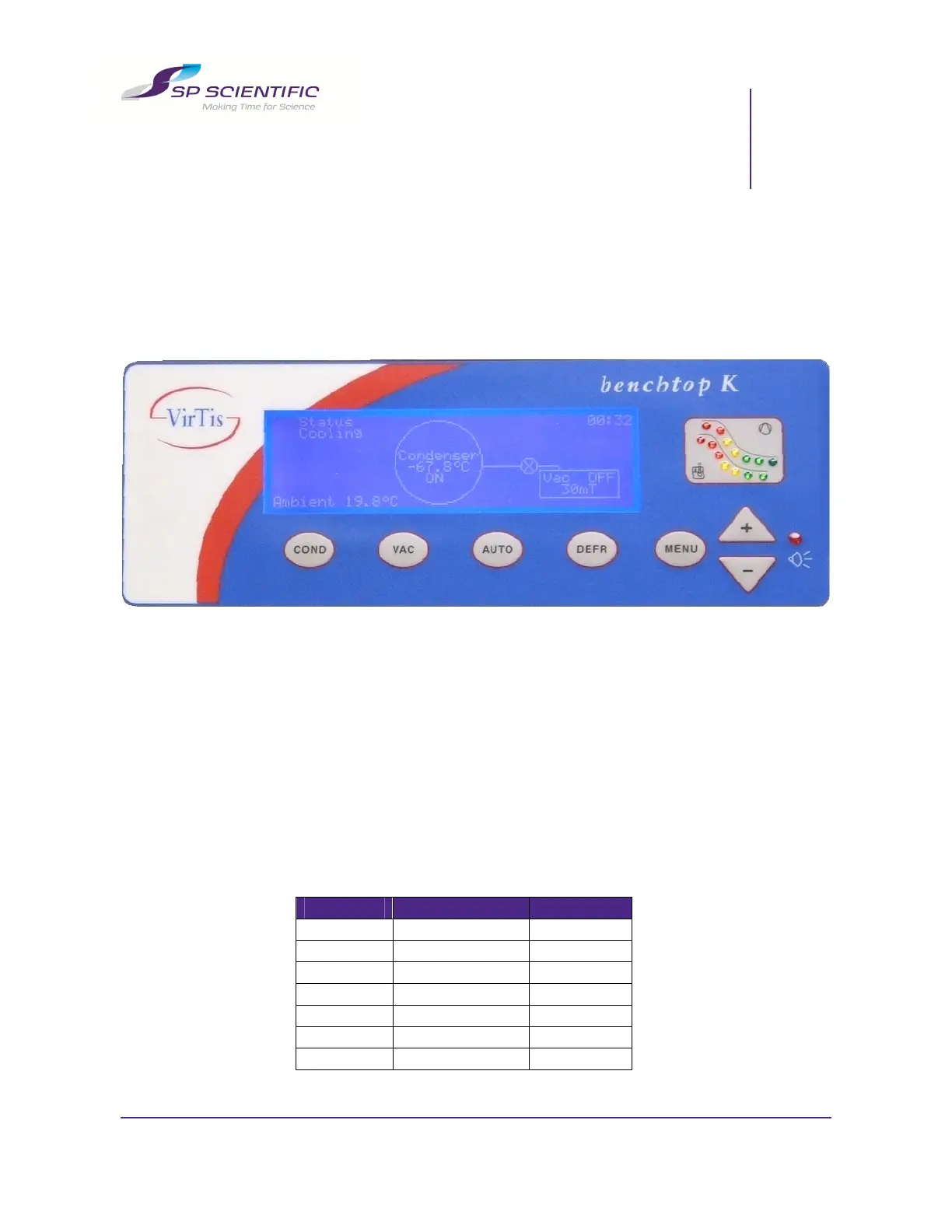
The Sentry 2.0 front panel consists of the following:
An LED wave display, which allows you to assess the status of the system
quickly and easily.
Tactile buttons located on the membrane, which allow you to activate specific
functions and navigate through the menus within the LCD display.
An LCD display, which shows the status of the unit and allows you to adjust
the alarm and control parameters, as well as modify system configurations.
LED Wave Display (Qualitative Reference)
1. Condenser Temperature
The LEDs on the bottom wave represent the following temperatures:
LED Temperature (°C) Color
1 10 Red
2 0 Red
3 -10 Red
4 -20 Amber
5 -30 Amber
6 -40 Green
7 ≤ -50 Green


 To Next Page