Chapter
2
Revision 001, 03/09 3
© SP Industries, Inc. 2009
Navigation
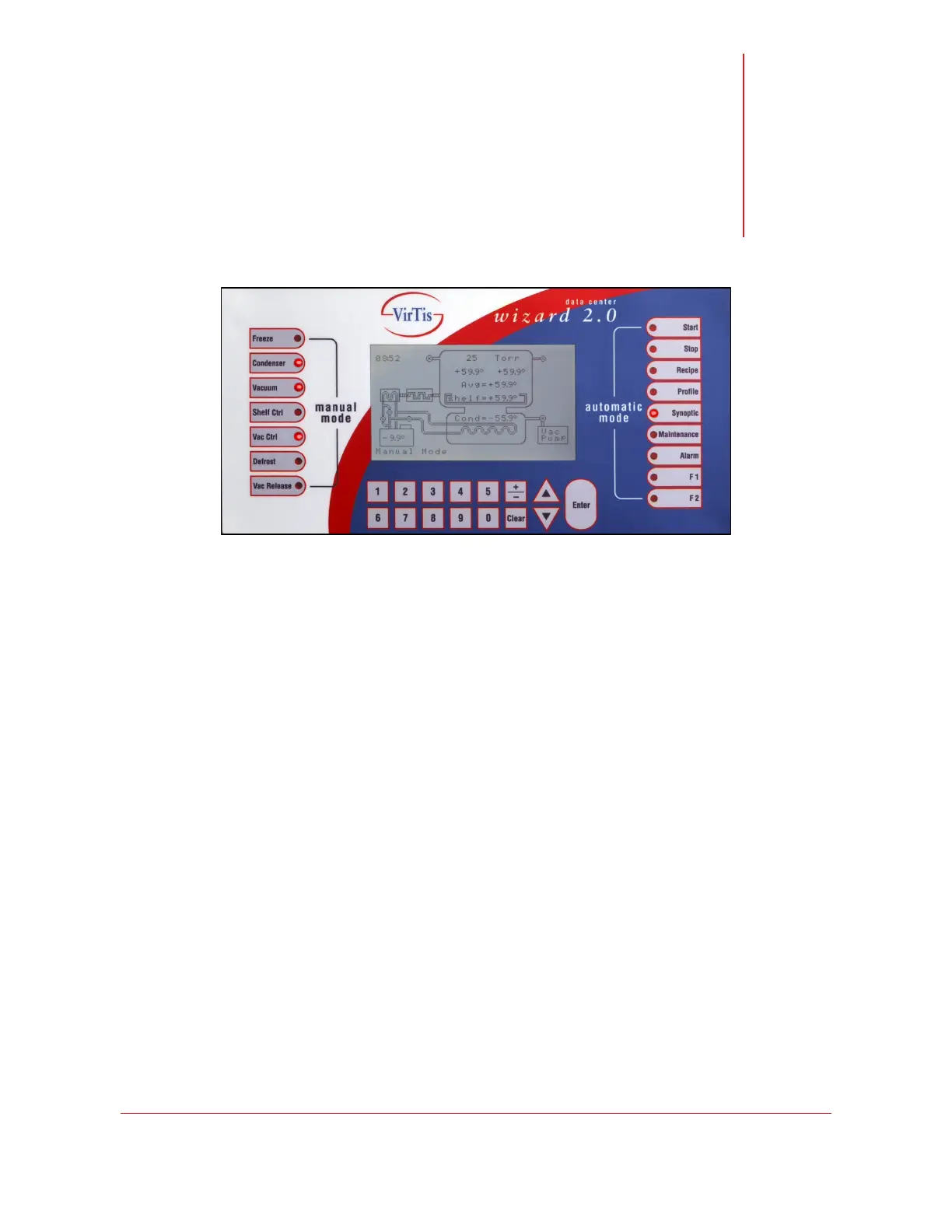
The Wizard 2.0 controller is divided into four primary areas.
• The Manual Mode buttons allow you to activate various components of your
freeze dryer.
• The LCD display shows the status of the freeze dryer in real time and
indicates recipe progress and any active alarms.
• The tactile buttons below the LCD display allow you to enter recipe and
configuration data, as well as navigate system menus.
• The Automatic Mode buttons allow you to control your freeze dryer, as well as
navigate through various menus and screens of your Wizard 2.0 controller.
Button Functions
Manual Mode Buttons
• Freeze activates all components needed to cool the shelves to the Manual
Freeze setpoint.
• Condenser activates the condenser refrigeration system and cools the
condenser.
• Vacuum activates the vacuum system. Use in conjunction with the Vac Ctrl
button to control the vacuum pressure at a defined setpoint.
Note: Select your preferred unit of measure—millitorr, microbar or Pascal—from the
Configuration menu
• Shelf Ctrl initiates shelf temperature control at the Manual Heat setpoint.
Note: The Shelf Ctrl button should be used with the Condenser button to control the
shelf temperature at the setpoint.


 To Next Page