OPERATIONOPERATION 1716
ADJUSTING THE GRINDING
RING HEIGHT
To watch the How-To video, visit sparxhockey.com/ringheight.
For every pair of skates sharpened, you must assess
the height of the Grinding Ring and adjust if necessary.
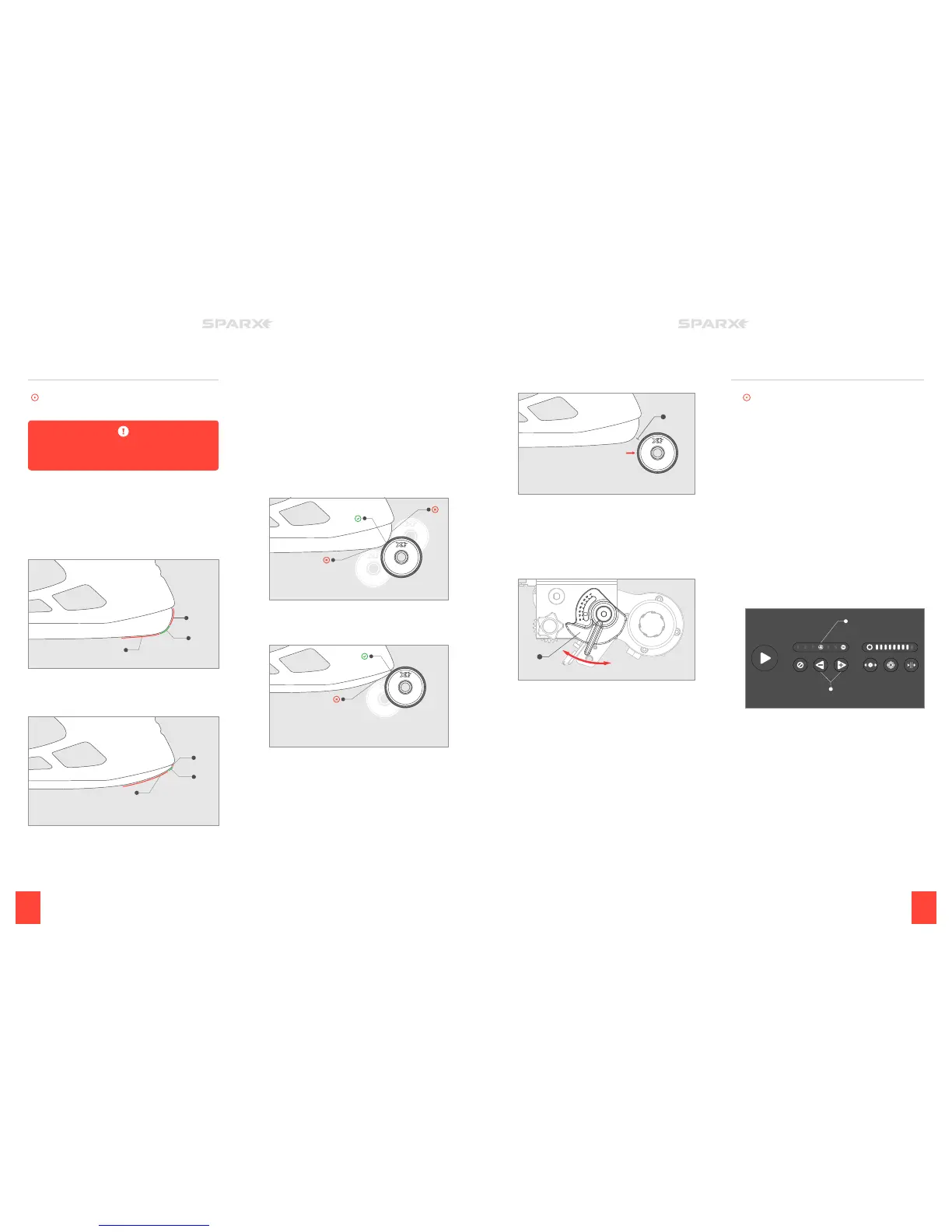
We will first introduce a few new concepts, and then move into the
actual adjustment. We want to first define an intersection zone,
where the vertical face of the blade (B) meets the nearly horizontal
face of the blade (C).
This zone can be a curved section of blade (A) like that shown in the
figure below or in some cases, it can be a point where surfaces (B)
and (C) meet.
When the intersection zone is a curved surface (A as shown above)
the Grinding Ring can safely initially contact the blade anywhere in
this region (A).
A
B
C
When the intersection zone is a point, which is more common with
skates that have been sharpened multiples times (A as shown above),
the first contact between the Grinding Ring and the blade should be
just below the point.
A
B
C
1 INITIATE MOVE MODE
Press the
m
Move Button on the Keypad. This will set the
Grinding Ring into Move Mode and allow you to control
its movement.
2 INSPECT THE CONTACT POINT
Use the
l
Left and r Right Buttons to touch the Grinding
Ring to the skate blade. Inspect its contact point and be sure it
is in the desired position. In the graphic below you will see an
example of a contact point that is too high (B) and too low (C).
A Grinding Ring contacting in the right zone is shown below as
A. If the Grinding Ring is not in a desired position, follow step 3.
If the Grinding Ring is in a desired position, skip to step 6.
If the skate blade is worn down the graphic below shows a
contact point that is too low (B) and a Grinding Ring contacting
the blade at the proper point (A).
B
C
A
B
A
3 MOVE THE CARRIAGE INTO POSITION
Using the
l
Left and
r
Right Buttons on the Keypad, back
the Grinding Ring o the heel of the skate blade 1/4 inch.
4 ADJUST THE GRINDING RING HEIGHT
Open the Glass Door. Locate the red
h
Height Adjustment
Knob (A). Turn the knob left to raise the height or right to
lower the height until the Grinding Ring is at the desired height.
The knob is labeled 1-8, with 8 being the highest setting for the
Grinding Ring and 1 being the lowest setting.
5 INSPECT THE CONTACT POINT
Close the Glass Door. Once the Glass Door has been closed,
using the
l
Left and r Right Buttons, touch the Grinding Ring
to the skate blade. Inspect its contact point and be sure it is
in its desired position. Repeat steps 4 and 5 until the Grinding
Ring makes contact at the desired position.
6 END MOVE MODE
Press the
m
Move Button again to send the Grinding Ring back
to its home position.
A
A
SELECTING THE NUMBER
Of CyCLES
To watch the How-To video, visit sparxhockey.com/cycle.
When the sharpener moves the Grinding Ring out and back over the
skate blade once, it is called a cycle.
The Sparx™ Sharpener comes set automatically to a standard
4
four cycles with all standard Radius Ring™ and FIRE Ring™ Grinding
Rings. We recommend trying four cycles to start and moving higher
or lower as needed. Typically, we have found that four cycles will
handle normal wear and tear (and even small nicks) from one to four
hours of skating between sharpenings. For brand-new steel or when
changing Grinding Ring hollow depths, we recommend using the
1
10-cycle setting to ensure you completely reset the skating surface
of the blade. See Sharpening New Steel at the end of the Operation
section.
1 ADJUST THE CYCLE COUNT
Use the
l
Left and
r
Right Buttons (A) on the Keypad to
adjust the number of cycles desired. The number of cycles
selected will be illuminated on the Cycle Counter (B).


 To Next Page
 Loading...