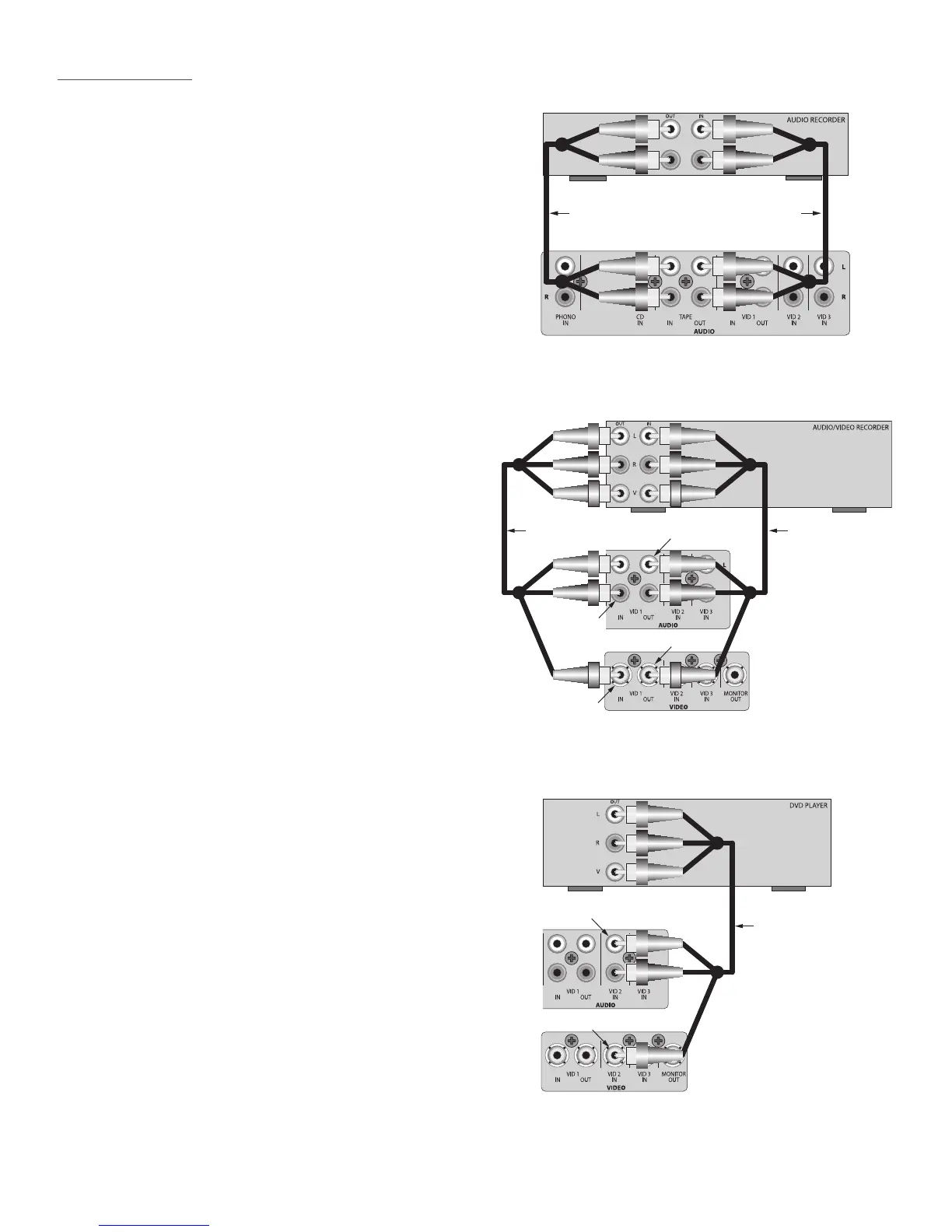
Connect a CDR, Tape Deck or other audio record/
playback device to Tape In/Out on the Vital 710 Rear
Panel as shown in . The Tape In/Out can also
be used as a loop connection for an audio signal pro-
cessor.
Using a stereo RCA-RCA audio patch cable with
gold ends, connect the L&R line level audio OUT of
the Audio Recorder to the L & R TAPE IN on the Vital
710.
Using a stereo RCA-RCA audio patch cable with
gold ends, connect the TAPE L&R OUT of the Vital
710 to the appropriate L & R line level audio IN on
the Audio Recorder.
Stereo RCA-RCA
Patch Cable
Stereo RCA-RCA
Patch Cable
Tape In/Out Connections
Stereo Audio/Video
Patch Cable
Stereo Audio/Video
Patch Cable
A/V Recorder
A/V OUT
Vital 710
VID 1Audio IN
Vital 710
VID 1 Video IN
A/V Recorder
A/V IN
Vital 710
VID 1 Audio OUT
Vital 710
VID 1 Video OUT
Video 1 In/Out Connections
Stereo Audio/Video
Patch Cable
DVD
A/V OUT
Vital 710 VID 2 Audio IN
Vital 710 VID 2 Video IN
Video 2 Connections
Connect a DVR, VCR or other audio/video record/play-
back device to the Video 1 In/Out on the Vital 710 Rear
Panel as shown in
. This will allow recording any A/V source se-
lected on the Vital 710 and playback of the recorded
content.
Using a stereo A/V patch cable with gold ends,
connect the L&R line level audio OUT of the A/V
Recorder to the L & R VID 1 Audio IN on the Vital
710. Connect the composite video OUT of the A/V
Recorder to the VID 1 Video IN on the Vital 710.
Using a stereo A/V patch cable with gold ends,
connect the L&R VID1 Audio OUT on the Vital 710 to
the appropriate L & R line level audio IN on the A/V
Recorder. Connect the VID Video OUT on the Vital
710 to the appropriate composite video IN on the
A/V Recorder.
Connect a DVD Player or other audio/video source
to the VID 2 A/V Inputs on the Vital 710 Rear Panel as
shown in .
Using a stereo A/V patch cable with gold ends,
connect the L&R line level audio OUT of the DVD
Player to the L & R VID 2 Audio IN on the Vital 710.
Connect the composite video OUT of DVD Player to
the VID 2 Video IN on the Vital 710.


 To Next Page