The Vital 710 can store up to 30 AM or FM Preset Channels (30 total). They can be stored manually by individu-
ally tuning channels and saving them as Presets. The Auto Preset function can be used to quickly store up to 30
FM channels. Auto Preset will scan the FM Band up to two times and then stop automatically.
SP. A
B
MHz
PRESET CH.
TUNED STEREO MEMO
Programming Presets
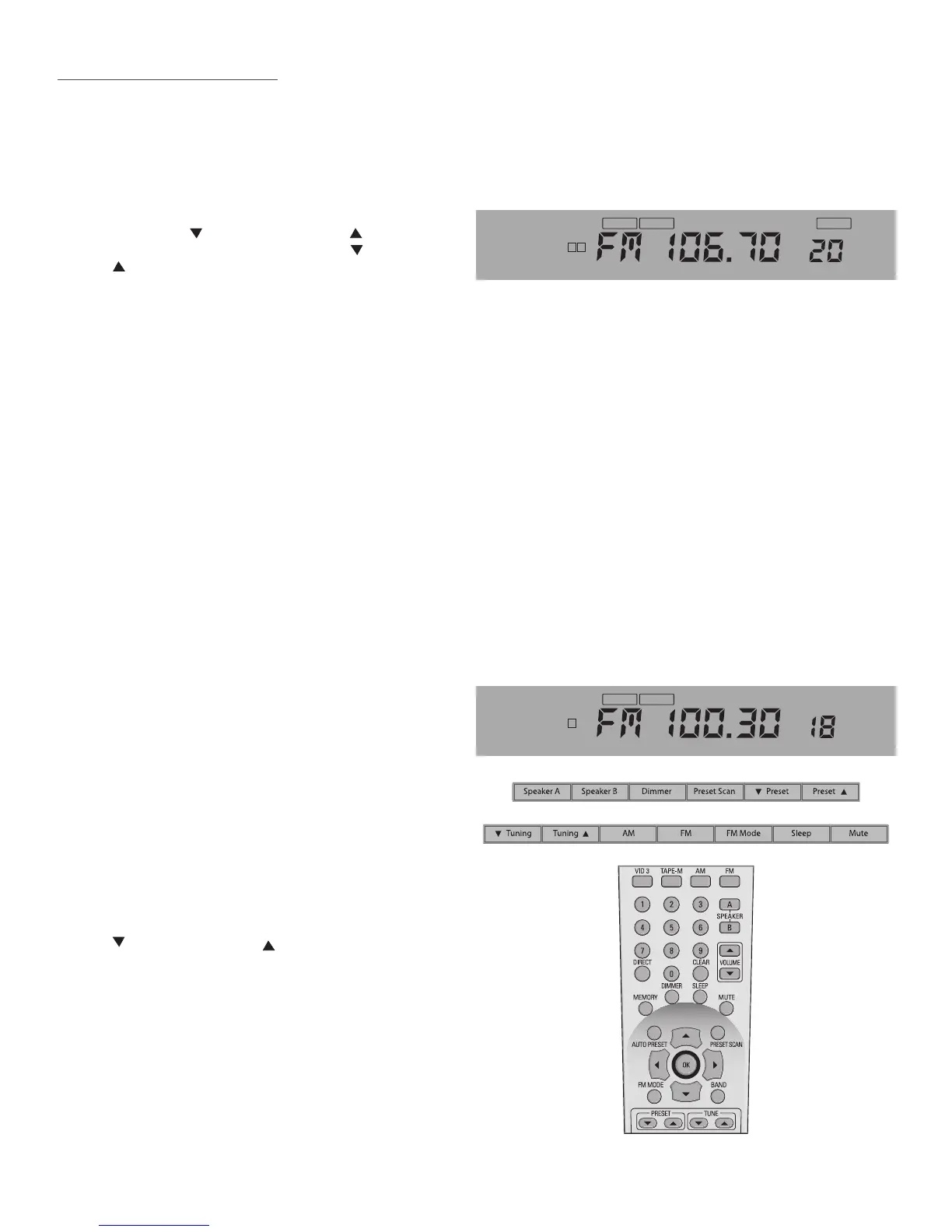
Using the TUNING or TUNING buttons on
the Vital 710 Front Panel or the TUNE or TUNE
buttons on the Vital 710 Remote, manually
tune an AM or FM Channel to be stored as a
Preset.
Press the Memory button on the Vital 710 Remote. MEMO will begin to ash slowly on the Front Panel
Display.
Enter a number from 1-30 to store the channel as a Preset.
If a Preset has already been programmed entering that Preset Number with a new channel will
replace the existing Preset Channel.
With the FM Tuner Band selected, press and hold the Auto Preset button on the Vital 710 Remote until
MEMO and Preset Number begin to ash in the Front Panel Display. The Vital 710 Tuner will
scan the FM Band, and automatically store up to 30 tunable FM channels. If fewer than 30 channels are
found, the tuner will scan the band two times and then stop.
Once programmed, there may be channels that have been stored using Auto Preset that may
be undesirable. These channels can be replaced with AM channels or possibly some harder to tune FM
channels that were not picked up in the scan mode using the Preset Programming method in the previ-
ous section.
Preset Channels can be tuned in three ways: Preset Scan, Manual Preset Tuning, Direct Numeric Preset Tuning.
With the Vital 710 ON and the Tuner selected,
press the Preset Scan button on either the Vital
710 Front Panel or the Vital 710 Remote to start
a cycle through the programmed Preset Chan-
nels. Each Preset will play for ve seconds and
then the Vital 710 will advance to the next Pre-
set. Press the Preset Scan button again to select
a Preset Channel. The selected Preset Number is
indicated on the Front Panel Display to the right
of the tuned frequency.
With either the AM or FM Tuner selected, press
the
PRESET or PRESET button on the Vital 710
Front Panel or Vital 710 Remote to select the
previous/next programmed Tuner Preset. The
selected Preset Number is indicated on the
Front Panel Display to the right of the tuned fre-
quency. The Vital 710 Remote UP/DOWN Cursor
buttons can also be used for this function.
With either the AM or FM Tuner selected, on the
Vital 710 Remote, press the Numeric buttons to
select Preset Channels. To select Preset 1, simply
press 1. To select Preset 30, press 3-0.
SP. A
MHz
PRESET CH.
TUNED STEREO
Tuner Preset Controls
Vital 710 Front Panel
Vital 710 Remote


 To Next Page