8
7. SYSTEM INTERFACE
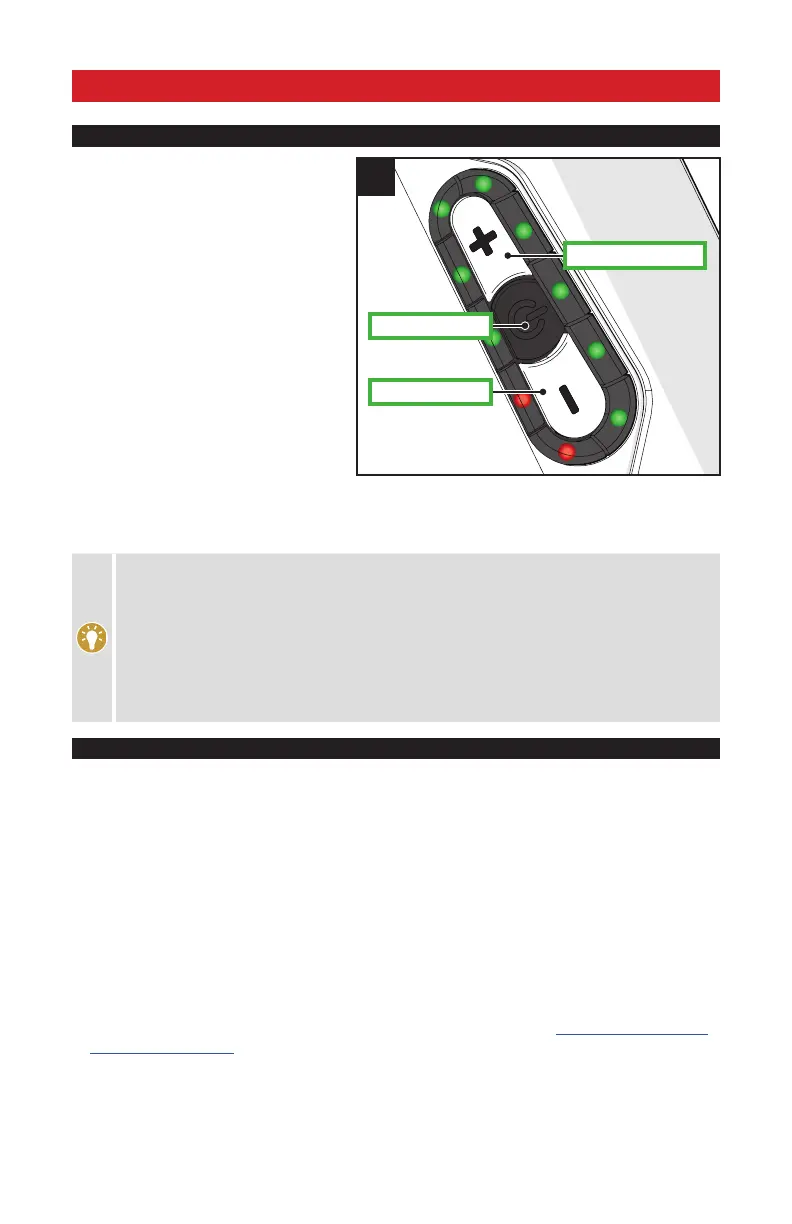
SUPPORT MODES
1
- : TRAIL OR ECO
+ : TRAIL OR TURBO
POWER
The Levo motor support is available in three
different drive settings - TURBO, TRAIL and ECO.
TURBO MODE: The motor, while pedaling,
provides maximum (100%) support.
TRAIL MODE: The motor, while pedaling,
provides 50% support (default).
ECO MODE: The motor, while pedaling,
provides 20% (default).
The various modes (TURBO, TRAIL and ECO)
are managed using the +/- buttons on the Trail
Display, located on the side of the battery (fig.1).
In addition, the drive system can be controlled
through a variety of devices (Mission Control App
or select LEV-supported computers) by being able
to access additional control features.
To switch into a different support mode, press the + or - button on the battery, app or computer. After reaching the
strongest or weakest mode, the system will not continue to switch. To reduce from TURBO to TRAIL to ECO, you
have to press the - button. To increase from ECO to TRAIL to TURBO, you have to press the + button.
The support modes affect how much support the motor delivers based on your pedaling input.
Generally, more support provides faster acceleration and easier climbing at the expense of shorter
range and greater chance of wheelspin. Lower power modes that provide less support result in
longer battery run times, longer range, and more control in situations where traction is limited.
Specialized recommends experimenting with the power settings that work best for your riding
style and conditions.
The level of motor support in TURBO, TRAIL and ECO modes can be customized for your individual
needs. Using the Mission Control App or with help from your local Authorized Specialized Retailer,
you can adjust the ECO and TRAIL modes to provide between 10% and 70% of motor support.
CONNECTIVITY OPTIONS
The motor support system provides a high degree of interface flexibility, through Bluetooth and/or ANT+
connectivity. Depending on the device and the connectivity option, a variety of features can be accessed.
BLUETOOTH LE:
The Mission Control App (iOS or Android) provides an enhanced ride experience by recording rides while syncing with Strava,
eliminating “range anxiety” with the Smart Control function, GPS-based navigation, and system diagnostics. Android and iOS
devices can sync to all Levo bicycles via Bluetooth LE. Visit Google Play or the Apple App Store for the latest version of the free
Mission Control App. All Mission Control functionality instructions can be found within the App itself.
ANT+:
The ANT+ Protocol offers a range of devices that sync with the Levo bicycles.
The LEV (Light Electric Vehicle) profile allows visibility of additional types of data, including cadence, rider power
output, motor temperature, battery temperature, battery State of Charge, and speed while also allowing some
support mode control. For an up-to-date list of LEV compatible ANT+ devices go to https://www.thisisant.com/
directory/filter/~/~/~/200/.
The “Fake Channel” option displays the battery State of Charge on any ANT+ cycling device that has an unused
Power, Heart rate, or Cadence channel. The Mission Control App must be used to select this option.





 To Next Page