16
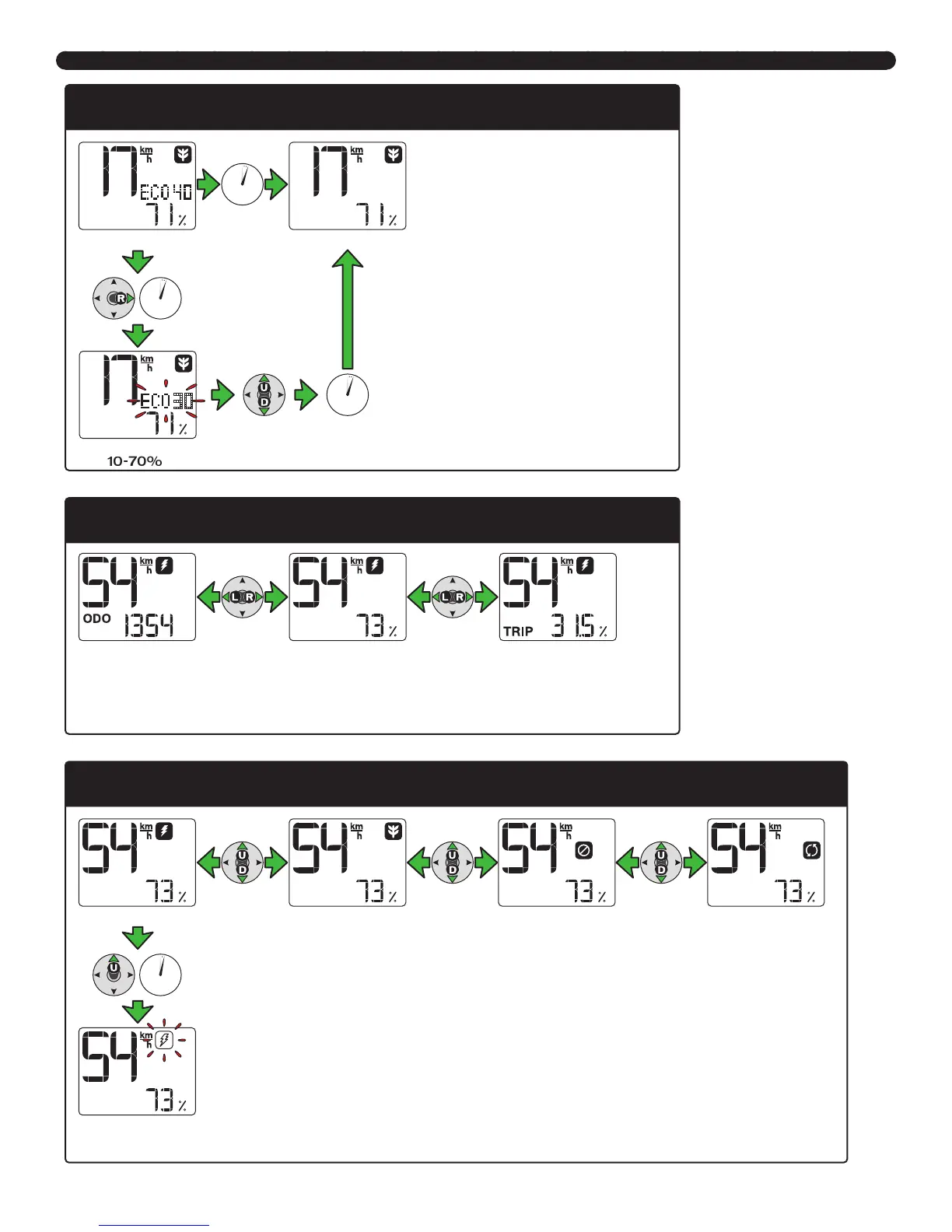
D. Screen modes
3 sec
3 sec
3 sec
Set ECO level: When the speed setting is in
ECO mode, the ECO # will be displayed.
• If nothing is done for 3 seconds, the ECO
# disappears.
• With the ECO # visible, if the joystick is
held to the right for 3 seconds, the ECO
# will start to flash. While flashing, the
percentage of ECO assistance can be
adjusted between 10 and 70%.
• When the ECO # is flashing, if nothing
is done for 3 seconds, the ECO # will
disappear.
ECO % +/- ADJUST
ECO mode
DO NOTHING
DO NOTHING
ECO % adjust mode:
★✩✪
70%
ECO mode
Mode options: To switch between ODO mode, TRIP mode or default view, press the joystick to the left
or right.
MODE OPTIONS
Odometer mode Default view Trip mode
2 sec
Travel mode options: To switch between TURBO, ECO, NO
ASSIST and REGEN modes, press the joystick up or down.
• 45 km/h version only: When in TURBO mode, press the
joystick up for 2 seconds to access the THROTTLE mode. The
TURBO symbol will flash.
TRAVEL MODE OPTIONS
TURBO mode ECO mode NO ASSIST mode REGEN mode
Flashing=Throttle mode




 To Next Page