4
❘
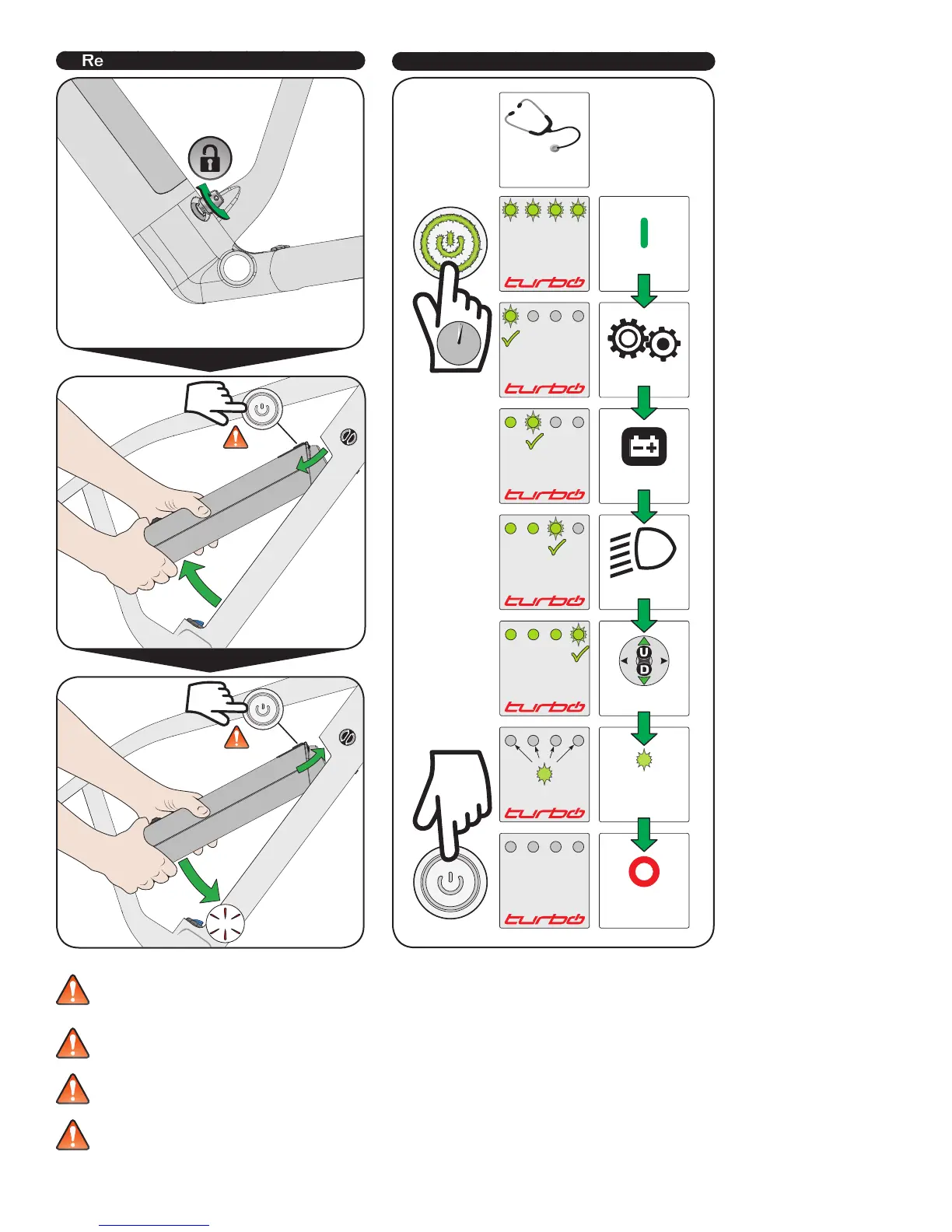
emoving / installing the battery
OFF!
OFF!
Checking the battery diagnostic
ON
STARTUP
DIAGNOSTIC
OFF
MOTOR OK
BATTERY OK
LIGHT OK
REMOTE OK
ANY LED BLINK x2:
• Connection failed
• Component can’t
be found
MOTOR
BATTERY
LIGHT
REMOTE
WARNING! Before you ride the bicycle, please familiarize yourself with the behavior and operation of the bicycle in a quiet, safe place.
WARNING! The battery is heavy, so please ensure that you do not drop it as this could cause injury and/or damage to the battery.
WARNING! Remove the key before riding. Otherwise, you may injure yourself on the protruding key, lose the key or the battery could
become loose and fall out. This could result in accidents and injury.
WARNING! To prevent an uncontrolled launch, the system only starts to support you when the rear wheel is turning. Nevertheless, for
your safety you should always have one brake applied before you place your foot on the pedal. Please also note that the speed switch
provides strong support. This might feel very unusual. Uncontrolled launches with your bicycle can lead to a fall or serious accidents,
particularly on loose or skiddy surfaces or in road traffic. Refer to local laws regarding wearing a bicycle helmet while riding (for example,
helmet standard AS/NZS 2063).




 To Next Page