10
8. SYSTEM INTERFACE
Depending on the model, the VADO is equipped with either an LCD display or a TFT touch-enabled display.
WARNING! Use caution when viewing or using the display while riding, especially if the touch
controls are enabled, as it can be distracting and can lead to accidents. You should always stop
before changing settings or operating the various functions of the display.
The display must be connected when operating the bike. If it is removed from the mount, the motor will not work.
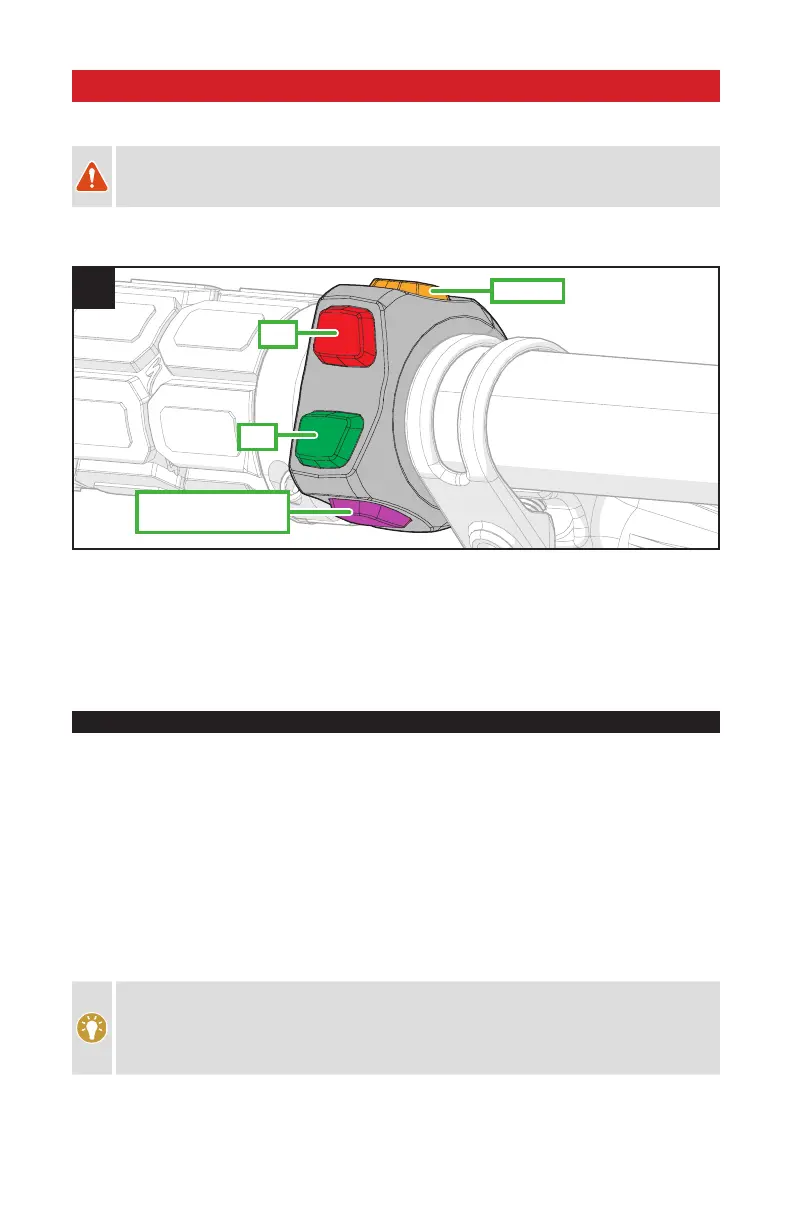
The handlebar remote (fig.3) controls certain functions of the display and the level of motor support.
-
+
25 km/h VADO: LIGHT
45 km/h VADO: HORN
SET
3
SET BUTTON: Allows for the user to toggle through the functions (trip distance, available range, ride time and
odometer). Also allows for the clock and unit (metric/imperial) to be adjusted.
+ BUTTON: Increases the amount of support. Pressing and holding activates the walk-assist mode.
- BUTTON: Decreases the amount of support.
LIGHT/HORN: Turns the light on/off (25 km/h or 20 MPH USA VADO models) or activates the horn (45 km/h
VADO models).
8.1. SUPPORT MODES
The VADO motor support is available in three different drive settings - TURBO, SPORT and ECO.
TURBO MODE: The motor, while pedaling, provides maximum (100%) support.
SPORT MODE: The motor, while pedaling, provides 50% support (default).
ECO MODE: The motor, while pedaling, provides 20% (default).
OFF MODE: The motor will not offer any assistance, but the display and lights will still function.
You can change between the different support modes (TURBO, SPORT and ECO) by pressing the +/- buttons on
the handlebar remote (fig.3).
To switch into a different support mode, press the + or - button on the remote. After reaching the strongest or
weakest mode, the system will not continue to switch. To reduce from TURBO to SPORT to ECO, you have to press
the - button. To increase from ECO to SPORT to TURBO, you have to press the + button.
The support modes affect how much support the motor delivers based on your pedaling input.
Generally, more support provides faster acceleration and easier climbing at the expense of shorter
range and greater chance of wheelspin. Lower power modes that provide less support result in
longer battery run times, longer range, and more control in situations where traction is limited. You
should experiment with the power settings that work best for your riding style and conditions.



 To Next Page