13
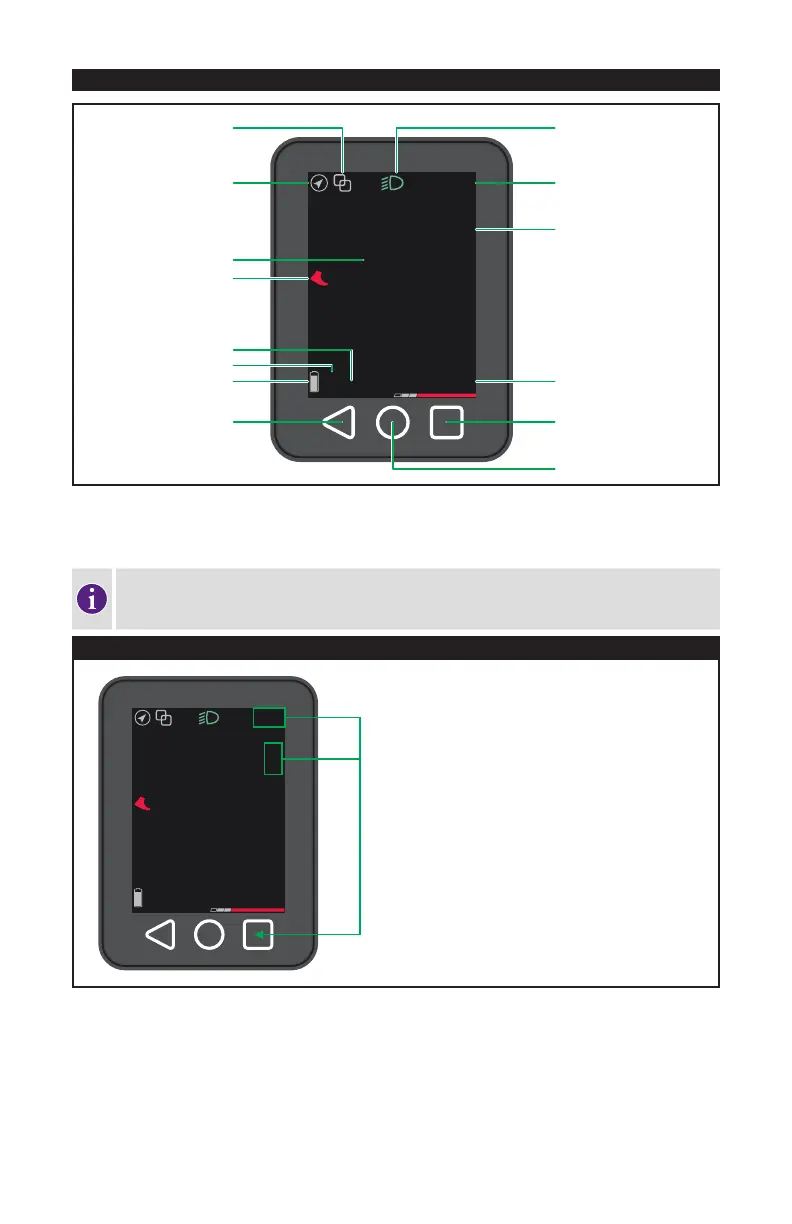
8.3. DISPLAY FUNCTIONS (TFT DISPLAY)
20
12:34
km/h
99km TURBO
BLUETOOTH
SPEED
METRIC / IMPERIAL
SUPPORT LEVEL
MENU
HOME
CLOCK (12/24hr)
HEADLIGHT
METRIC / IMPERIAL
RANGE
REMAINING CHARGE
HISTORY / BACK
GPS
WALK-ASSIST
The display is controlled using the buttons on the handlebar remote (fig.3), as well as the three touch buttons below
the display and the touch-enabled display itself. The touch screen can be navigated using touch, swipe, pinch and
spread gestures.
The TFT display is equipped with a highly adjustable operating system that may improve over
time. Make sure you periodically visit your Authorized Specialized Retailer for potential software
updates to make sure you have the latest software and features.
20
12:34
km/h
99km TURBO
SETTING THE TIME / UNIT
The time and unit of measure can be set for 24hr / km/h or
12hr / mph.
To set the time and unit of measure, press the Menu button
and choose the desired function you wish to update.
The time can also be set automatically with the dealer
tool.



 To Next Page