Need help?
Do you have a question about the SpectraLink 6020 and is the answer not in the manual?
Explains icons used in the document for warnings, tips, and information.
Details the four operational modes of the Spectralink handset: Standby, Active, Config Menu, Message Alert.
Explains how to use the navigation keys to move through menu options.
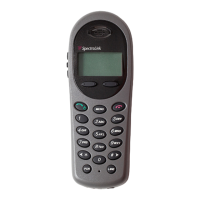
Describes the different parts of the handset display, including status bar, middle lines, and softkey labels.
Explains how shortcut keys on the keypad activate menu options displayed on the screen.
Explains the meaning of various icons and indicators displayed in the handset's status bar.
Lists and explains the function of various labels associated with the handset's softkeys.
Covers essential operations like removing/replacing battery, turning handset on/off, and unlocking the keypad.
Describes how to access advanced telephony features programmed by the system administrator.
Explains how to use the Message Alert application for text messages and its configuration.
Details how to enter and edit data using the keypad and softkeys, including alphanumeric entries.
Guides users on accessing and using the Config Menu to set user preferences and settings.
Explains options that operate on a toggle basis, showing the current setting on the info line.
Describes the five User Profiles that establish handset ring behavior and how to change them.
Details how to adjust ring tone, cadence, and volume for different profiles and message alerts.
Provides a detailed overview of the options available within the Config Menu for various settings.
Explains the different Battery Pack types, their capacities, charging, and handling notes.
Provides important notes on battery performance, replacement, and disposal of damaged batteries.
Offers advice on best practices for charging the handset and battery packs.
Explains how to interpret the charging status indicators on the handset and charger LEDs.
Details the functionality and operation of the Single Charger for the wireless handset.
Details the functionality and operation of the Dual Charger for the wireless handset.
Details the functionality and operation of the Quad Charger for the wireless handset.
Lists and describes various carrying accessories for the handset, such as belt clips and holsters.
Discusses the use of optional headsets with the wireless handset and Spectralink's recommendations.
Provides answers to frequently asked questions regarding handset operation, charging, and features.
Provides regulatory information specific to Industry Canada regarding radio transmitters.
Details operating environment, handling, and disposal precautions for chargers and battery packs.
Presents important safety information and warnings related to the operation of wireless handsets.
Highlights potential hazards and precautions for operating the handset in certain environments.
Warns against using the handset in potentially explosive atmospheres and outlines associated risks.
Discusses susceptibility to EMI and compatibility considerations in facilities and near medical devices.
Advises on safe distances and precautions when using the handset near pacemakers.
Recommends consulting manufacturers and physicians regarding RF shielding for other medical devices.
States compliance with FCC rules regarding interference and operation.
Provides guidelines for safe operation of wireless handsets while driving vehicles.
Warns about placing the handset in airbag deployment areas due to potential injury.
 General
| Headset Jack | 2.5 mm |
|---|---|
| Speakerphone | Yes |
| Vibration | Yes |
| Type | Wireless Telephone |
| Display | LCD |
| Operating Temperature | 0°C to 40°C |
| Connectivity | DECT |
| Range | Up to 300 meters (open space) |
| Compatibility | SpectraLink DECT infrastructure |

 To Next Page