MUG1160S-A1 Page 1
Charter Spectrum Remote Control User Guide
URC1160
Image of remote line art
Getting Started: Install Batteries
1. Apply pressure with your thumb and slide the battery door for removal
Show image of bottom of remote, indicating pressure point and slide direction
2. Insert 2 AA batteries. Match the + and – marks.
Show illustration of batteries in place
3. Slide the battery door back into place.
Show bottom of remote with battery door in place, include arrow for slide direction.
Setup Your Remote for a Charter WorldBox
If you have a Charter WorldBox, the remote must be paired with the box. If you do NOT have a
WorldBox, proceed to PROGRAMMING YOUR REMOTE FOR ANY OTHER CABLE BOX.
To Pair the Remote to the WorldBox
1. Ensure that your TV and WorldBox are both powered-on and that you can view the video feed
from the WorldBox on your TV.
Show image of STB and TV connected and on
2. To pair the remote, simply point the remote at the WorldBox and press the OK key. The Input
key will begin blinking repeatedly.
Show image of remote pointed at the TV, transmitting data
3. A confirmation message should appear on the TV screen. Follow the on-screen instructions to
program the remote control for your TV and/or audio equipment as needed.
To Un-Pair the Remote to the WorldBox
If you wish to use the remote with a different cable box, follow these steps to un-pair it with your
WorldBox.
1. Press and hold MENU and Nav Down keys simultaneously until the INPUT key blinks twice.
Show remote with MENU and Nav Down keys highlighted
2. Press 9-8-7 digit keys. The INPUT key will blink four times to confirm pairing has been disabled.
Show remote digits with 9-8-7 highlighted in order.

 Need help?
 General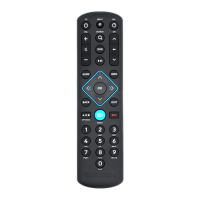

 To Next Page