Need help?
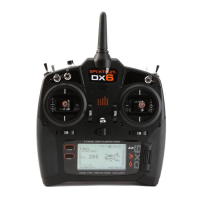
Do you have a question about the Spectrum DX6 and is the answer not in the manual?
Instructions for installing the optional lithium ion battery pack into the transmitter.
Steps to insert the SD card into the transmitter for various functions.
Procedures for updating the transmitter's AirWare software using an SD card.
Step-by-step guide for binding the receiver to the transmitter using a receiver battery.
Instructions for binding the receiver to the transmitter using an ESC.
Guidelines for testing the receiver power system to ensure adequate voltage.
Explanation of the QuickConnect technology and its brownout detection feature.
Details on the SmartSafe failsafe technology for throttle control.
Explanation of the Hold Last Command failsafe feature.
Guide to programming Preset Failsafe for specific model responses.
Installing and using telemetry modules for aircraft data.
Setting up wired trainer functions for practice.
Calibrating the transmitter's proportional controls for accuracy.
Importing and exporting model files via SD card.
Procedures for updating the transmitter's firmware.
Performing an RF link range test by reducing transmitter power.
Accessing and managing telemetry data and settings.
Changing the transmitter's gimbal stick mode (1, 2, 3, or 4).
 General
| Channels | 6 |
|---|---|
| Modulation | DSMX/DSM2 |
| Model Memory | 250 |
| RF Power | 100mW |
| Display | LCD |
| Battery | 4 AA batteries |

 To Next Page