English-08
1
2
3
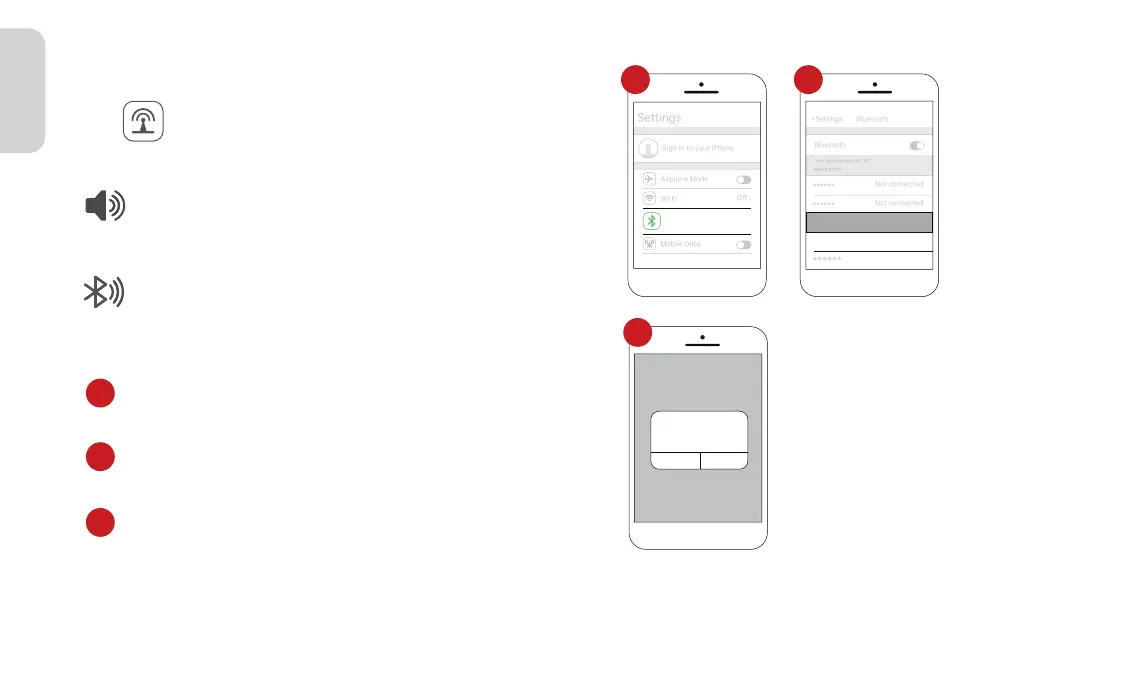
2.2 In the “Other Devices” Bluetooth device list, select the
Bluetooth name of your car.
2.3 A prompt will pop up on the phone, choose "Pair", and
the phone will pair successfully with the car's Bluetooth.
2.1 Go to Settings on your iPhone > Bluetooth,turn on the
“Bluetooth”.
>
On
Bluetooth
Now discoverable as “X6”.
MY DEVICES
Other DEVICES
Car******
Bluetooth
Not connected
Not connected
Now discoverable as “X6”.
MY DEVICES
Other DEVICES
******
******
Spedal-******
******
<Settings Bluetooth
Bluetooth Pairing Request
******
Cancel
Pair
1 2
3
3.2.2 Apple CarPlay Audio Out
In CarPlay/Android Auto mode, the phone is directly
connected to the car's Bluetooth (if the phone has
been paired with the car's Bluetooth before, there is
no need to repeat the connection operation).
2. Bluetooth
1. Built-in Speaker
Click“ ”on the home screen to enter the Audio Out.
The sound is played from the speaker of the device.



 To Next Page