11
>
Wi-Fi
Spedal_wifi_****
Password
12345678
Cancel JoinEnter Password
Screen
Mirroring
Screen Mirroring
SmartScreen
TV
1 2
3 4
3.5 Mirroring
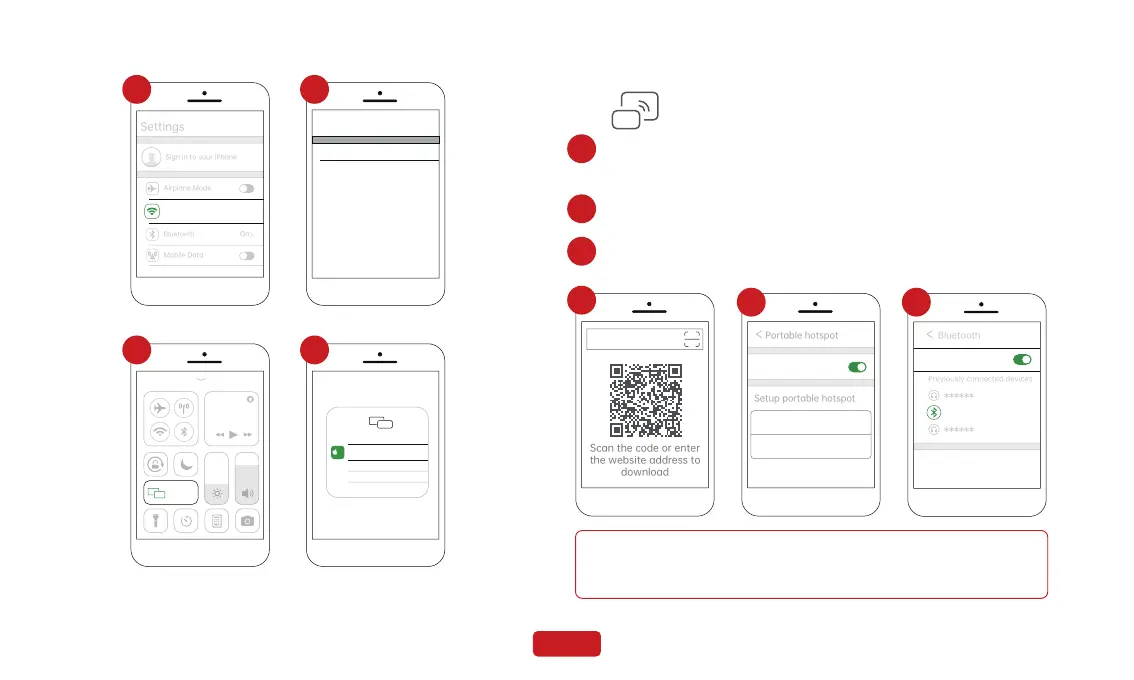
Click " " on the home screen to enter the Mirroring.
1
1. Scan the screen QR code to enter the download interface, download
and install it,Alternatively, enter the following URL in the browser to
download the app.(http://39.97.238.202:8081/system/app/download)
2. Set the portable hotspot name of the phone to "car" and the hotspot
password to “12345678”; enable hotspot and Mirroring application;
3. Turn on your phone's Bluetooth and connect to this device, named
"Spedal-****".
3
2
Due to differences in Android phone models, the display may vary.
Refer to your specific device for accuracy.
Note
Portable hotspot
SSID car
12345678
Password
>
>
Bluetooth
Previously connected devices
Spedal-****
32
1
Scan the code or enter
the website address to
download


 To Next Page