07
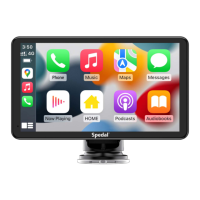
In CarPlay/Android Auto mode, the phone is directly
connected to the car's Bluetooth (if the phone has been
paired with the car's Bluetooth before, there is no need to
repeat the connection operation).
2. Bluetooth
1. Native Audio
The sound is played from the speaker of the device.
1
2
3
2.2 In the “Other Devices” Bluetooth device list, select the
Bluetooth name of your car.
2.3 A prompt will pop up on the phone, choose "Pair", and the
phone will pair successfully with the car's Bluetooth.
2.1 Go to Settings on your iPhone > Bluetooth,turn on the
“Bluetooth”.
>
On
Bluetooth
Now discoverable as “X6”.
MY DEVICES
Other DEVICES
Car-*****
Bluetooth
Not connected
Not connected
Now discoverable as “X6”.
MY DEVICES
Other DEVICES
******
******
Spedal-******
******
<Settings Bluetooth
Bluetooth Pairing Request
******
Cancel
Pair
1 2 3
Connect to the car through an AUX cable, and the sound will
play from the car's speakers.
3. AUX Connection
3.1 Insert the audio cable into the car AUX port, and connect the other
end to the AUX OUT port of the device.
3.2 Set the car's audio input mode to AUX audio input. After the
connection is successful, you can play music, navigation, calls and
more through your car's audio system.
Please confirm if your car supports AUX IN and note that the location of
the AUX may vary depending on the car model. Please consult your
manufacturer for more details.
Note
Connect through FM to play sound through your car's
audio system.
4. FM Transmitter


 To Next Page