Car-******
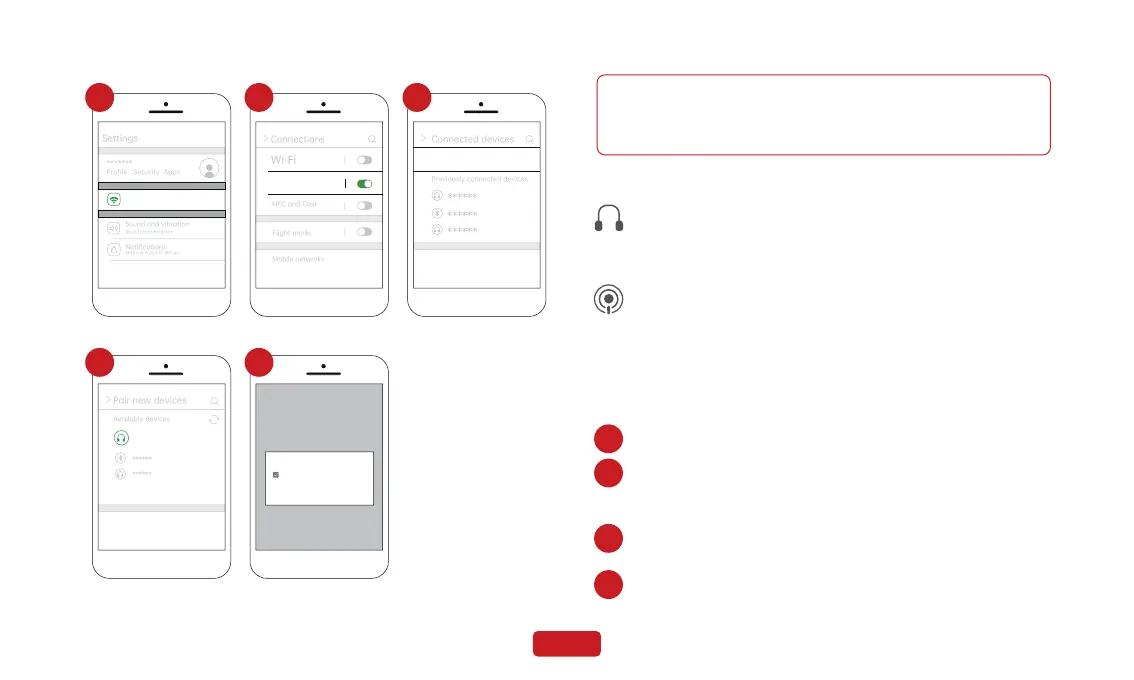
Pair new devices
Available devices
Pairing...
>
Spedal- ******
******
******
Pair with Car-****** ?
Allow access to your contacts
and call history
Cancel
Pair
Connections
Wi-Fi,Bluetooth,Flight mode
Status bar,do not disturb
1
Bluetooth
2
Pair new devices
Previously connected devices
+
3
4 5
1.Due to differences in Android phone models, the display may vary.
Refer to your specific device for accuracy.
2.The initial connection time might be relatively long, please be patient.
The same as the page 07--3.2.2--4.FM Transmitter.
The same as the page 07--3.2.2--3.Aux Connection.
3. AUX Connection
4. FM Transmitter
3.4 Apple AirPlay
Apple AirPlay Wileless Connect
1. Go to Settings on your iPhone > Wi-Fi
2. Select the Wi-Fi network with the name starting with
"Spedal_wifi_****" and connect to it. Enter the
password, the default password is “12345678”.
3. Swipe down from the top of the iPhone screen to access the
Control Center menu, then tap "Screen Mirroring".
4. Click on “SmartScreen” to complete Screen Mirroring.
1
2
3
4
Note
10


 To Next Page