04
Note
Depending on the vehicle, the cigarette lighter socket may be located in
a different position. The figure provided is for reference only.
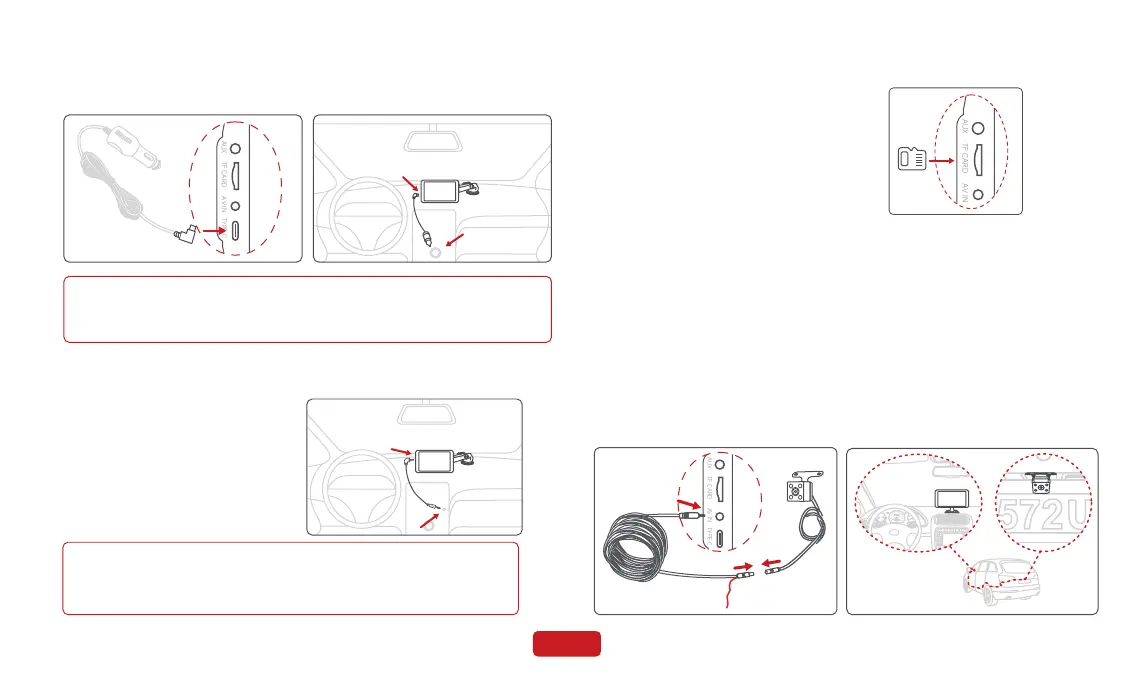
2.5 Device Installation
Insert the power cable into the car cigarette lighter, and connect the
other end to the power interface of the device.
2.6 Audio Cable Installation
1. Insert the audio cable into the car
AUX port, and connect the other end
to the AUX OUT port of the device.
2. Set the car's audio input mode to
AUX audio input. After the connec-
tion is successful, you can play
music, navigation, calls and more
through your car's audio system.
2.7 TF Card Installation
· Insert the TF card into the TF card slot.
· The self-provided TF card should meet
the following requirements: Class 10 or
above, the capacity does not exceed
128GB.
Note
Please confirm if your car supports AUX IN and note that the
location of the AUX may vary depending on the car model. Please
consult your manufacturer for more details.
Red wire to reversing
light postive pole
1. Connect the rear camera to the Rear camera cable, and insert
the other end into the rear camera port (AV-IN) of the device;
2. Use the rear camera bracket to fix the rear camera above the
license plate;
3. Please tear off the rear camera lens protective film before use;
4. Please adjust the lens to a suitable angle.Tighten the screws.
2.8 Rear Camera


 To Next Page