05
3.1 Home Screen
3. Features And Settings
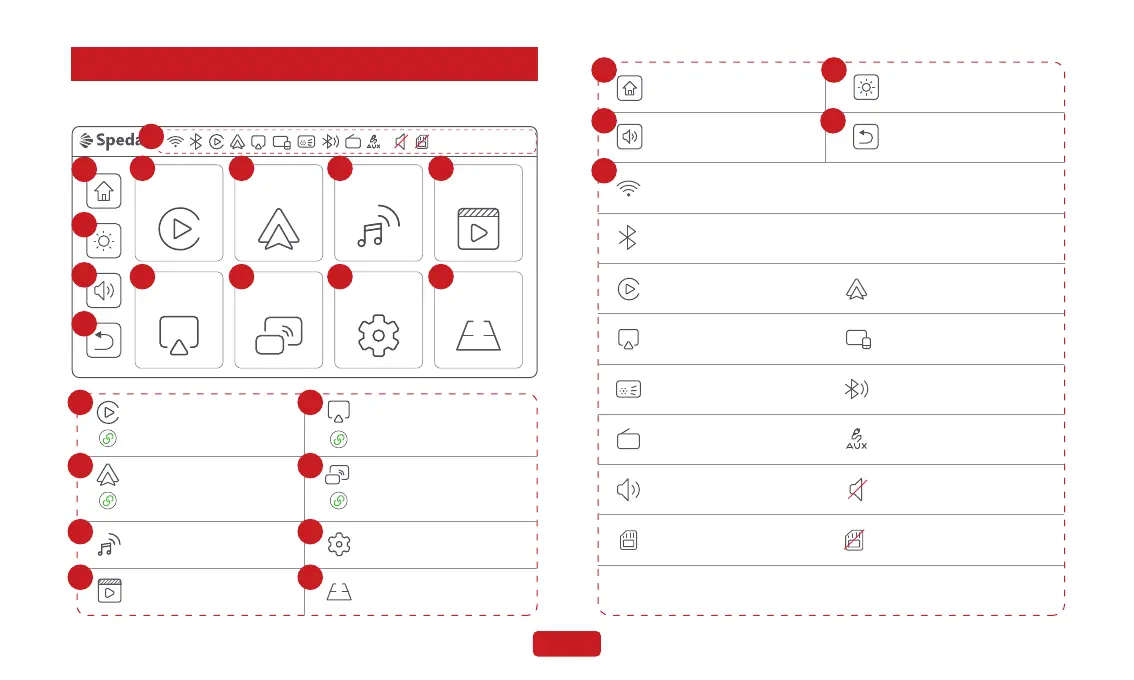
CarPlay Android Auto
Mirroring SettingsAirPlay
Audio Out
Rear Camera
Media Player
1 2 3 4
5 6 7 8
9
10
11
12
Audio Out
CarPlay
CarPlay connected to the device.
Android Auto
AirPlay
Mirroring
Setting
Media Player
1
2
3
4
5
6
7
8
Mirroring connected to
the device.
Android Auto connected to
the device.
AirPlay connected to the device.
Rear Camera
03/01/2024 12:30:24
13
FM
Back To Home Screen
Adjust the brightness of
the device screen.
Adjust the speaker
volume of the device.
Return to the previous
menu level.
11
13
12
Wi-Fi connected to the device.
Bluetooth connected to the device.
Android Auto connected to
the device.
CarPlay connected to the device.
AirPlay connected to the device.
Sound turned on Mute
TF card inserted
TF card not inserted
The current audio output is
set to the local speaker
The current audio output is
set to the FM
The current audio output is
set to the AUX
The current audio output is
set to the Bluetooth
Mirroring connected to the device.
FM
Date and time
03/01/2024 12:30:24
109


 To Next Page