08
4.1 Adjust the car FM to a frequency that is not occupied by the broadcast,
and adjust the device FM to the same frequency; for example, adjust
the car FM to 91.0MHz (if not occupied), and then adjust the the FM
frequency of the device to 91.0MHz, as well, and the FM function is
turned on; after the connection is successful, the sound on the device
will be transmitted to the car speakers.
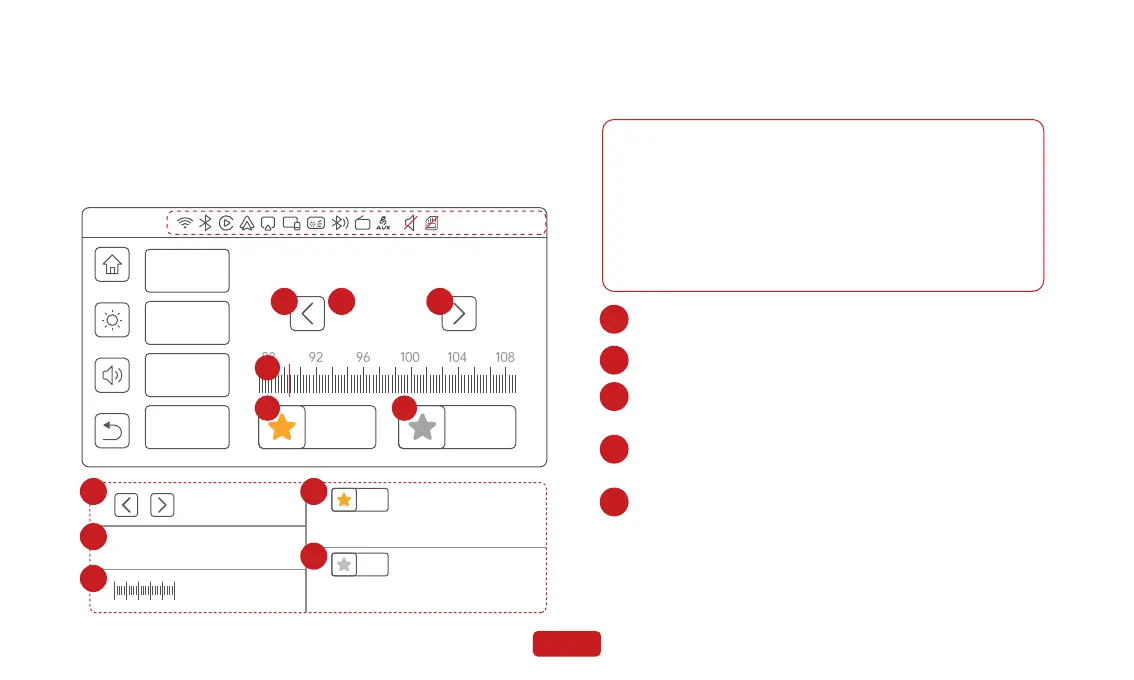
4.2 When the FM is on, you can select the button or slide the pointer to
adjust the frequency.
3.3 Android Auto
3.3.1 Android Auto Wireless Connection
Note
1. Any phone with Android 11.0.
2.A Google or Samsung phone with Android 10.0.
3.A Samsung Galaxy S8, Galaxy S8+, or Note 8, with Android 9.0.
What you need:
A compatible Android phone with an active data plan, 5 GHz
Wi-Fi support, and the latest version of the Android Auto app.
Wireless projection is compatible with these Android versions:
1.Go to Settings on your phone, turn on "Bluetooth" and "Wi-Fi".
2.Click on "Bluetooth" to enter the Bluetooth search page.
3.After entering the “Bluetooth” menu, click "Pair new devices" to
search for new Bluetooth devices.
4.Select the Bluetooth device starting with "Spedal-*****" from the
list of "Other DEVICES" Bluetooth devices.
5.Wait for about 20 seconds, a prompt box will pop up on the
phone with "Pair with Spedal-*****", click "Pair" (as shown
below), and wait for the Bluetooth pairing to complete. After the
Android Auto connec- tion is completed, it will automatically
enter the Android Auto mode.
1
2
3
4
5
Audio Out
3
Please operate the volume adjustment on the
mobile phone/car side.
Mhz
89.2
Native Audio
Bluetooth Audio
AUX Audio
FM Audio
103.0
MHz
0.0
MHz
03/01/2024 12:30:24
FM
4 5
1 2 1
Refer to [3.1 home screen]
Scale&Pointer
1
2
3
4
TUNING +/- 0.1
Mhz
89.2
FM Frequency
103.0
MHz
0.0
MHz
Save Current Frequency Status
Saved
Save Current Frequency Status
To be saved
5


 To Next Page