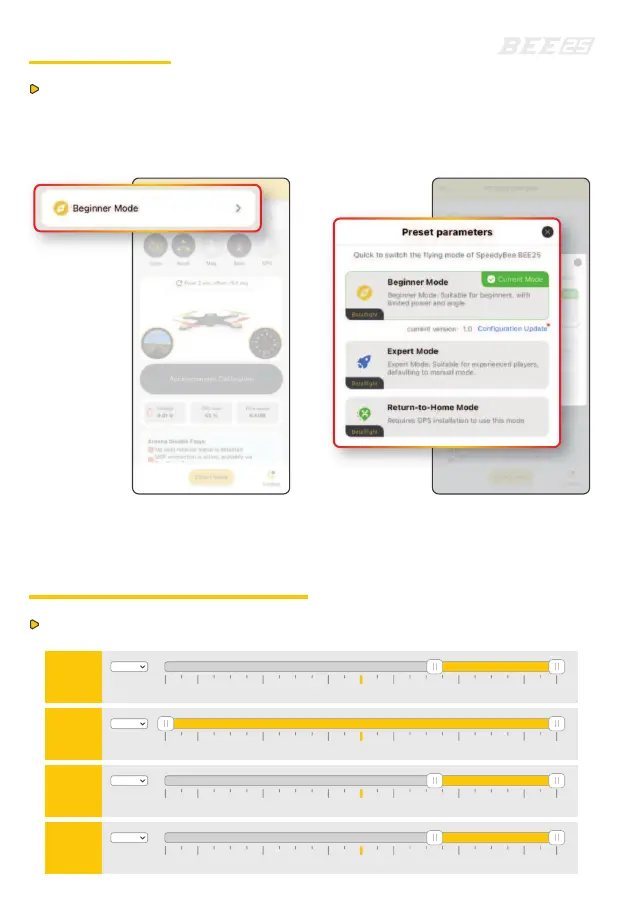
Beginner Mode: Suitable for beginners, with limited power and angle.
Preset Mode
BEE25 introduces a new preset mode selection. Power on the drone,
connect to BEE25 via the SpeedyBee app, and select the preset mode
from the top of the main interface.
Preset Mode Description
ARM
Min:1725
Max:2100
900 1000 1200 1400 1600 1800 20001500 2100
AU X1
ANGLE
Min:1325
Max:1700
900 1000 1200 1400 1600 1800 20001500 2100
AU X3
BEEPER
Min:1725
Max:2100
900 1000 1200 1400 1600 1800 20001500 2100
AU X2
LED LOW
Min:1725
Max:2100
900 1000 1200 1400 1600 1800 20001500 2100
AU X4


 To Next Page