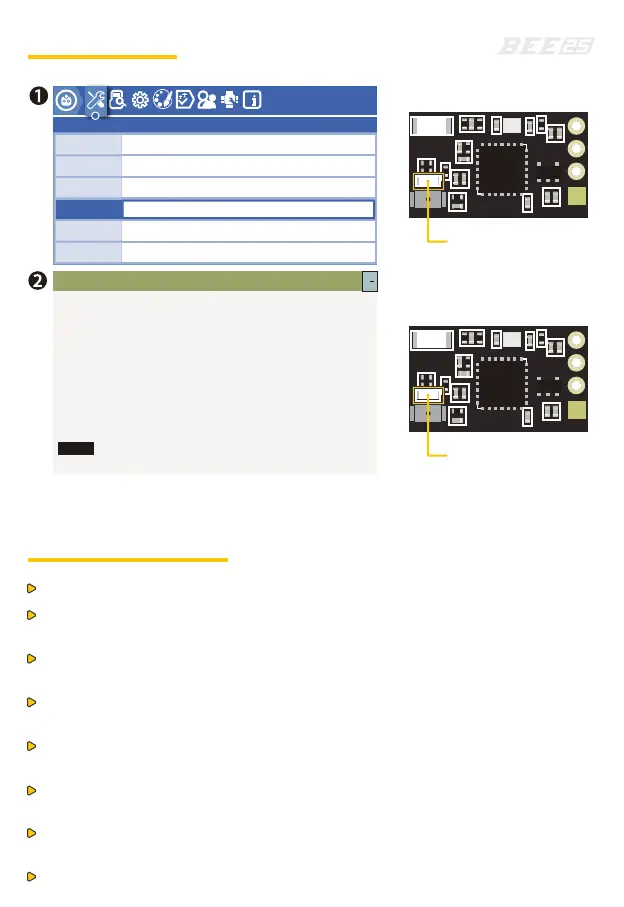
1.Press and hold the Bind button on the TBS receiver while powering it on until the
green light flashes rapidly, then release the Bind button. Press and hold the Bind
button again for 8 seconds, then release it. Wait for the green light on the receiver
to turn off and the red light to flash slowly. The remote controller screen will show
"Update micro RX?", then select "ENTER".
2.Wait for the update to complete and automatic binding. Once binding is successful,
the remote controller will display "Binding OK", and the green light on the TBS receiver
will be solid.
LED blinks twice:
during binding
Solid LED:
binding successful
lua
lua
lua
lua
19:46
lua
lua
Crossfire configure
TOOLS
DSM Forward Progr amming v0.2
ELRS
ExpressLRS
FrSky GaSuite
FrSky RB30_RB40
Packet Rate
Telem Ratio
Switch Mode
Model Match
>TX Power
>TX Administrator
>WIFI Connectivity
>Backpack
[BLE Joystick]
2.5.1 ISM2G4a7e2e4
Hybrid
Off
1:128
500(-105dbm)Hz
0/500
[Bind]
ELRS Binding
1. Check if the drone is damaged. If damaged, inspect or repair it.
2. Please ensure that the propellers are rotating in the correct direction
and the screws are tightened securely.
3. Please ensure the battery is tightly secured with the strap. Tidy or secure the
battery balance head to prevent it from being hit by the propellers.
4. Check the battery voltage. When fully charged, the voltage should be 16.8V
for 4S and 25.2V for 6S.
5. Turn on the remote controller, select the correct model, ensure the arming
switch is “disarmed”, and the throttle is at the lowest position.
6. Turn on the FPV goggles or screen and check to ensure there is no
frequency conflict with others.
7. After powering on the drone, maintain a safe distance of 3 meters and test arming
to see if all propellers work normally.
8. Please Take off in a safe area with no people nearby!
Pre-Flight Checks


 To Previous Page
 Loading...