Need help?
Do you have a question about the Spektrum SLT6 and is the answer not in the manual?
Technical specifications for the SLT6 transmitter, including type, channels, power supply, and frequency.
A labeled illustration detailing the various components and controls of the transmitter.
Step-by-step instructions for installing batteries into the transmitter.
Procedure for powering the transmitter on and off using the power button.
The process of pairing the transmitter with a receiver for operation.
Instructions on how to perform a radio range check for the transmitter.
Details regarding the product's warranty coverage and limitations.
Contact details for obtaining warranty support and product service.
Regulatory compliance statements and information related to the FCC.
Regulatory compliance statements and information related to Industry Canada.
EU compliance statements, directives, and disposal information.
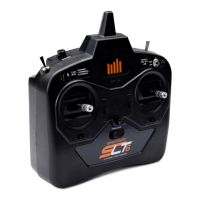
The Spektrum SLT6 6-Channel Transmitter is a sophisticated hobby product designed for controlling unmanned, hobby-grade, remote-controlled vehicles and aircraft. It operates on the 2.4GHz frequency band, providing a reliable connection between the user and their model. This transmitter is intended for users aged 14 years and older, emphasizing the need for caution, common sense, and basic mechanical ability during operation.
The primary function of the Spektrum SLT6 transmitter is to provide precise control over a 6-channel model. It features a Mode 2 control layout, which is common for aircraft and drone control, where the left gimbal typically controls throttle and rudder, and the right gimbal controls elevator and aileron. The transmitter facilitates communication with an SLT receiver, ensuring that the specific commands from this transmitter are the only ones the receiver will respond to. This binding process is crucial for secure and interference-free operation.
The transmitter includes several auxiliary switches and buttons to enhance control and functionality. These include a momentary button, a 3-position switch, and two 2-position switches, allowing for various customizable functions depending on the model's capabilities. A dedicated "Bind / Panic Button" serves a dual purpose: initiating the binding process with a receiver and, in some models, activating a "panic" or recovery mode for emergency situations.
For precise adjustments during flight, the SLT6 is equipped with digital trims for elevator, aileron, throttle, and rudder. These trims allow users to fine-tune the neutral positions of the control surfaces, compensating for aerodynamic imbalances or personal preferences, thereby improving the model's stability and handling.
The transmitter also incorporates a "Throttle Cut Switch" for safely disabling the throttle, preventing accidental motor activation. A "Dual Rate Switch" allows users to adjust the sensitivity of control inputs, which can be beneficial for different flying conditions or pilot skill levels. A "Flight Mode Switch" enables quick changes between pre-programmed flight characteristics or modes, offering versatility for various maneuvers or operational requirements.
Operating the Spektrum SLT6 transmitter involves a straightforward power-on sequence. Users simply slide the power button to the ON position, and a green LED indicator will illuminate, signifying that the transmitter is active and transmitting signals. To power down, the button is slid to the OFF position.
Before initial use, the transmitter must be bound to the receiver in the model. This process involves powering on the receiver, then holding the bind button on the transmitter while powering it on, ensuring the throttle stick is in the low position. The receiver's LED will flash until a successful bind is established, connecting it exclusively to this transmitter.
A crucial pre-flight safety check is the range test. This feature allows users to verify the integrity of the radio link at a reduced power output, ensuring reliable control within a safe operating distance. To initiate a range test, the transmitter is powered on with the throttle stick and trim low. The user then presses and holds the bind/panic button and toggles the dual rate switch four times within 10 seconds. The transmitter's LED will flash, and an alarm will sound, indicating entry into range check mode. It is essential to keep the bind button pressed throughout the entire range check; releasing it will exit the mode. This test helps identify potential signal issues before a full-power flight.
The integrated handle provides a comfortable and secure grip for extended use, enhancing user experience during operation. A neck strap hook is also included, allowing users to attach a neck strap for added comfort and security, distributing the weight of the transmitter and freeing up hands when not actively controlling the model.
The Spektrum SLT6 transmitter is powered by four AA batteries, which are installed in a compartment located at the bottom of the unit. Accessing this compartment is as simple as removing the battery cover. Users are cautioned to never remove the transmitter batteries while the model is powered on, as this could lead to loss of control, damage, or injury. If using rechargeable batteries, only rechargeable types should be used, and non-rechargeable batteries must not be charged within the unit to prevent bursting and potential injury. Proper disposal of used batteries according to national regulations is also emphasized.
The transmitter includes a USB port, which is designated for data output only. While the manual does not detail specific maintenance functions through this port, it suggests potential for diagnostics, firmware updates, or data logging in more advanced applications, though its primary function is not for charging or direct control.
The device is designed for durability, but users are advised against disassembly or alteration without the approval of Horizon Hobby, LLC, to maintain warranty validity and ensure safe operation. In case of issues, Horizon Hobby provides comprehensive warranty services and support, requiring users to contact their authorized service center rather than attempting repairs themselves. This ensures that any necessary inspections or services are performed by qualified personnel, maintaining the product's integrity and performance. The warranty explicitly excludes damage from misuse, abuse, negligence, or unauthorized modifications, reinforcing the importance of proper handling and maintenance.
 General
| Channels | 6 |
|---|---|
| Frequency | 2.4 GHz |
| Model Memory | 10 |
| Display | LCD |
| Battery | AA (4) |

 To Next Page