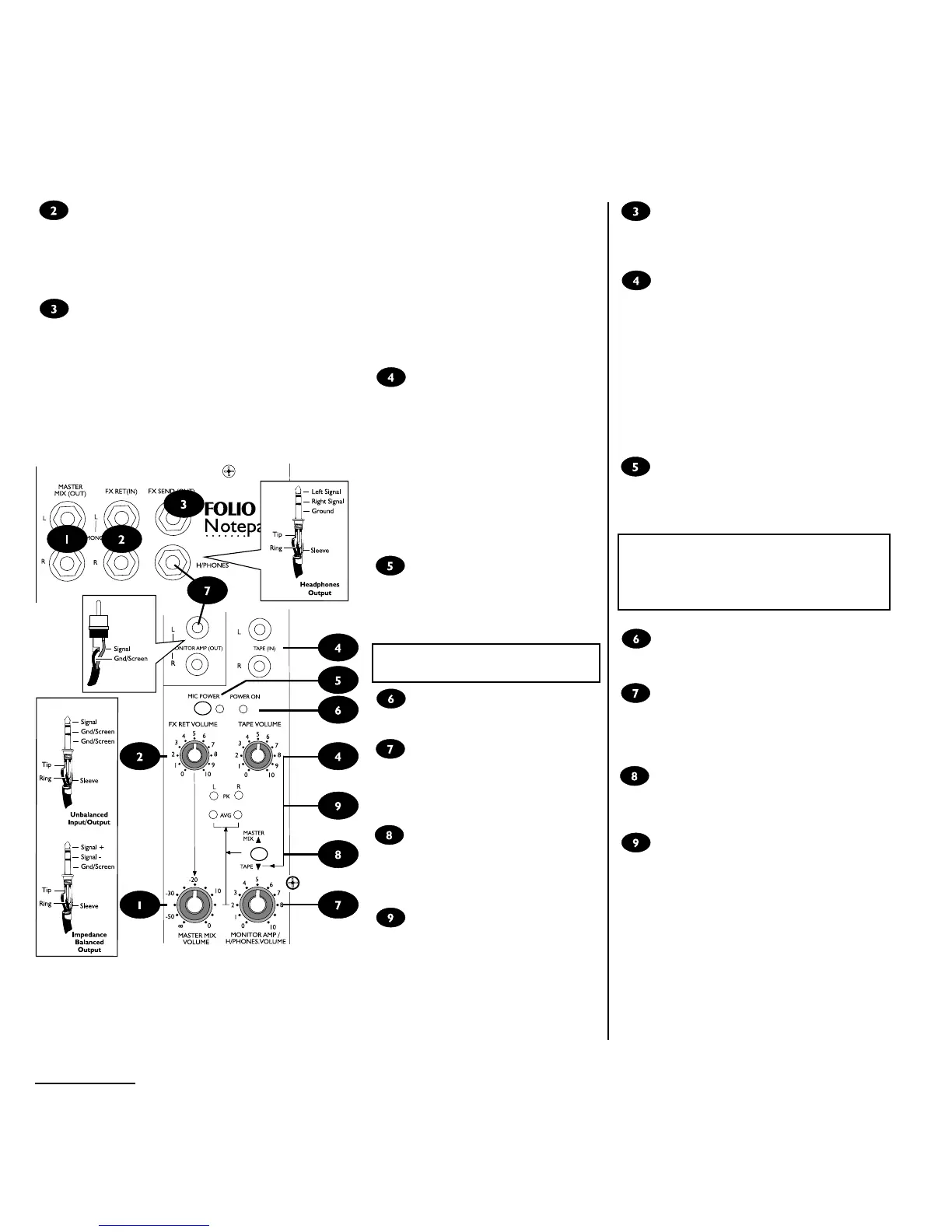
FX SEND (Ausgang)
An diese Buchse wird der Eingang eines Effektgerätes
angeschlossen. Der Pegel wird durch die Einstellung
der einzelnen FX Sends auf den Kanälen bestimmt.
Tape Eingang
An diese beiden unsymmetrischen Cinch-Eingänge
können Ausgänge von Cassettenrekordern, DAT-
Rekordern, CD-Spielern oder Computer
Soundkarten angeschlossen werden, um über
Monitor oder Kopfhörer abgehört zu werden. Sie
eignen sich hervorragend für Hinterbandkontrolle
während einer Aufnahme oder das Abhören einer PC
Soundkarte. Mit Tape Volume wird die Lautstärke
des Signals eingestellt. Beachten Sie bitte, daß das
Tape In-Signal nicht auf den Master Mix gebracht
werden kann.
Phantom Spannung
Schaltet die Versorgungsspannung für professionelle
Kondensator-Mikrofone (auf den XLR-Steckern) an.
Die LED signalisiert den Betrieb.
Schalten Sie niemals die
Spannungsversorgung bei unsym-
metrischen Quellen an! Es könnten
Schäden am Gerät entstehen!
Power On
Diese LED zeigt den Betrieb bei angeschaltetem
Netzteil an.
Monitor/Kopfhörer-Lautstärke
Hier stellt man die Lautstärke des Kopfhörers bzw.
der Abhörlautsprecher ein. Durch Einstecken des
Kopfhörers wird automatisch der Monitor Ausgang
abgeschaltet.
Master Mix/Tape
Ist dieser Schalter nicht gedrückt, hören Sie auf
Kopfhörer bzw. Monitor den Master Mix. Durch
Drücken schalten Sie um auf den Tape Eingang .
Pegelanzeige
Vier LEDs zeigen das Kopfhörer/Monitor Signal an.
Bei richtigem Ausgangspegel leuchtet AVG. PK
(Peak) warnt vor bersteuerungen.
Page 9
FX Ret (In)
These jacks allow the output of an effects unit to be fed back to the mixer and combined with the rest of the
stereo mix, without using up valuable input channels. The input is unbalanced, and the jacks are connected so
that a mono effect can be plugged into the left jack only and automatically fed to both left and right sides of the
mix.
The FX RET VOLUME control adjusts the level of the signal to the stereo mix.
FX Send (Out)
The combined mix of all of the input channel FX Sends can be taken from this jack to your effects units input.
The output level will depend on the settings of the individual FX Send controls.
Tape (In)
Two separate unbalanced RCA phonos are
available to connect the output from a
stereo tape machine, DAT recorder, CD
player or computer sound card and feed it
to the headphones or monitors, and the
meters. They are ideal for playing back your
masters when recording, or for listening to
the output from a PC sound card. TAPE
VOLUME sets the level of the input. Note
that TAPE (IN) cannot be routed to the
mix.
Mic Power
Pressing this switch adds a powering voltage
to the mic input sockets for professional
condenser microphones. The LED lights
when power is active.
DO NOT switch the power on when using
unbalanced sources, to avoid damage.
Power On
This green LED lights when the power sup-
ply is active.
Monitor Amp/H/Phones Volume
This control adjusts the output level to the
Headphones or the Monitor Amp (Out)
phonos. Plugging in a headphones jack will
automatically cut off the monitor amp output.
Master Mix/Tape
When this switch is up your headphones or
monitors hear your Master Mix. Press the
switch down to hear the Tape input (4)
instead.
Meters
Four LEDs show the level of the signal
selected to the headphones or monitors. A
normal output level will light the AVG
(Average) LEDs. The PK (Peak) LEDs light
to warn that you are close to overload.



 To Next Page