16
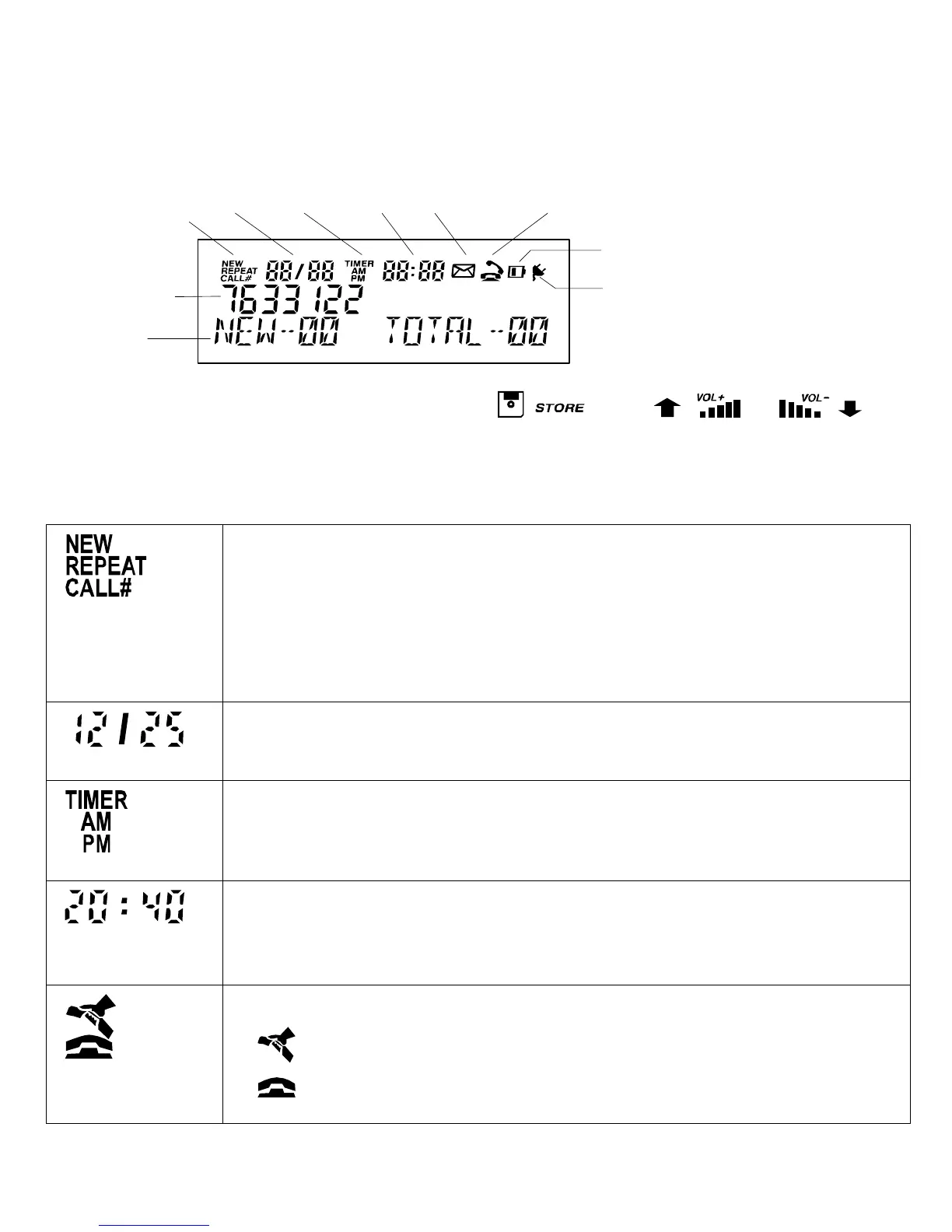
Display
NEW
REPEAT
CALL#
DATE TIME ENVELOPE
BATTERY
ADAPTOR
Numeric Field
Alpha-Numeric
Field
ANSWERED
UNANSWERED
TIMER
AM / PM
Note: Changing the display contrast, press , then or to
select LCD contrast.
Please refer to the drawing above
This is the received calls indicator.
NEW denotes calls not previously reviewed.
REPEAT - indicates multiple calls from the same caller; only the
Date and Time from the most recent attempt will be displayed.
CALL # - indicates received Caller List entry number.
This is the Date field showing date in MONTH/DAY format; it
shows the current date or date of received call.
This field indicates Time mode status.
TIMER - indicates Call Timer or Stop Watch mode is active.
AM/PM - for clock display (only displays in 12 hour mode).
Displays the current time or the time of the received call in
HOUR : MINUTE format. It also displays the call timer and stop
watch in MINUTE : SECOND format.
These symbols are used in conjunction with Caller list.
indicates the call was answered;
indicates call was not answered.



 To Next Page