Button Functions
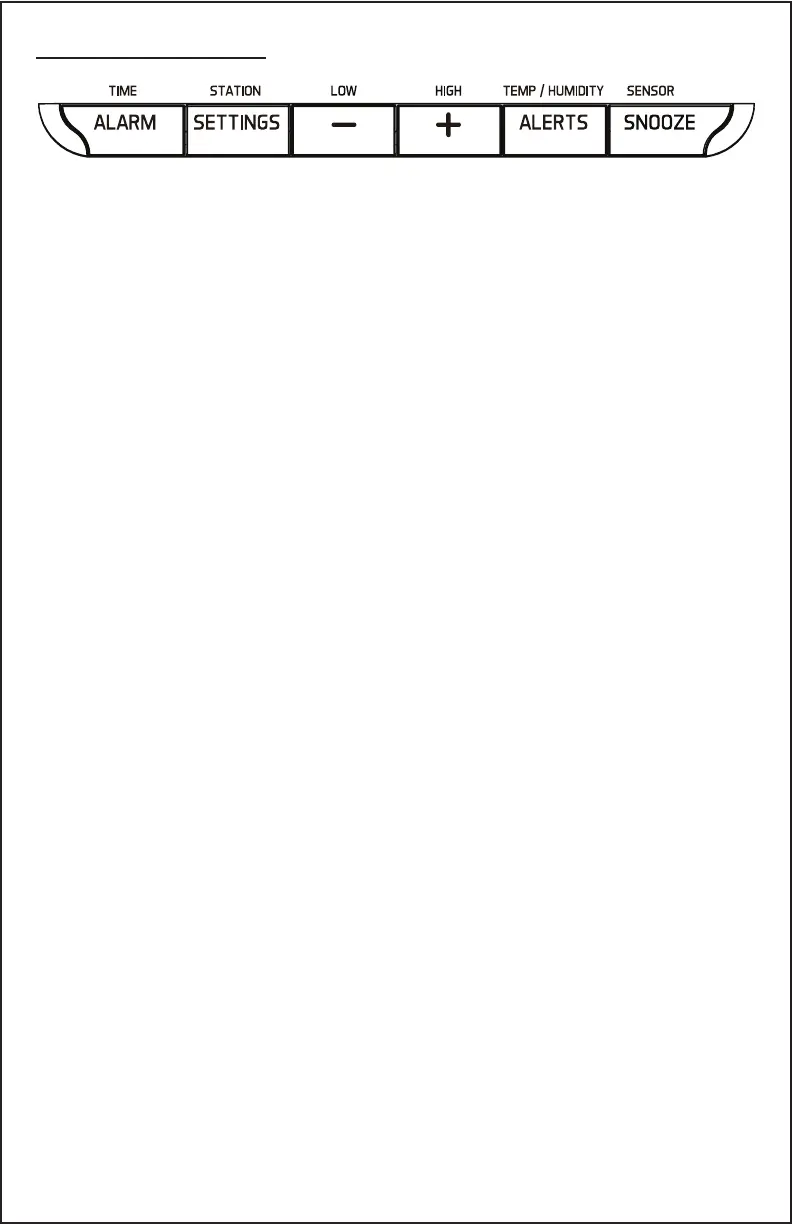
ALARM Button
Normal Display:
• Press once to show alarm time
Alarm Time Display Mode:
• Press to activate or deactivate
time alarm.
• Hold for 2 seconds enter alarm
setting mode
SETTINGS Button
Normal Display:
• Hold to set time/date/etc.
SNOOZE Button
ALERTS Button
Normal Time Display:
• Hold 3 seconds to search for
outdoor sensor.
When Alarm is sounding:
• Press to activate the 10 minutes
snooze function when alarming
During Setting Mode:
• Press to exit any setting mode.
Normal Time Display:
• Press to toggle between
different alerts.
Alert Setting:
• Hold to set alert value when
armed.
CA86514 Page | 2
MINUS Button
Normal Time Display:
• Press to display MIN
temperature/humidity.
• Hold 3 seconds to clear MIN
temperature/humidity memory
when MIN value displayed.
Setting Mode:
• Press to decrease values during
setting.
• Hold 3 seconds to quickly adjust
values.
Alert Display-
• Press to arm/disarm the
selected alert.
PLUS Button
Normal Time Display:
• Press to display MAX
temperature/humidity.
• Hold 3 seconds to clear MAX
temperature/humidity memory
when MAX value displayed.
Setting Mode:
• Press to increase values during
setting.
• Hold 3 seconds to quickly adjust
values.
Alert Display-
• Press to arm/disarm the
selected alert.



 To Next Page