LCD Features
M
O
N
T
H
D
A
T
E
HI
LO
INDOOR
OUTDOOR
FORECAST
COMFORT
D
R
Y
G
O
O
D
H
U
M
I
D
1
2
3
4
5
6
7
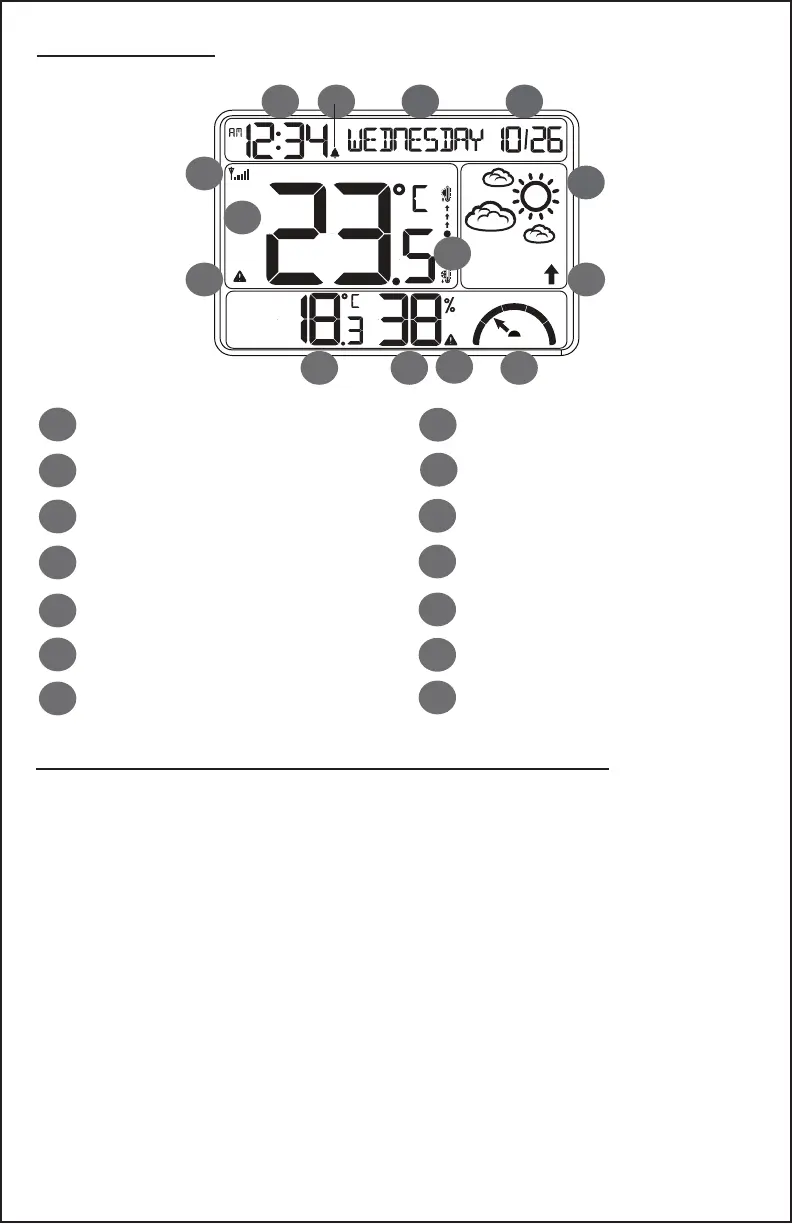
Time (manual set)
Alarm Active (bell)
Month/Date
Weekday
Outdoor Temperature °F/°C
Temperature Trend (3 hours)
Weather Forecast Icons
Sensor Reception Icon
1 2 3 4
5
6
7
8
9
10
11 12
13
14
Indoor Temperature °F/°C
Low Temperature Alert Icon
8
9
10
11
12
13
14
Forecast Trend Trend
Indoor Humidity %RH
HI Humidity Alert Icon
Indoor Comfort Graph
Settings: Time, Date, Temperature Display
• Hold the SETTINGS button to enter time set mode.
• Press the + or - buttons to adjust the values.
• Press the SETTINGS button to conrm adjustments and move
to the next item.
• Press the SNOOZE button at any time to exit.
Time set order:
1. Language (English or French)
2. Beep ON/OFF
3. 12/24 Hour
4. Hour
5. Minutes
6. Year
7. Month
8. Date
9. Month/Date(M-D) or
Date/Month(D-M) mode
10.Celsius/Fahrenheit
CA86514 Page | 3



 To Next Page