Indoor/Outdoor Temperature Records (HIGH/LOW)
All HIGH/LOW temperatures and humidity will automatically reset at
midnight. You can manually reset them if you choose.
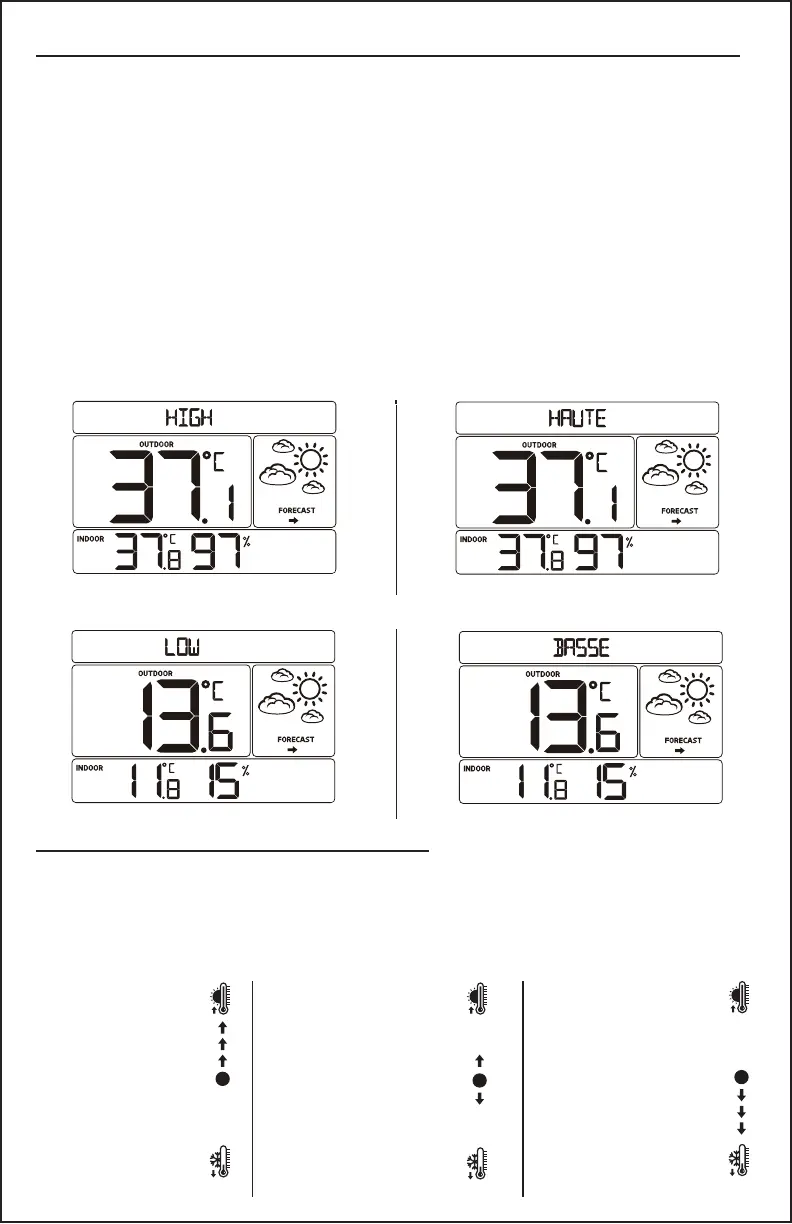
1. Press and release the HIGH/+ button to view temperature and
humidity maximum readings.
2. Hold the HIGH/+ button to reset maximum temperature and
humidity to current temperatures.
3. Press and release the LOW/- button to view temperature and
humidity minimum readings.
4. Hold the LOW/- button to reset minimum temperature and
humidity to current temperatures.
HIGH Record English HIGH Record Francais
LOW Record English LOW Record Francais
Temperature Trend Indicator
The temperature (2°F/1°C) trend indicator updates every 30 minutes.
The trend reects changes over the past 3 hours.
E.G.: At 3:00, compares to 12:00 data; at 3:30, compares to 12:30.
When the arrows
point up, the
temperature has
risen in the past
three hours.
Arrows point to
thermometer
with sun.
When the arrows
point down, the
temperature has
fallen in the past
three hours.
Arrows point to
thermometer
with ice.
CA86514 Page | 7
When the arrows
point both up
and down, the
temperature has
not changed.
Arrows point
to both
thermometers.



 To Next Page