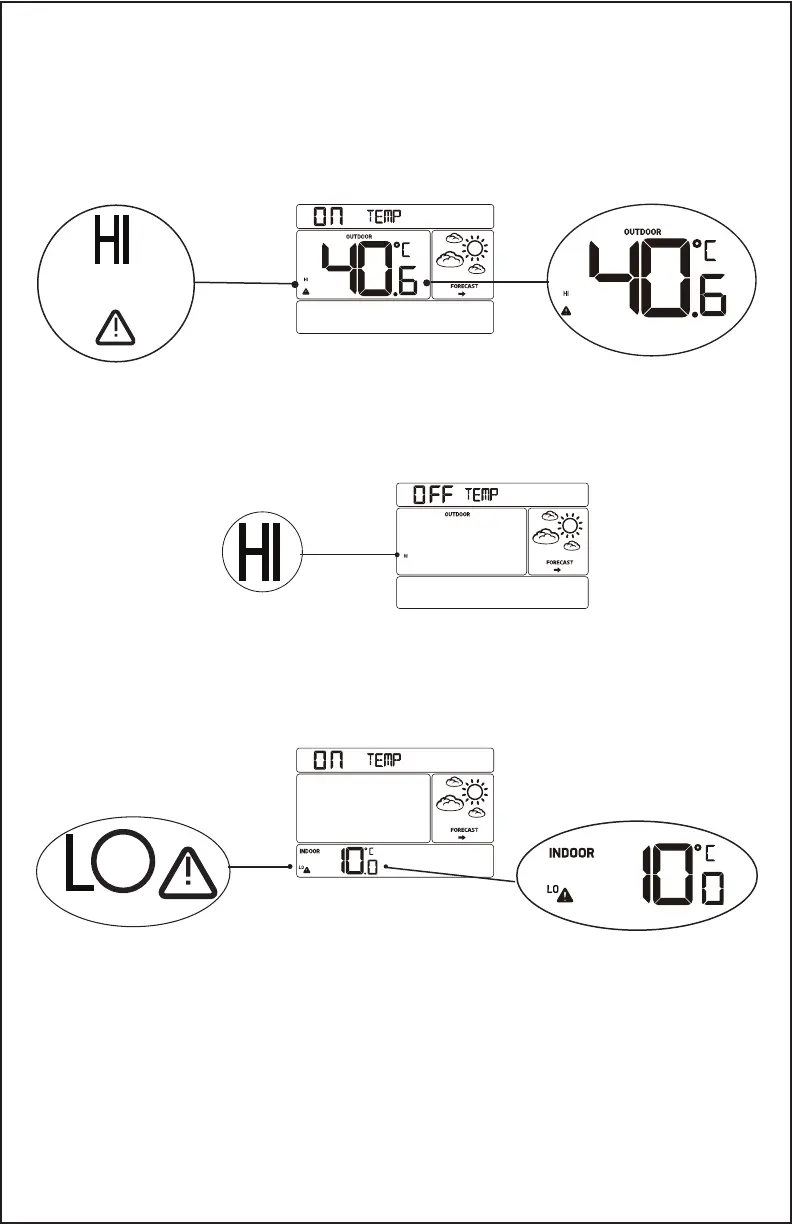
4. When the alert is armed (ON) press the ALERTS button to set the
alert value.
5. Press the + or - buttons to adjust the High Alert value.
6. Press the ALERTS button to conrm adjustments and move
to the next alert.
7. Press the SNOOZE button at any time to exit.
8. If you do not wish to set an alert, press the ALERTS button again
to move to the next alert.
9. The Outdoor LOW Alert will show OFF.
10. Press and release the ALERTS button until you get to the alert you
wish to set.
12. To set the alert, rst press the + or - buttons to turn the alert ON.
13. When the alert is armed (ON), press the ALERTS button to set the
alert value. The Indoor LOW Alert value will ash.
14. Press the + or - buttons to change the alert value.
15. Press the ALERTS button to conrm and move to the next alert.
Repeat sequence for all alerts, or press the LIGHT button to exit.
CA86514 Page | 6
ALERTS to
skip-move to
next alert.



 To Next Page