Do Don’t
▪ Keep clean from dust and resin
▪ Follow instructions on the screen
▪ Wipe resin and IPA off immediately
▪ Hold by the front and sides
▪ Touch the lens beneath
▪ Use abrasive cleaners
▪ Let IPA stand on the surface
▪ Use sharp objects on the panel
Optical Panel
The Optical Panel is a long-term consumable item that is
easy to replace in your office. You can track its health and
usage via the printer touchscreen.
Only replace the Optical Panel when directed by the
printer touchscreen or customer support.
Keep it Clean
The Optical Panel should not require regular interaction, but
it must remain clean at all times. Make sure there is no dust,
resin, fingerprints, or other debris that might obstruct the
path of light through the panel. Clean the top surface only -
never touch the lens beneath.
Replaceable Product
The Optical Panel is a long-term consumable that must be
replaced after it reaches a usage threshold that is monitored
by the printer. To avoid potential downtime, keep an extra
Optical Panel on hand. Purchase at store.sprintray.com
How to Clean
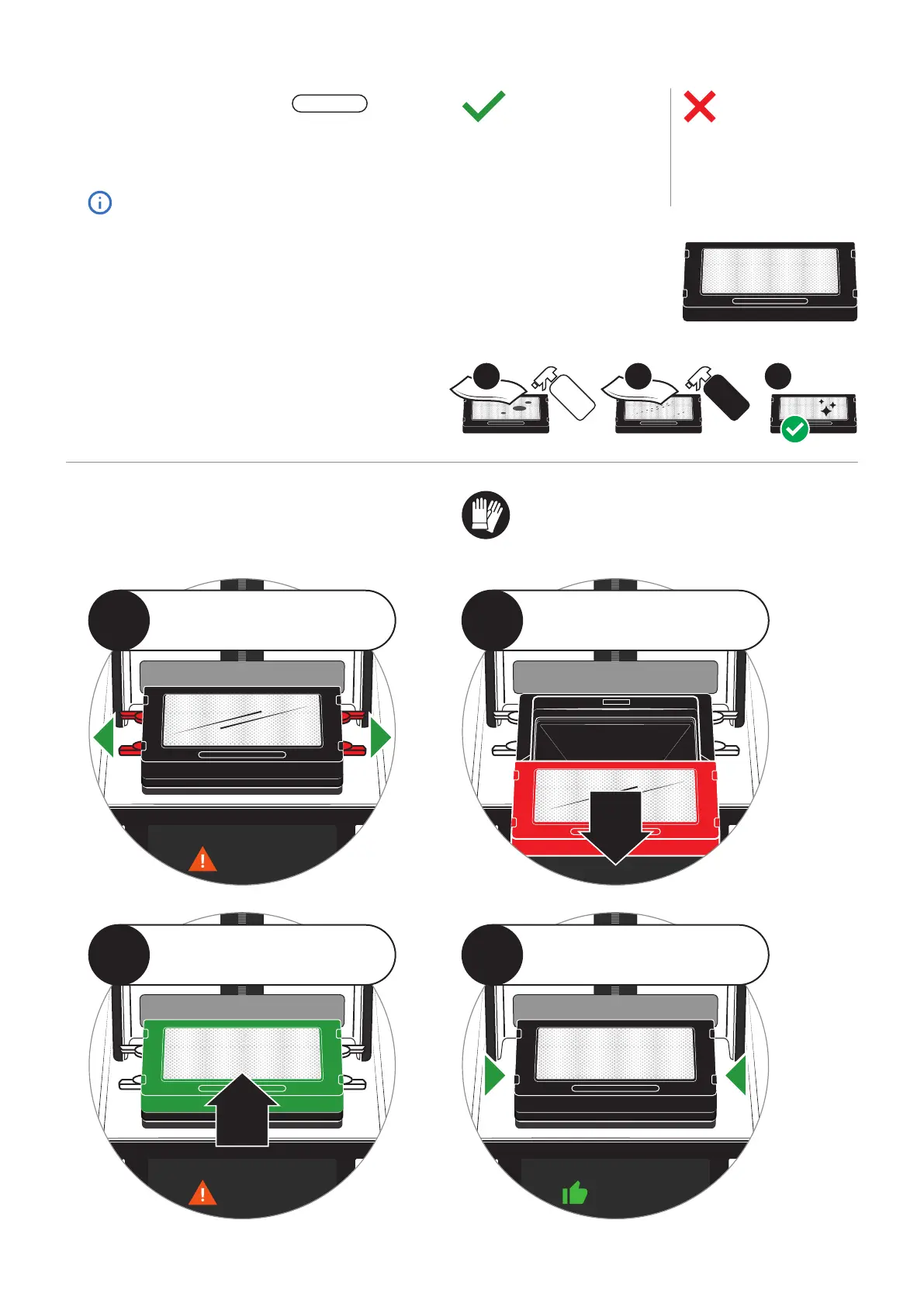
To clean, use IPA 91% and a soft
cloth to wipe away any resin. Finish
with glass cleaner to remove all
streaks and dust.
Replacing Optical Panel
When the printer notifies you that it’s time to change
the Optical Panel, follow these instructions.
2
Slide the old Optical Panel toward
you to remove it. A bit of force may
be needed to remove it.
1
Unlock the Optical Panel by opening
the four tabs recessed into the side
of the cradle.
4
Close the four tabs in the cradle to
lock the Optical Panel into place.
3
Slide the new Optical Panel into
place until it sits flush. A bit of force
may be needed to seat it fully.
REPLACEABLE
32
Glass
Cleaner
IPA
91%
1
Wear Gloves
Always wear gloves when
handling the Optical Panel.


 To Next Page
 Loading...