• Dimensions: 280x 141x 151mm
• Unit weight: 1.9kg
• Output power: RMS 40W
• S/N ratio: 85db +/- 3db
• Frequency range: 90Hz - 20 kHz
• USB-C input: 5V⎓3A (15W), 9V⎓3A (18W),
12V⎓2.5A (30W), 15V⎓2A (30W)
• USB-A output: 5V⎓2.4A (12W)
• Batery capacity: 15,600mAh
• Playime: Up to 10 hours at 75% volume
• Charging time: Approximately 8-10 hours
• Function: Bluetooth/ UNISYNC/ Aux-in/
Microphone/ USB-C input/ USB-A power output/
LED flashlight/ Wireless charging pad
• Bluetooth version: 5.1
• Drop proof to 2 metres
• Waterproof IP67
• Shock proof
• Operating temperature: -10C to 55C
4. OPERATING CONTROLS 5. SPECIFICATIONS
LED INDICATOR
The single blue LED indicator will flash when Nomad
Alpha is switched on
When it is flashing red and blue, Nomad Alpha is in
pairing mode.
LED BATTERY INDICATOR
The batery LED indicator will flash from one to four
LEDs to indicate Nomad Alpha is charging. The lights
will stop flashing once Nomad Alpha is fully charged.
POWERBANK
Nomad Alpha comes with a USB-A output por, which
is capable of supplying up to 5V⎓2.4A. The main
power switch must be turned on to use this feature.
Whilst charging another device, the LED batery
indicator lights will indicate how much charge is
remaining in the speaker’s powerbank.
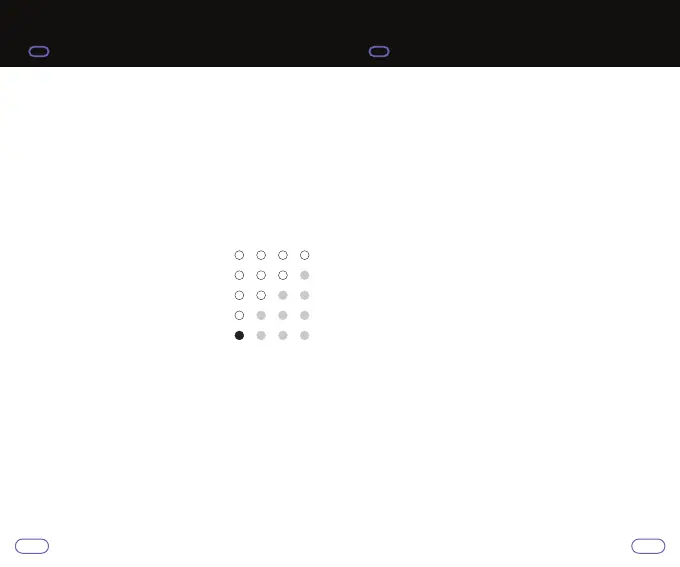
4 blue lights on: Batery 100%
3 blue lights on: Batery 75%
2 blue lights on: Batery 50%
1 blue light on: Batery 25%
1 red light on: Batery requires
recharge
98


 To Next Page