20
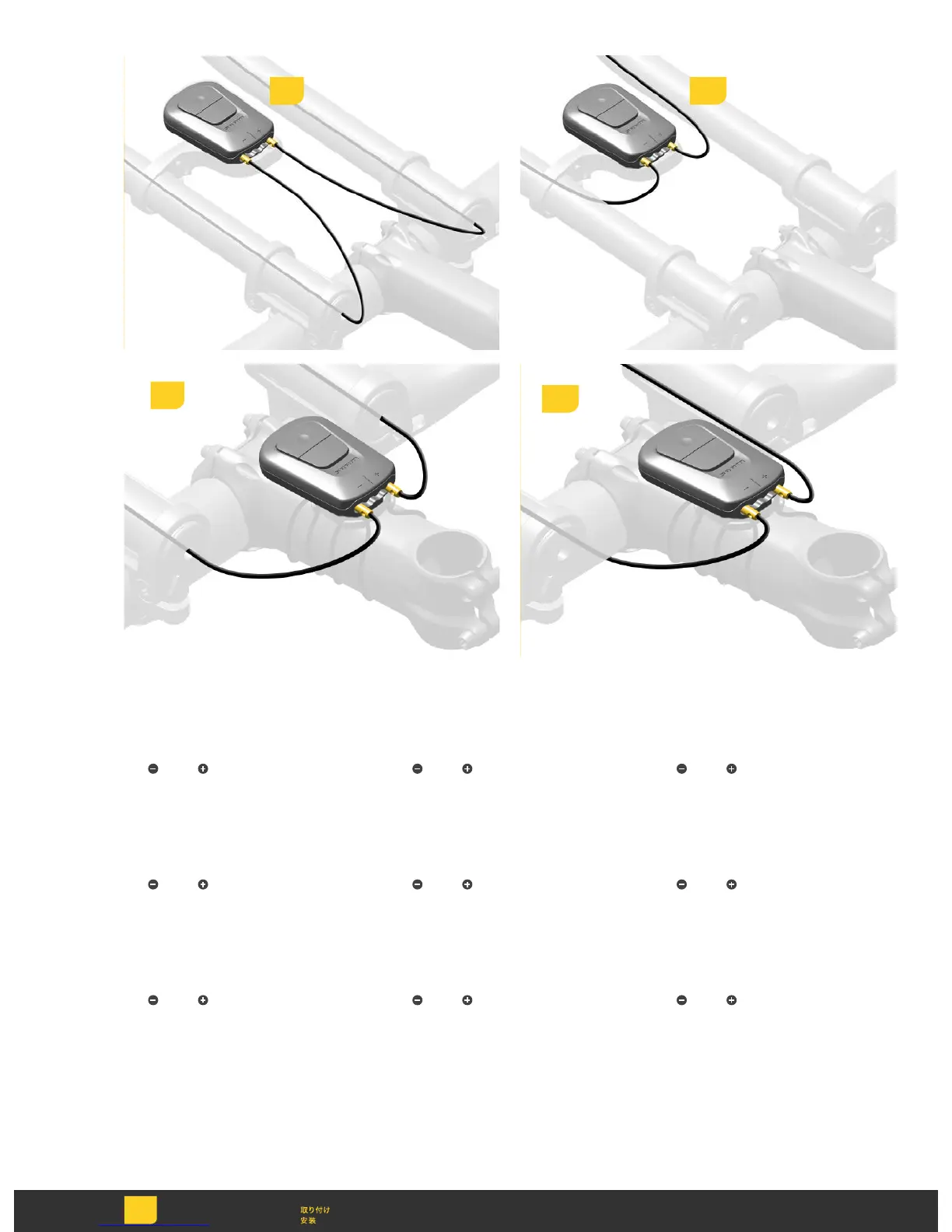
Route each Blip wire from the end of
the bar extension, internally (1a) or
externally (1b), to the BlipBox. Plug
each connector into the BlipBox;
left
, right .
Route each Blip wire from the end of
the bar extension, internally (1a) or
externally (1b), to the BlipBox. Plug
each connector into the BlipBox;
left
, right .
Route each Blip wire from the end of
the bar extension, internally (1a) or
externally (1b), to the BlipBox. Plug
each connector into the BlipBox;
left
, right .
Route each Blip wire from the end of
the bar extension, internally (1a) or
externally (1b), to the BlipBox. Plug
each connector into the BlipBox;
left
, right .
Route each Blip wire from the end of
the bar extension, internally (1a) or
externally (1b), to the BlipBox. Plug
each connector into the BlipBox;
left
, right .
Route each Blip wire from the end of
the bar extension, internally (1a) or
externally (1b), to the BlipBox. Plug
each connector into the BlipBox;
left
, right .
Route each Blip wire from the end of
the bar extension, internally (1a) or
externally (1b), to the BlipBox. Plug
each connector into the BlipBox;
left
, right .
Route each Blip wire from the end of
the bar extension, internally (1a) or
externally (1b), to the BlipBox. Plug
each connector into the BlipBox;
left
, right .
Route each Blip wire from the end of
the bar extension, internally (1a) or
externally (1b), to the BlipBox. Plug
each connector into the BlipBox;
left
, right .
1a 1b
Install
Einbauen
Instalación
Installer
Installare
Monteren
Instalar
1a
1b



 To Next Page