21
1
2
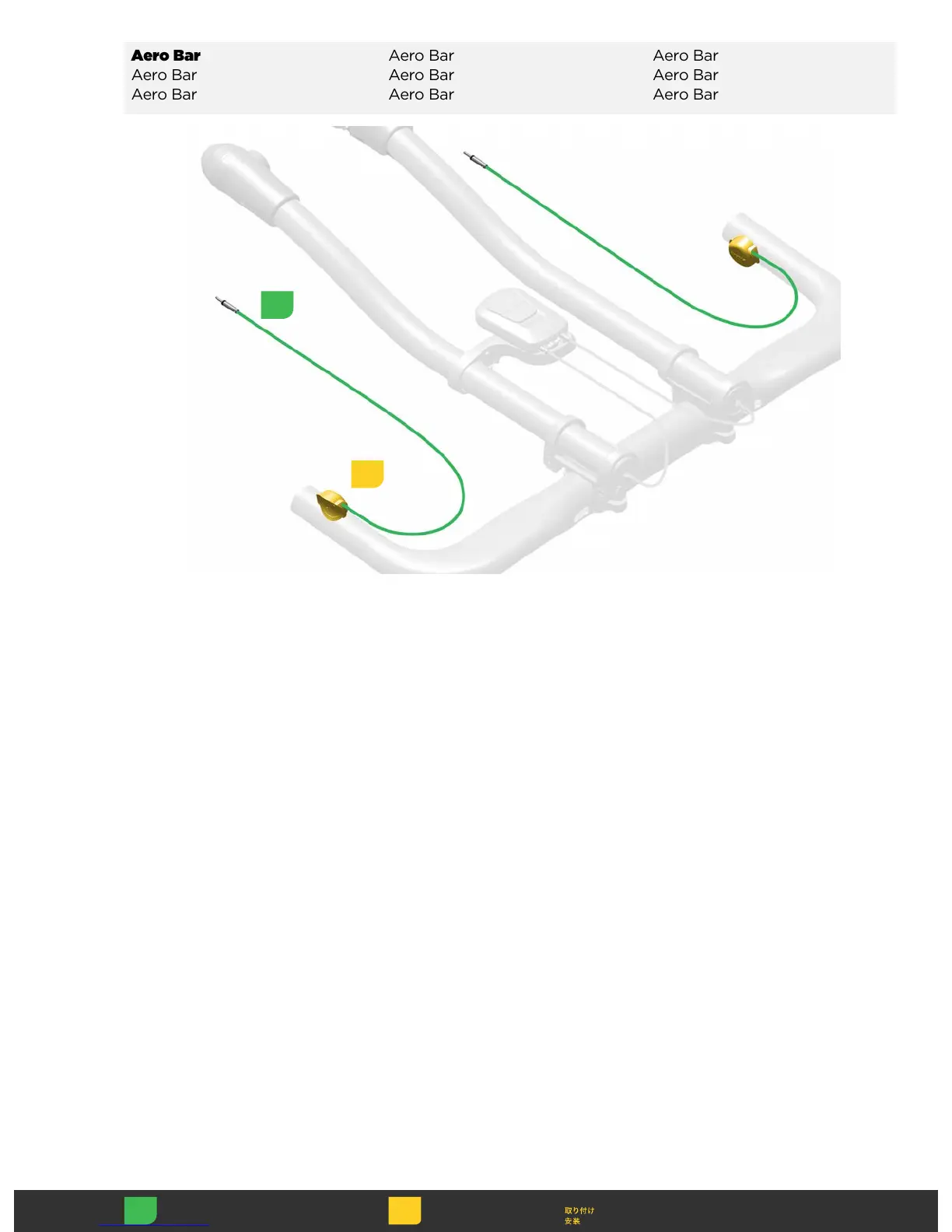
Clean the handlebar with isopropyl
alcohol.
Attach the Blip to the handlebar
with the adhesive tab in the desired
ergonomic position.
Clean the handlebar with isopropyl
alcohol.
Attach the Blip to the handlebar
with the adhesive tab in the desired
ergonomic position.
Clean the handlebar with isopropyl
alcohol.
Attach the Blip to the handlebar
with the adhesive tab in the desired
ergonomic position.
Clean the handlebar with isopropyl
alcohol.
Attach the Blip to the handlebar
with the adhesive tab in the desired
ergonomic position.
Clean the handlebar with isopropyl
alcohol.
Attach the Blip to the handlebar
with the adhesive tab in the desired
ergonomic position.
Clean the handlebar with isopropyl
alcohol.
Attach the Blip to the handlebar
with the adhesive tab in the desired
ergonomic position.
Clean the handlebar with isopropyl
alcohol.
Attach the Blip to the handlebar
with the adhesive tab in the desired
ergonomic position.
Clean the handlebar with isopropyl
alcohol.
Attach the Blip to the handlebar
with the adhesive tab in the desired
ergonomic position.
Clean the handlebar with isopropyl
alcohol.
Attach the Blip to the handlebar
with the adhesive tab in the desired
ergonomic position.



 To Next Page