27
Pairing Pairing Pairing
Pairing Pairing Pairing
Pairing Pairing Pairing
Adjust Régler Ajustar
Einstellen Regolare
調節
Ajustar Afstellen
调节
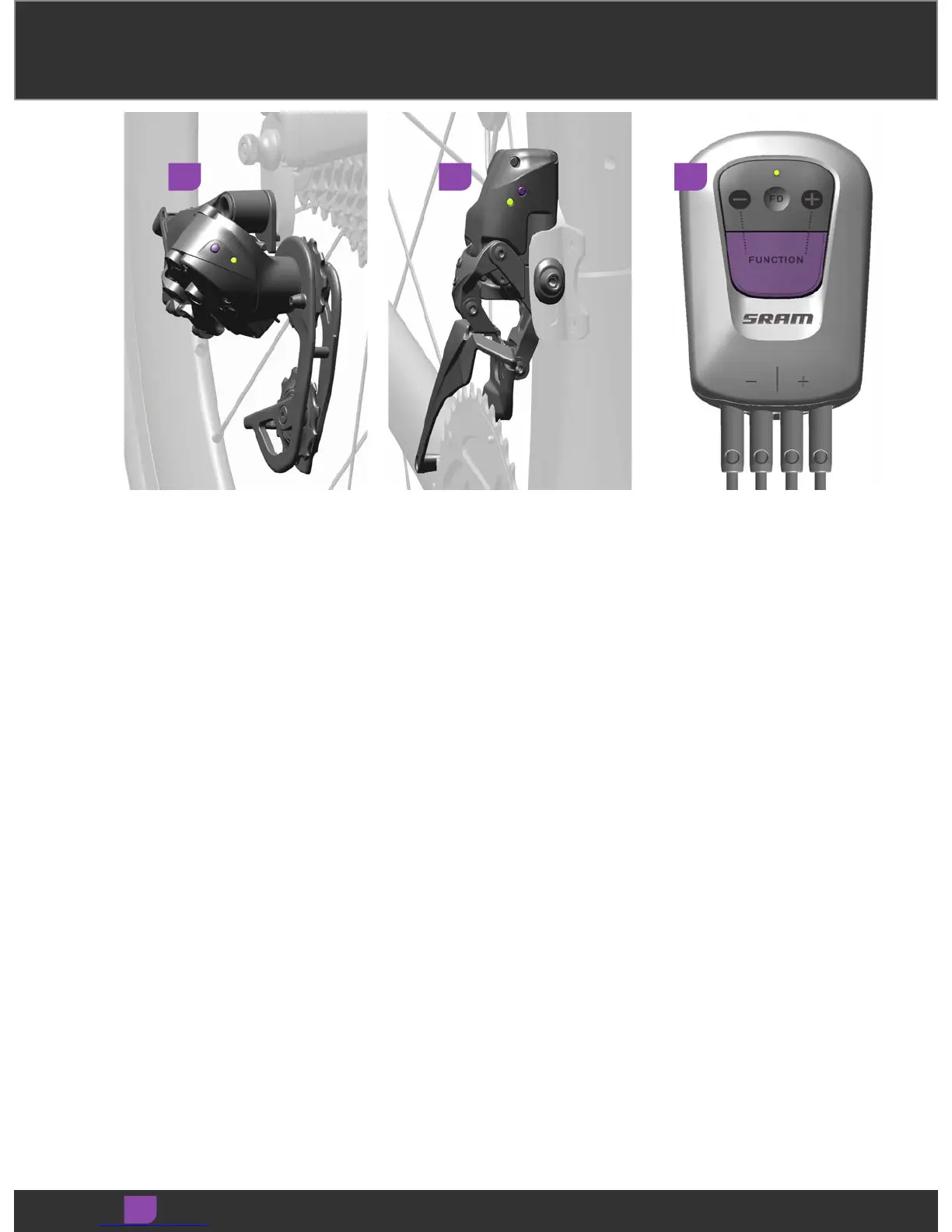
Begin the pairing session at the rear
derailleur. Press and hold the function
button on the rear derailleur until the
green LED blinks slowly, then release.
Begin the pairing session at the rear
derailleur. Press and hold the function
button on the rear derailleur until the
green LED blinks slowly, then release.
Begin the pairing session at the rear
derailleur. Press and hold the function
button on the rear derailleur until the
green LED blinks slowly, then release.
Begin the pairing session at the rear
derailleur. Press and hold the function
button on the rear derailleur until the
green LED blinks slowly, then release.
Begin the pairing session at the rear
derailleur. Press and hold the function
button on the rear derailleur until the
green LED blinks slowly, then release.
Begin the pairing session at the rear
derailleur. Press and hold the function
button on the rear derailleur until the
green LED blinks slowly, then release.
Begin the pairing session at the rear
derailleur. Press and hold the function
button on the rear derailleur until the
green LED blinks slowly, then release.
Begin the pairing session at the rear
derailleur. Press and hold the function
button on the rear derailleur until the
green LED blinks slowly, then release.
Begin the pairing session at the rear
derailleur. Press and hold the function
button on the rear derailleur until the
green LED blinks slowly, then release.
Individually pair the other components
in any order. Press and hold the
function button on each component
until its LED blinks quickly, then
release.
Individually pair the other components
in any order. Press and hold the
function button on each component
until its LED blinks quickly, then
release.
Individually pair the other components
in any order. Press and hold the
function button on each component
until its LED blinks quickly, then
release.
Individually pair the other components
in any order. Press and hold the
function button on each component
until its LED blinks quickly, then
release.
Individually pair the other components
in any order. Press and hold the
function button on each component
until its LED blinks quickly, then
release.
Individually pair the other components
in any order. Press and hold the
function button on each component
until its LED blinks quickly, then
release.
Individually pair the other components
in any order. Press and hold the
function button on each component
until its LED blinks quickly, then
release.
Individually pair the other components
in any order. Press and hold the
function button on each component
until its LED blinks quickly, then
release.
Individually pair the other components
in any order. Press and hold the
function button on each component
until its LED blinks quickly, then
release.
1 2 3


 To Next Page
 Loading...