-5-
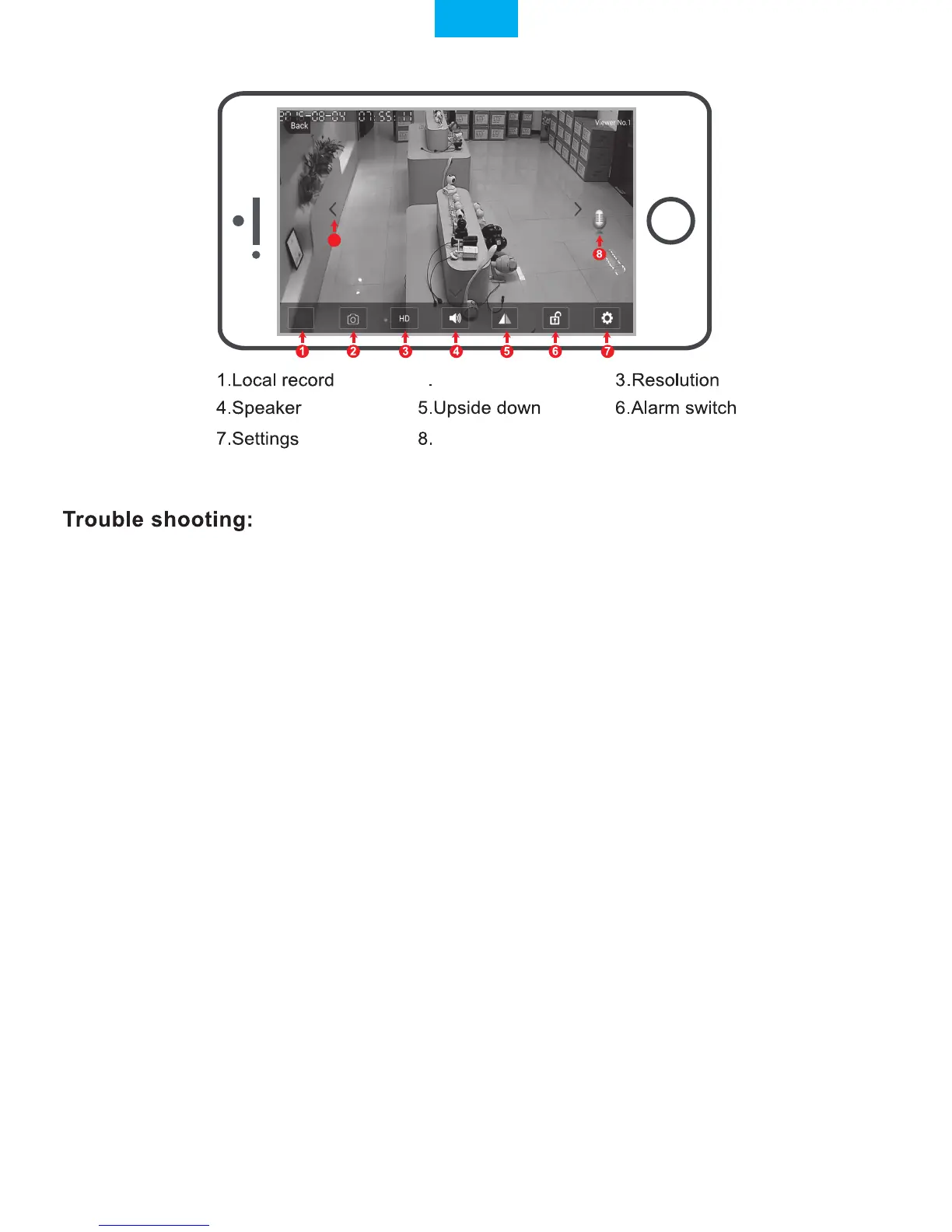
Live video stream on smartphone
9
For configuring and watching live videos on Windows PC, please download SricamPC
software and user manual at website:
www.sricam.com/download
Please visit:
www.sricam.com/faqs
More FAQs:
1. How to restore the camera to factory settings
2. How can I add the camera to my 2nd phone
3. Camera ID, Camera Password, App Account ID and Password
4. Watch live videos from SricamPC App on Windows 7/8/10 PC
5. How to watch live streams with ONVIF clients
-If you fail to setup the Wi-Fi network in step 4-7, please make sure your Sricam is not connecting
to a 5G Wi-Fi signal. You can resolve this issue by 1) reconnecting to a non-5G Wi-Fi signal on
your smart phone or 2) skip this step and setup the Wi-Fi by going through the steps under
“setting”>“Network Setting” on the app.
-If you experience inconsistent signal,it could be due to 1)too many devices sharing the same
internet network.Or 2)the IP camera is too far from the router if using Wi-Fi connection.
Microphone
9.Pan & Tilt
2.Screenshots
English


 To Next Page