8
REMOTE CONTROL
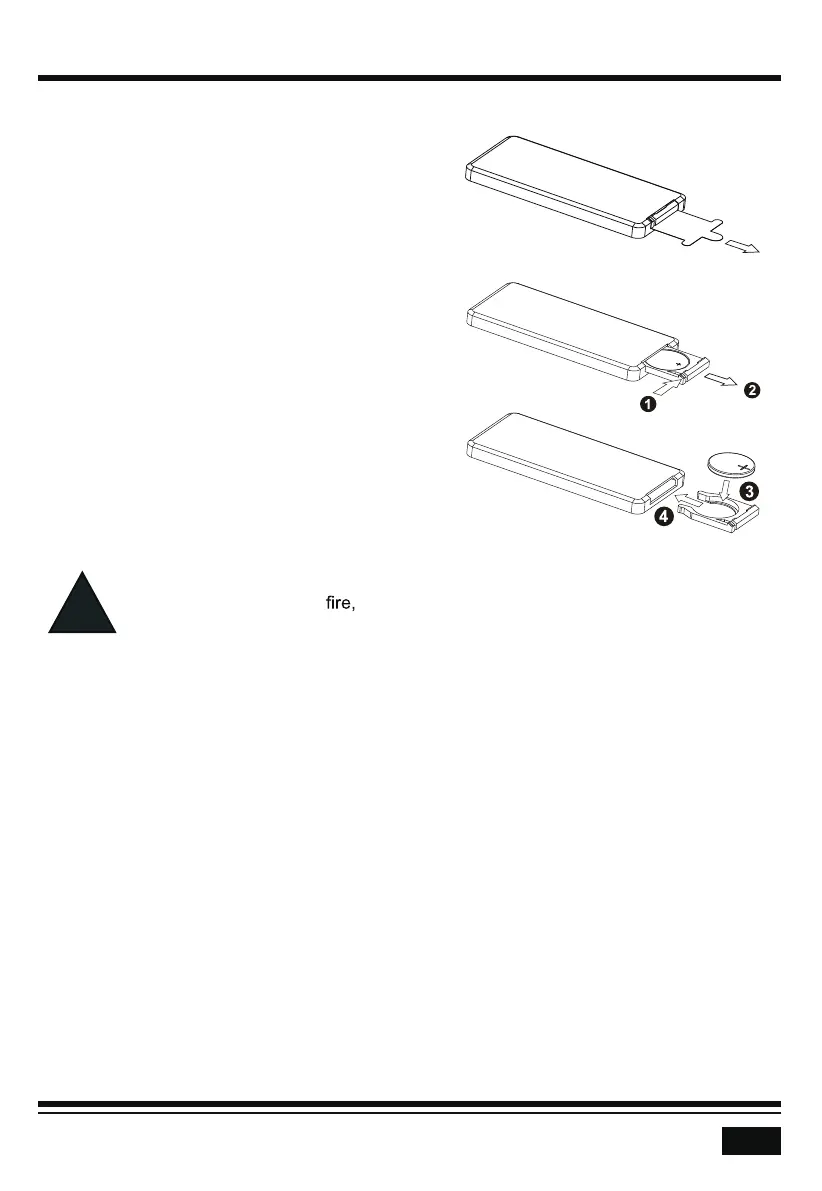
Remove Insulating Sheet
The remote control comes with an insulating sheet
attached to the underside of the remote control, as
illustrated on the right. The remote control will not
work until the insulating sheet is removed.
Replace Lithium Battery Cell
1. When the lithium cell battery becomes weak,
replace it as illustrated on the right.
2. Press and hold the movable block in the
direction indicated by arrow 1. At the same
time, pull the cell holder out of the remote
control in the direction indicated by arrow 2.
3. Replace the old cell with a new one, making
sure the (+) polarity is facing upward.
4. Re-insert the cell holder into the remote
control.
- Cell leakage may cause damage to the remote control.
- Do not throw cells into
as this may cause an explosion.
- Keep battery cells out of reach of children.
Remote Control Operation
Position the emitting window of the remote control
toward the sensor window of the unit.
• The operation angle for front panel remote control
reception is about 30 degrees.
• The distance between the emitting window of the remote control and the sensor window
of the unit should remain less than 5 meters.



 To Next Page